Collections Homebase, Rebuilt

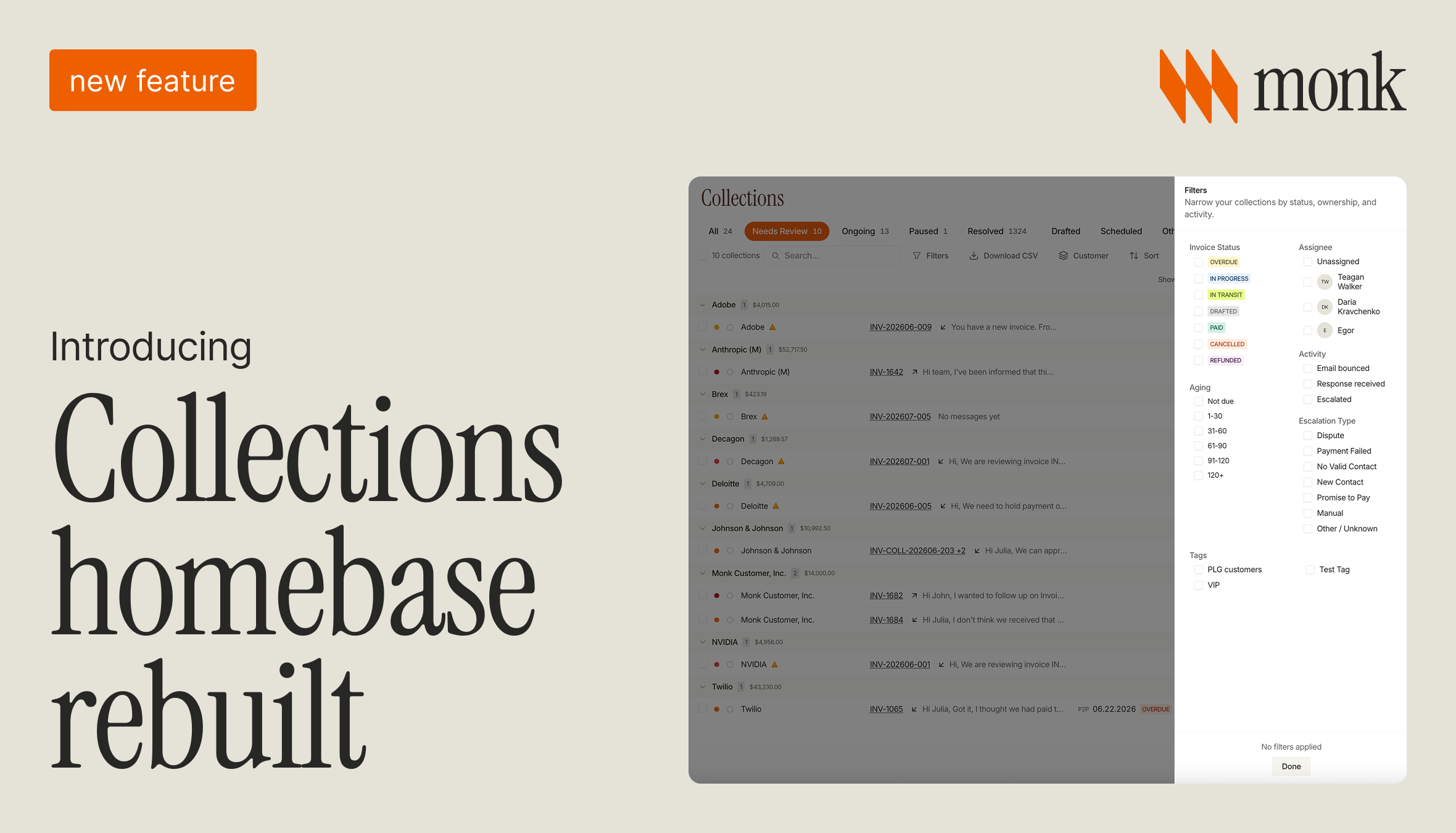
Monk rebuilt the Collections workspace into a single screen for managing every collection in one place. The new homebase brings together status tabs, a filters panel, and detailed per-collection rows, so a finance team can triage what needs attention, see how each account is behaving, and assign work without scanning a flat list.
What changed in the Collections workspace?
The workspace, which the team calls the homebase, is now one screen that shows every collection Monk is running for you. Instead of paging through a single long list, you get a structured view with tabs, filters, sorting, and search built in. Each collection is a row you can scan at a glance or open for the full history.
You choose how deep to go, from a quick read of the whole book of receivables to a focused review of a single account. The goal is simple. Give collectors and finance leads one place to understand the state of receivables and act on it, rather than piecing the picture together across screens.
How do the status tabs organize collections?
Seven status tabs run across the top of the workspace: All, Needs Review, Ongoing, Paused, Resolved, Drafted, and Scheduled. Each tab is a saved slice of your collections, so you can move from a full view to just the ones that need a human decision in a single click.
Needs Review is where you will spend the most time. It surfaces the collections that require attention, while Ongoing shows the ones Monk is actively working. Paused, Resolved, Drafted, and Scheduled keep the rest organized by where they sit in the process, and every tab reflects live status, so a collection moves between them as its situation changes.
How can you filter and prioritize collections?
A filters panel lets you narrow the list by how an account is behaving. You can filter by Invoice Status (Overdue, In Progress, In Transit, Drafted, Paid, Cancelled, Refunded) and by Aging bucket (Not due, 1-30, 31-60, 61-90, 91-120, and 120+ days) to focus on the invoices that matter most right now.
You can also filter by Assignee, either unassigned collections or a specific teammate, and by Activity such as Email bounced, Response received, or Escalated. Escalation Type narrows further into Dispute, Payment Failed, No Valid Contact, New Contact, Promise to Pay, Manual, and Other. Tags let you slice by segment, for example PLG customers, VIP, and any custom tags you create.
Every row shows the customer, the invoice, the latest message or status, and any promise-to-pay date, so you can prioritize without opening each one. Search, sort, a customer view, and Download CSV round out the actions available from the workspace.
How does this help a finance team work as a team?
Because you can filter by Assignee, work is easy to divide and track. A lead can see unassigned collections, hand them to the right person, and check Needs Review to confirm nothing is stalling. Nothing falls through, because every collection has a clear owner and a clear status.
The Activity and Escalation Type filters mean you can route by situation. Disputes go to one person, payment failures to another, and promise-to-pay follow-ups stay visible until they are resolved. Download CSV makes it straightforward to share a snapshot with the wider team or pull numbers into a report.
How does it connect to the rest of Monk?
The homebase sits on top of the same collections engine that resolves 90% of collections with zero human intervention. Monk's Intelligent Collections ingests the context of each conversation and responds more effectively than standard dunning, which is how customers see a 24% higher response rate and reduce DSO by 40% on average.
The workspace does not change how that engine works. It gives you a clearer way to watch it, step in when needed, and keep the team aligned. For the reporting side of the picture, see the rebuilt AR Overview dashboard as related reading. Go-live takes less than one week, and there is no percentage-of-collections fee.
Frequently asked questions
What is the Collections workspace?
It is Monk's rebuilt homebase, a single screen for managing every collection with status tabs, a filters panel, per-collection rows, search, sort, a customer view, and Download CSV.
How do the status tabs work?
Seven tabs (All, Needs Review, Ongoing, Paused, Resolved, Drafted, Scheduled) split your collections by where they sit in the process, so you can jump from everything to just what needs a decision.
What filters are available?
You can filter by Invoice Status, Aging bucket, Assignee, Activity, Escalation Type, and Tags, then sort and search to surface the collections that need attention first.
How does escalation-type filtering help?
Filtering by Escalation Type (Dispute, Payment Failed, No Valid Contact, New Contact, Promise to Pay, Manual, Other) lets you route each situation to the right person and keep follow-ups visible until they resolve.
Does it change how Intelligent Collections works?
No. It is the same collections Monk already runs, now easier to triage and assign from one screen.
See it on your own receivables. Book a demo.
Adjacent to this: Monk vs Tabs: AR Automation Compared for 2026.

.png)



.avif)