Changelog
Changelog: October 1 - October 15
Intelligent Collections
Call Logs, Easier to Scan
Play any recording right from the Call Logs list and see how long it ran. The summary column is wider, and each call has its own shareable link. Recordings can be downloaded from the player. Transcripts show each turn labeled Agent or Customer, with invoice numbers written out (INV-0129) instead of spelled the way the agent said them. Full call summaries now appear in the conversation timeline.

Guardrails on Automated Calls
Monk stops calling a number when the carrier reports it as disconnected, or when a customer opts out or says it's the wrong number. On calls that open with a phone menu, the agent presses the right digit and stays quiet until a person picks up.
Fewer Escalations Filed Under Other
Needs Review has two new categories. Payment Claim is for a customer saying they already paid or sending proof. Vendor Compliance is for an automated notice saying an invoice was held for a missing PO or form. Automated replies and contact changes also get their own labels now instead of landing in Other.
Start a New Email Thread From Other
Click New email in the Other tab, pick a customer, and send without leaving the list.
Blocked Contacts, Explained
When an email address or phone number is blocked because of a hard bounce, an opt-out, or a wrong number, Monk stops sending to it. The customer's contact card now shows why it was blocked and when. If a check only predicts that an address is undeliverable, Monk now sends anyway and reacts to a real bounce.
Other Intelligent Collections Updates
- Bulk-pause invoices from the collections list and clear their pending drafts
- Optional setting to auto-fill the agent's name and signature in manual replies (on the Agent identity page, off by default)
- Custom subject lines for payment portal emails, including invoice tags
- New playbook variable: Voice Call Attempts, available in every playbook
- New playbook condition: whether the customer responded on a live call
- New playbook condition: Customer Overdue Invoice Count
- A follow-up step in a playbook can be set to draft only, even when autosend is on
- During a call, the agent can draw on your organization's Knowledge, open invoices, and recent emails
- The "will retry at" preview respects calling hours
- The Disputes queue can sort by created date, invoice number, and invoice date, and filter by created date
Payments & Reconciliation
Remittances Move Invoices to In Transit
Turn this on in Settings > Rulesets (it's off by default). When a remittance clearly pays an invoice in full, the invoice moves to In transit right away and follow-ups pause while the bank payment clears. The invoice shows a "From remittance" tag, with options to open the remittance or remove it from the invoice. Canceling the remittance review puts the invoices back to In progress. Stripe syncs keep the invoice In transit while Stripe still shows it as open.
Link Remittances From the Transaction Drawer
The Remittance tab lists every open remittance that matches the transaction amount, and you can drop in a file to upload and link it in one step. If the totals don't match, you get a warning. On the Remittances page, items show Linked or Not linked and can be filtered by either.

Other Payments Updates
- Cash Application shows the lowest match confidence on a payment, which is the score that decides auto-approval
- Written-off invoices get a badge, a filter, and an export column
- On Stripe invoices marked uncollectible, real payments and credits are kept, and only the remainder is written off as bad debt
Portal Automation
Mark Invoices as Already Submitted
If your team already submitted an invoice to the portal, you can mark it from the portal task or from Portal actions on the invoice.
Blocked Portal Tasks Show What's Needed
When a portal task is blocked (for example a failed login, a 2FA code, or an exhausted PO), your team sees the reason and the action needed, and can respond right there. Rejected tasks show their reason too.

Other Portal Updates
- Add comments with attachments to portal tasks, and activity now reads oldest first
- Filter the Customers page by portal customers
- New 1Password page where you can test a portal login
Integrations
Choose Which Stripe Metadata Shows
Pick which Stripe customer metadata fields appear in a customer's IDs list, with an optional link for each.
Other Integration Updates
- NetSuite: "Use all NetSuite labels as tags," and choose whether reapplying a mapping covers invoices, customers, or both
- The public API now returns linked external IDs, such as Salesforce IDs, on contracts
Integration Fixes
- Campfire imports keep line-item descriptions, so the first refresh doesn't block sends
Changelog: September 15 - October 1
Knowledge
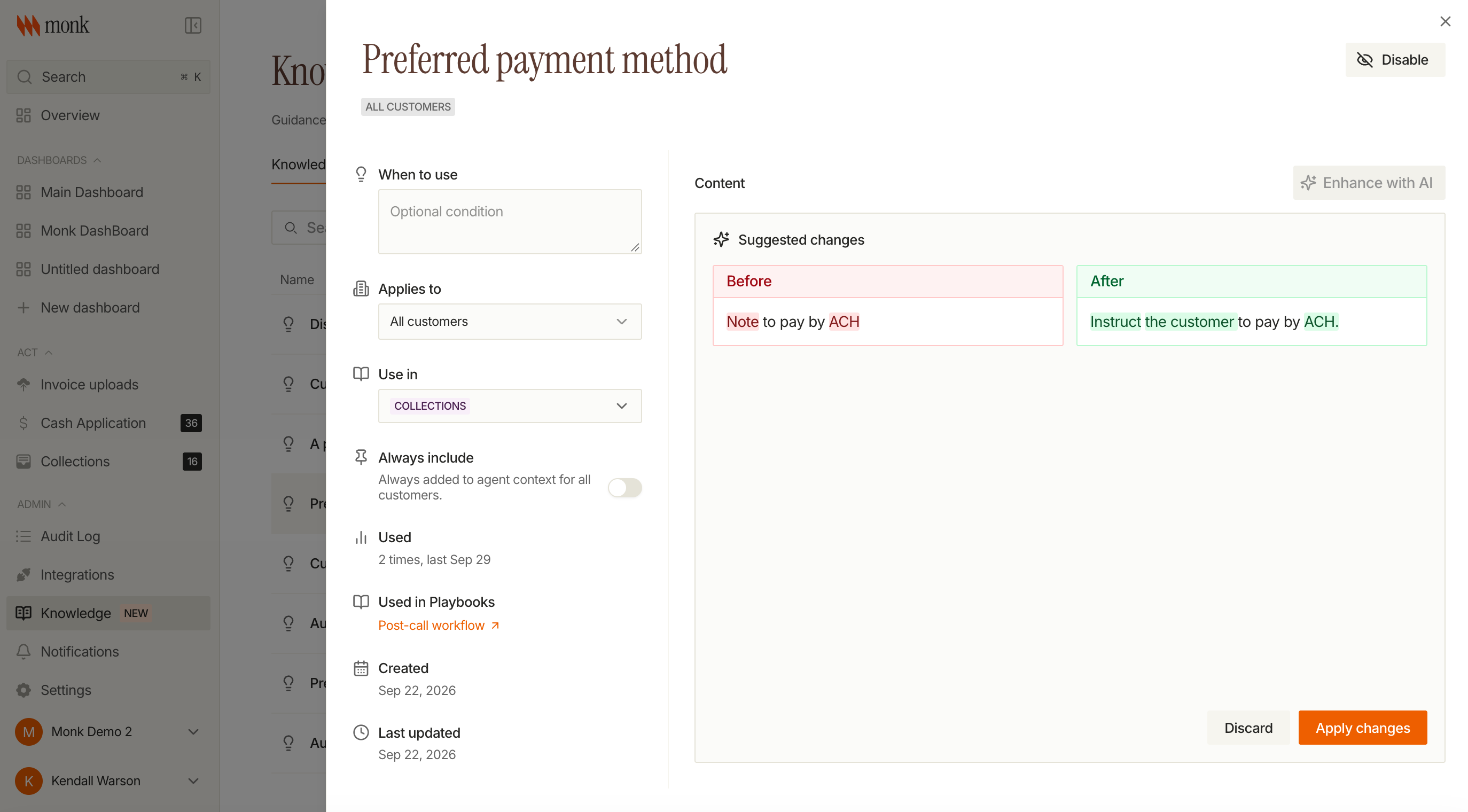
Knowledge now checks for conflicts and suggests improvements
Write a new entry and Monk shows you an AI-improved version as a before-and-after diff, then checks it against your existing guidance and warns you if the two conflict before you save.
Other Knowledge Updates
- Edit guidance in place from a playbook step
- An "always include" toggle for entries that should apply every time
- Organization-specific starter templates
- A Guardrails tab on the Knowledge page
Intelligent Collections
Collections Home v2 is now the default
The rebuilt collections workspace is what you land on now. The previous version is still reachable if you need it.
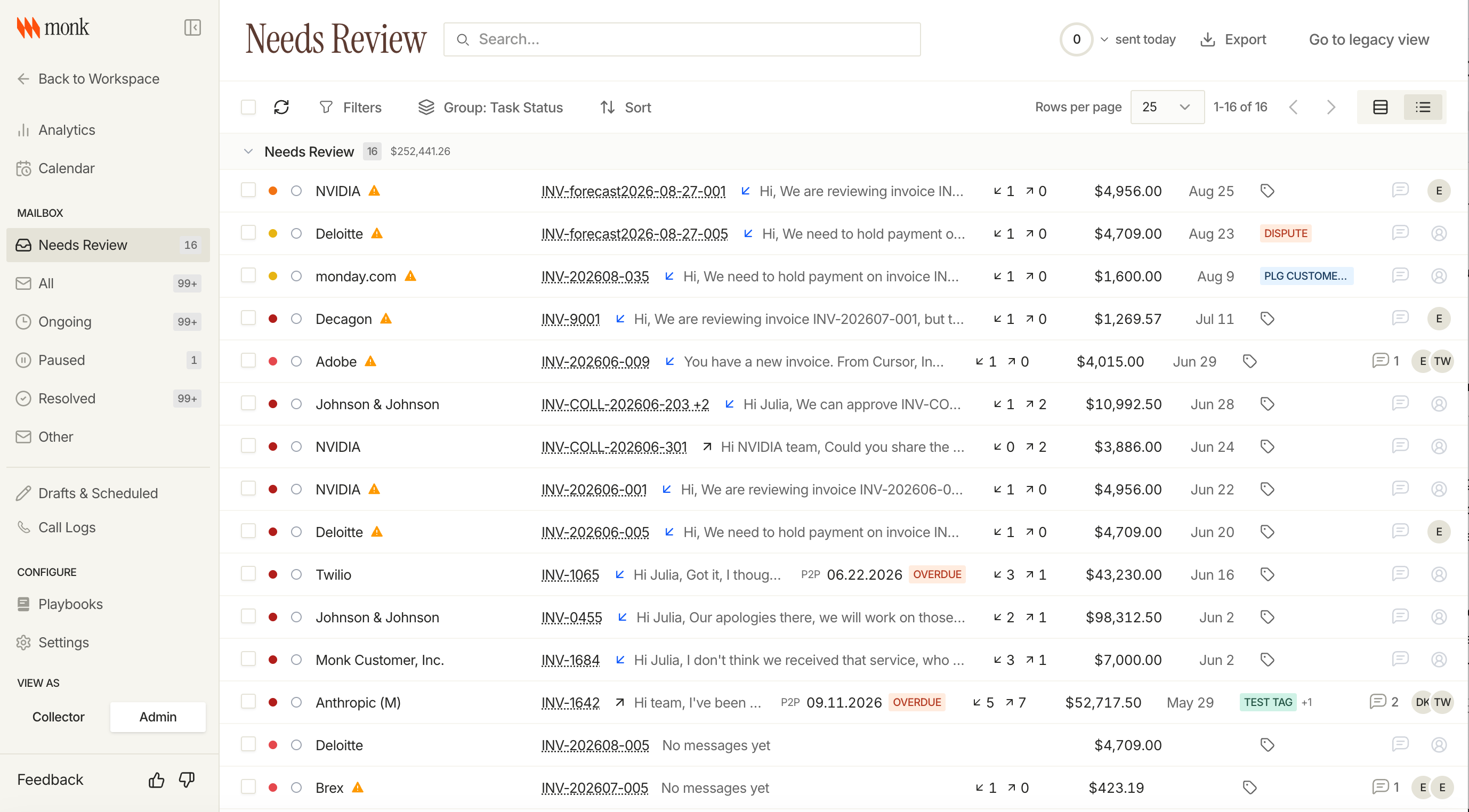
Voice calling, rebuilt
Outbound and inbound collection calls run on a new voice engine. Configure the agent and voice, keep recordings, and set separate controls for inbound calls, outbound calls, and retries.
Other Collections Updates
- Pausing an account now holds through planning, drafting, and sending
- Search within an invoice conversation
- Escalations record customer sentiment
- A separate daily cap for initial outreach
- Invoice tag conditions in playbooks and initial follow-ups
- Portal task status shows on the conversation page
- Pause and unpause from the invoice pane
- Page size on the collections list is selectable
- Filter for untagged conversations
Collections Fixes
- Saved reply CC recipients are honored
- Initial invoice emails accept attachments, including large files
- Draft guardrails tightened
- Money fields render as formatted currency
- No more extra blank line between sign-off and signature
- Replying to one thread snoozes its siblings
Payments & Reconciliation
Cash Application payments push to Stripe
Approved Cash Application payments now flow end to end into Stripe. Processing status shows on the invoice, and a transaction cannot move back to review once the push is underway.
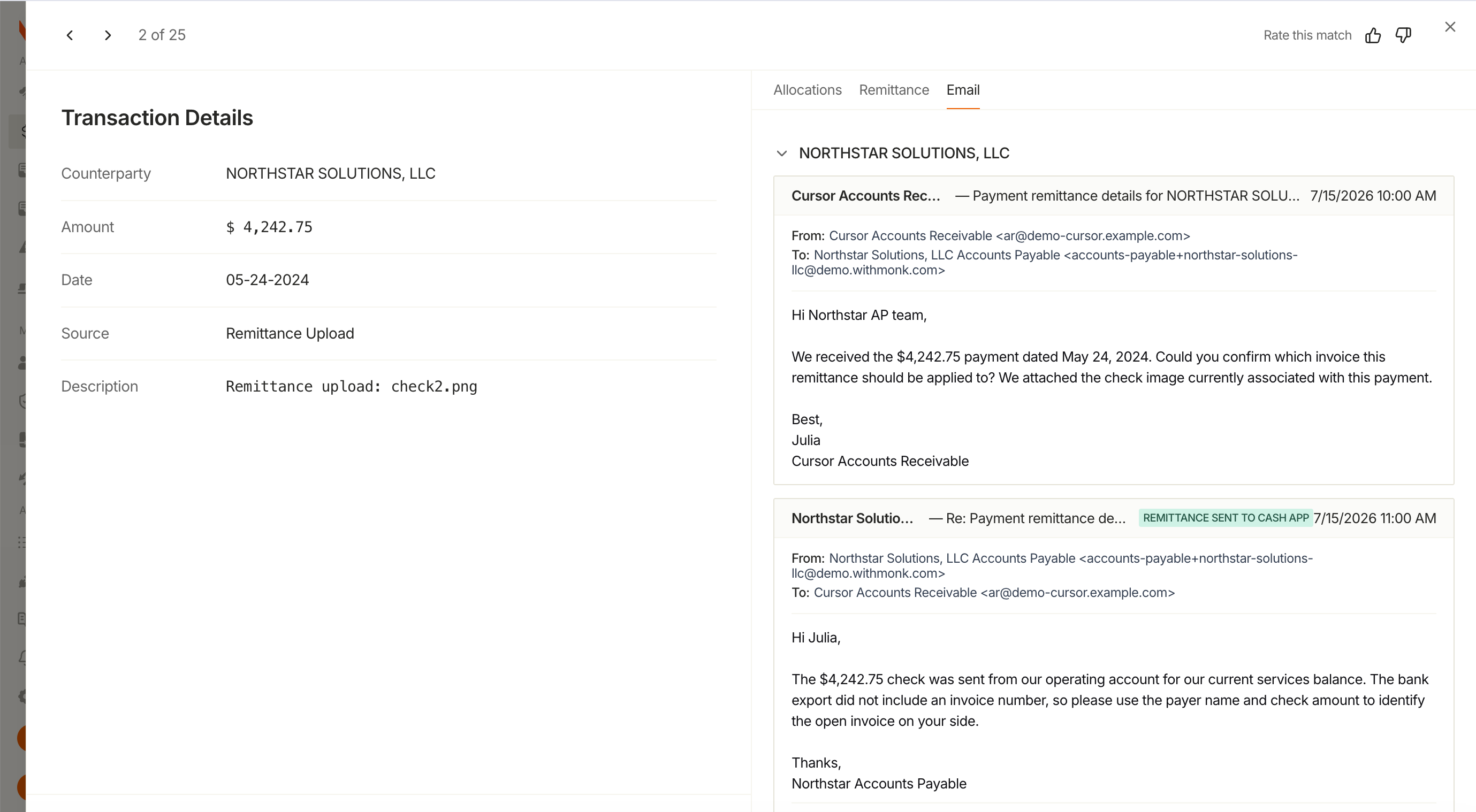
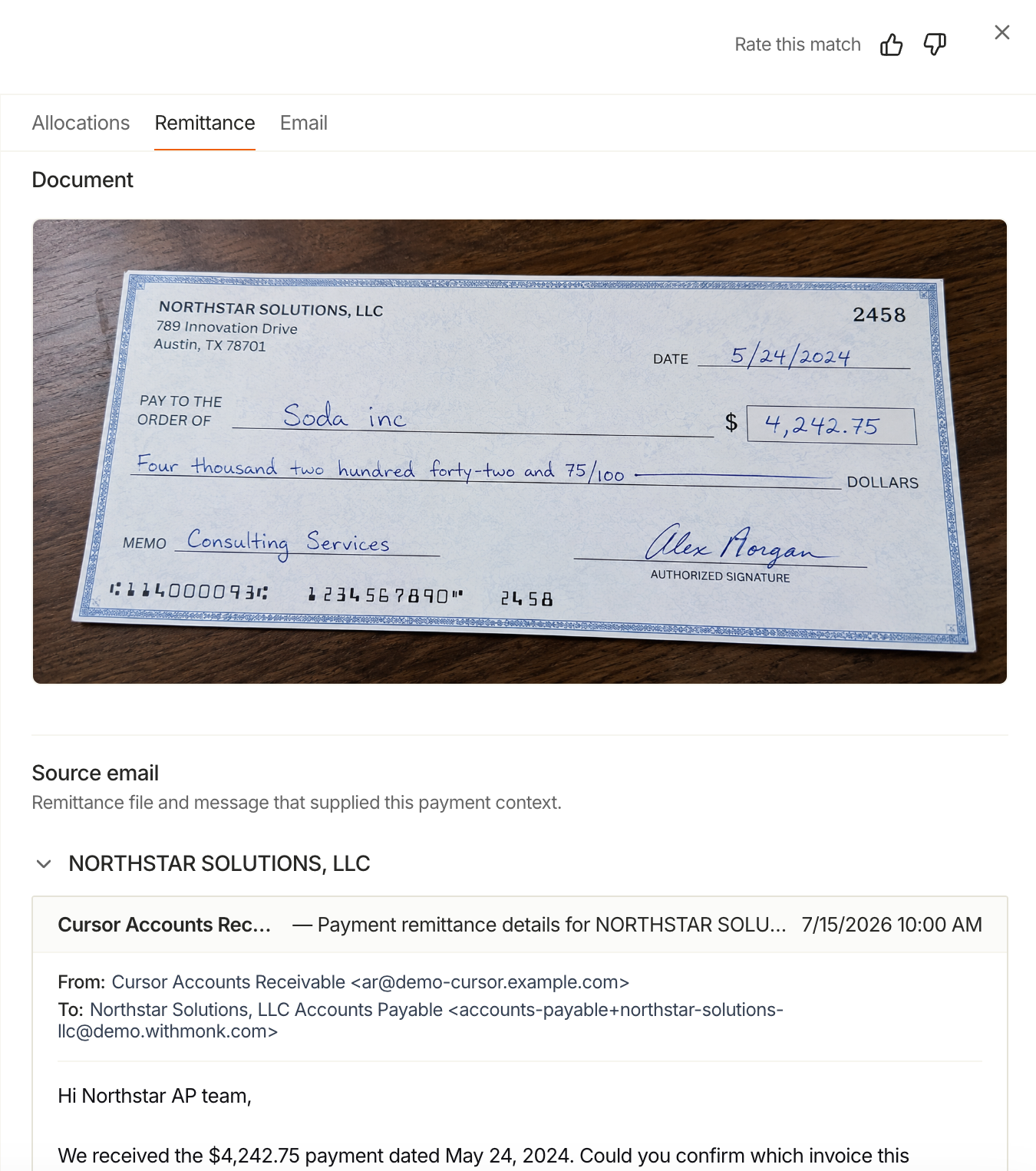
Monk reads remittance advice from email
Remittance sent by email, spreadsheet attachments included, is parsed and matched to transactions automatically. Anything that needs a human lands in a triage queue.
Other Payments Updates
- Short-pay write-offs push to NetSuite
- Follow-ups distinguish credits from partial payments
- Choose the payment method, cash account, and branch a pushed payment posts to
- Create and void pushed payments
- A Cash Application tab on the customer page
Payments Fixes
- Remittance status stays current in Collections
- Cash Application no longer matches against inactive aliases
Billing & Invoicing
Six report pages
Aging, DSO and Average Days Delinquent, Forecasting, Collections, Revenue, and Renewals each have a dedicated page now.
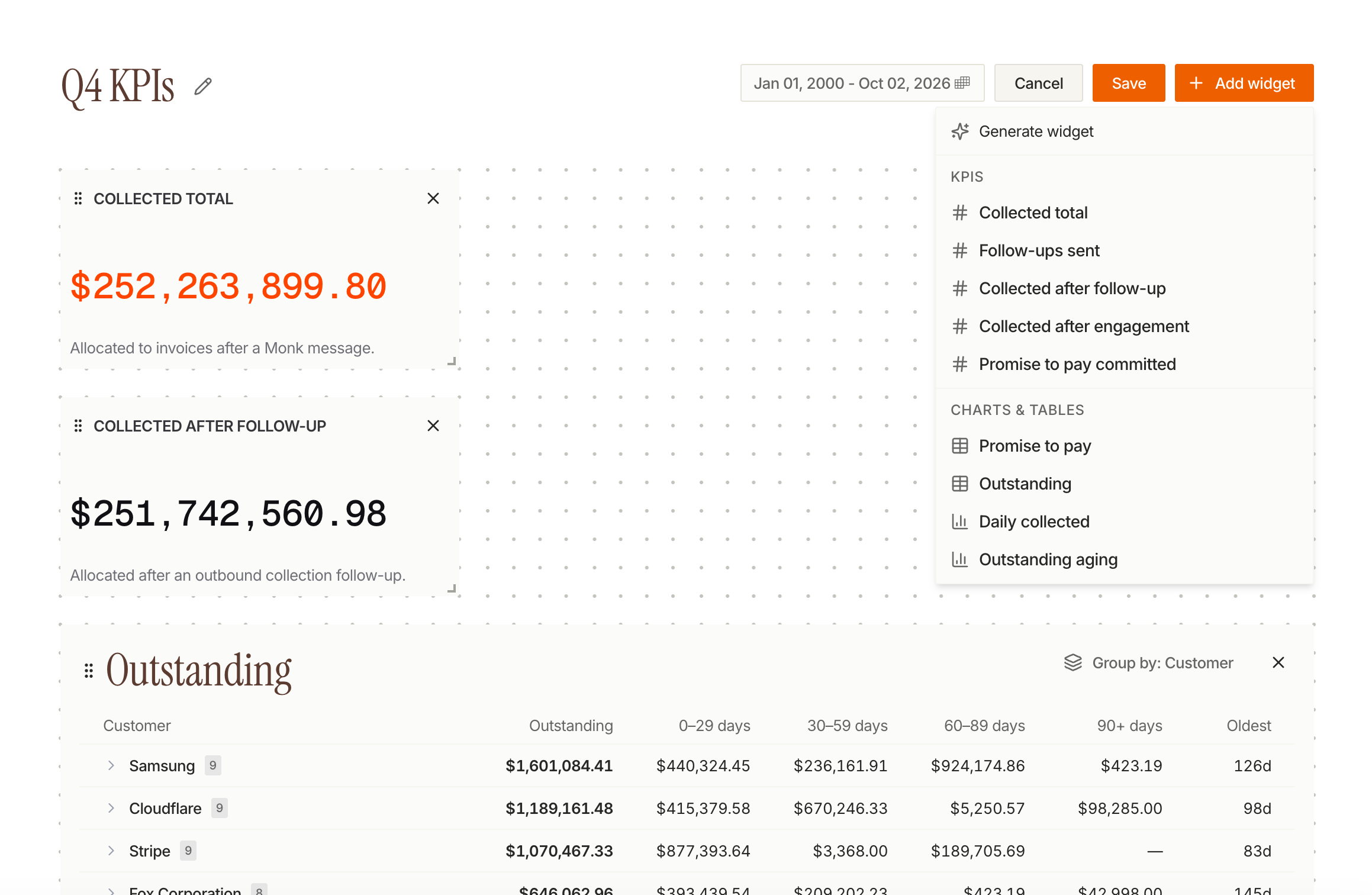
Build your own dashboard
Dashboards save per person. Add, duplicate, and remove widgets from a catalog, rearrange the grid, and pick which columns a table widget shows.
Other Billing Updates
- Multi-entity dropdowns default to all entities
- Saved agent reports can be replayed as a dashboard widget
Billing Fixes
- Legal name shows in entity selectors when display names collide
- KPI values and table cells no longer wrap
- Aging report layout and typography cleaned up
Contacts
Pausing a parent pauses its sub-customers
Pause a parent account and everything beneath it pauses too, with a preview before you confirm and the option to set an expiry or resume date.
Other Contacts Updates
- Inherited pause state shows in the customer list and detail
- Contact imports require explicit identifiers
- Set a deliverability override on a contact
- Custom metadata card on the customer overview
- Customer credit appears on statements
Contacts Fixes
- The pause button hides when a customer is already paused through its parent
- Long customer names stay inside the page header
- PDFs preview in the customer document drawer
Platform
Other Platform Updates
- Sender authentication check (SPF, DKIM, DMARC) on the mailboxes page
- Notification settings split into organization and personal tabs
Platform Fixes
- The organization switcher paginates and groups by parent organization
- Spreadsheet attachments sent by email are accepted
- Large attachments no longer fail validation
Changelog: September 1 - September 15
Knowledge
Knowledge is Live
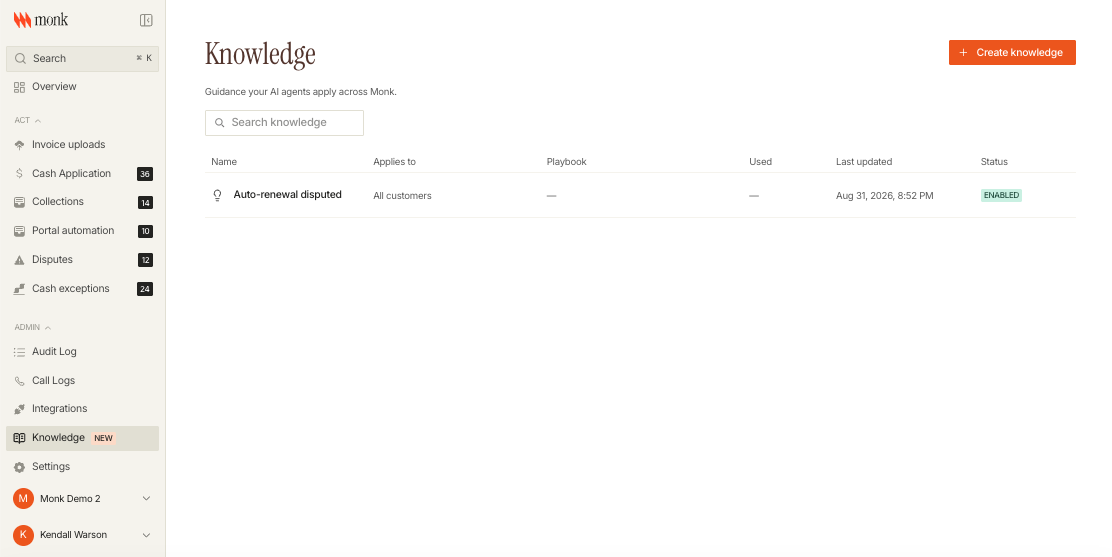
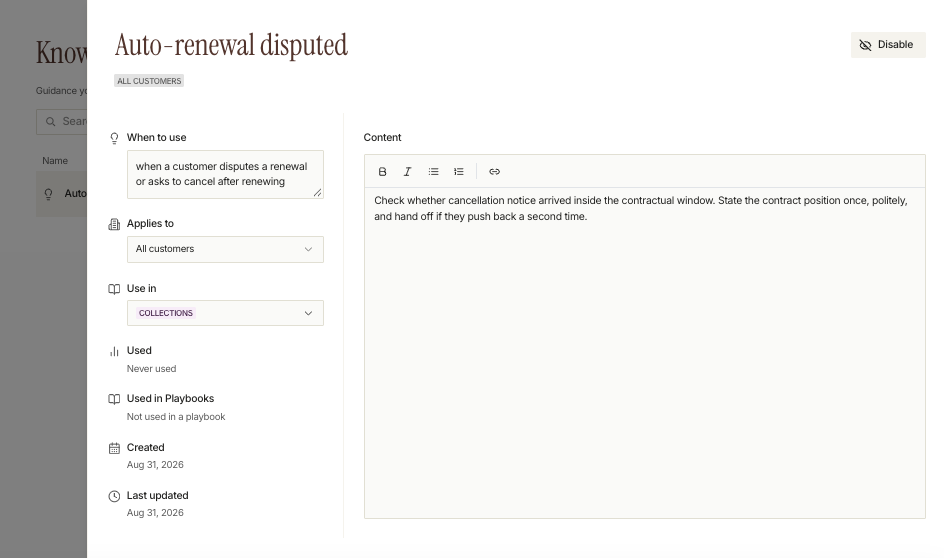
Monk's agents have always been yours to configure: playbooks, tone, cadence, when to escalate, when to stop. Knowledge adds the layer underneath, the situational context your team carries in its head. How you want a follow-up worded. What to say when a customer claims they already paid. Which accounts are on terms that don't match the standard.
Write one instruction, scope it to all customers org-wide or to a single customer, and add an optional note telling the agent when it applies. Start from scratch or from a template for payment claims, disputes, renewal disputes, and missed payment commitments. Pin a piece to a step in a playbook so the right language applies to an outbound collections email or an inbound reply. Anything you don't pin, the agent searches on its own when a customer raises something you didn't anticipate.
Every piece can be switched off, and the Used column shows which guidance the agent applied and where.
Intelligent Collections
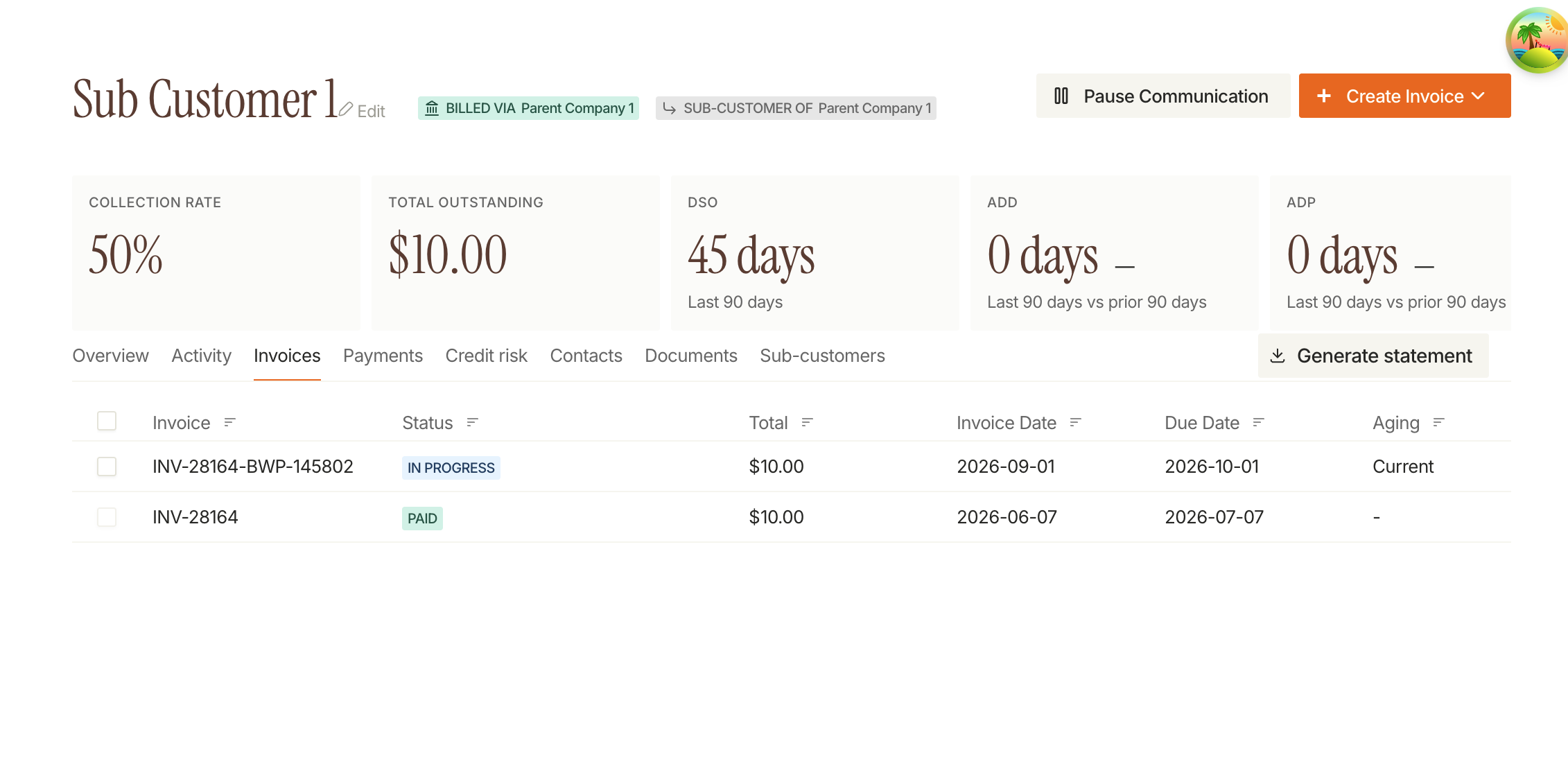
Everything Routes to the Parent Account
When a child account is billed to its parent, the email goes to the parent's contacts and the invoice sits under the parent's collection account. Children inherit the parent's playbook and assignment rules, and they no longer show up in contact review.
Send in Bulk, Delete in Bulk
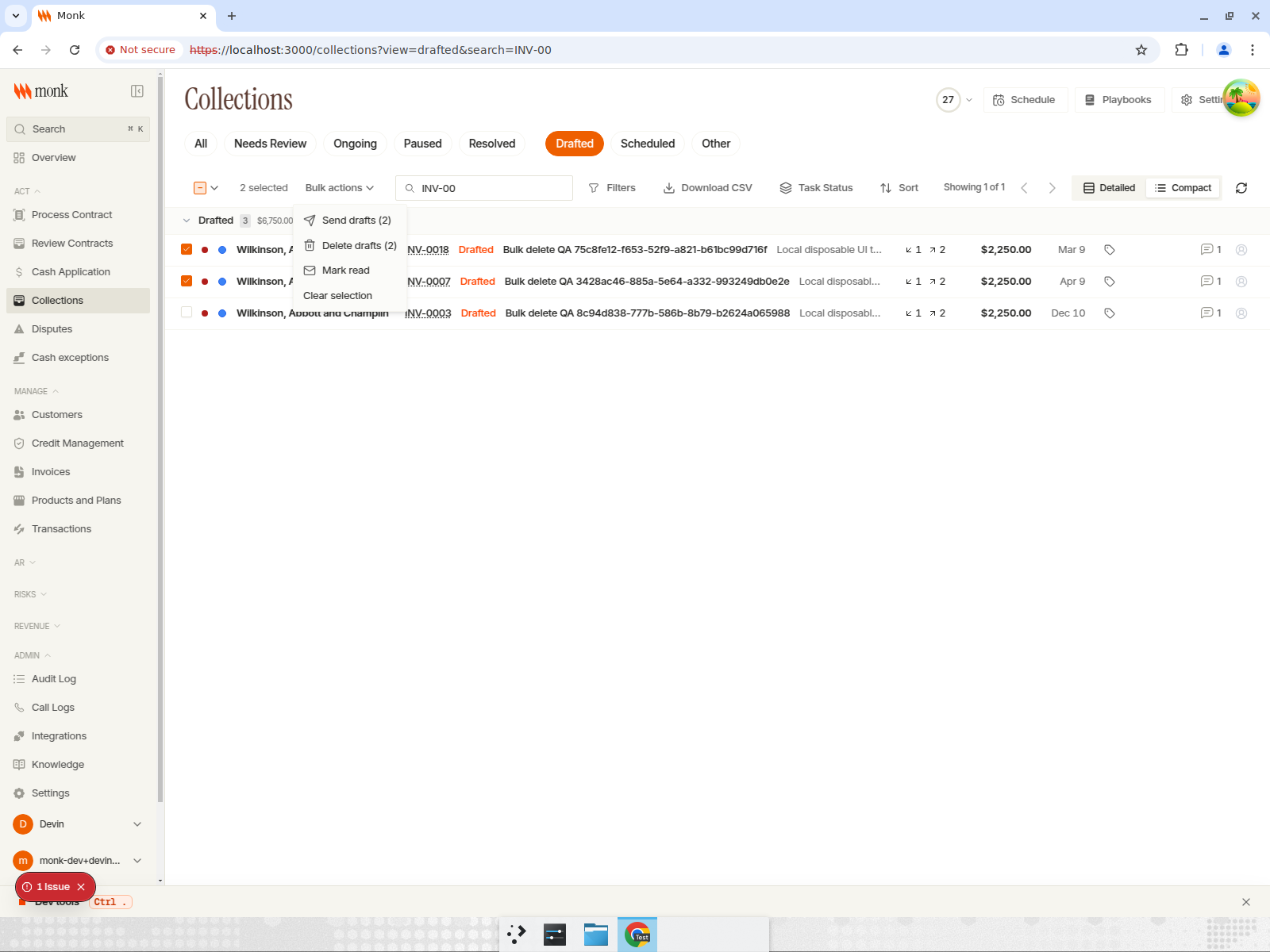
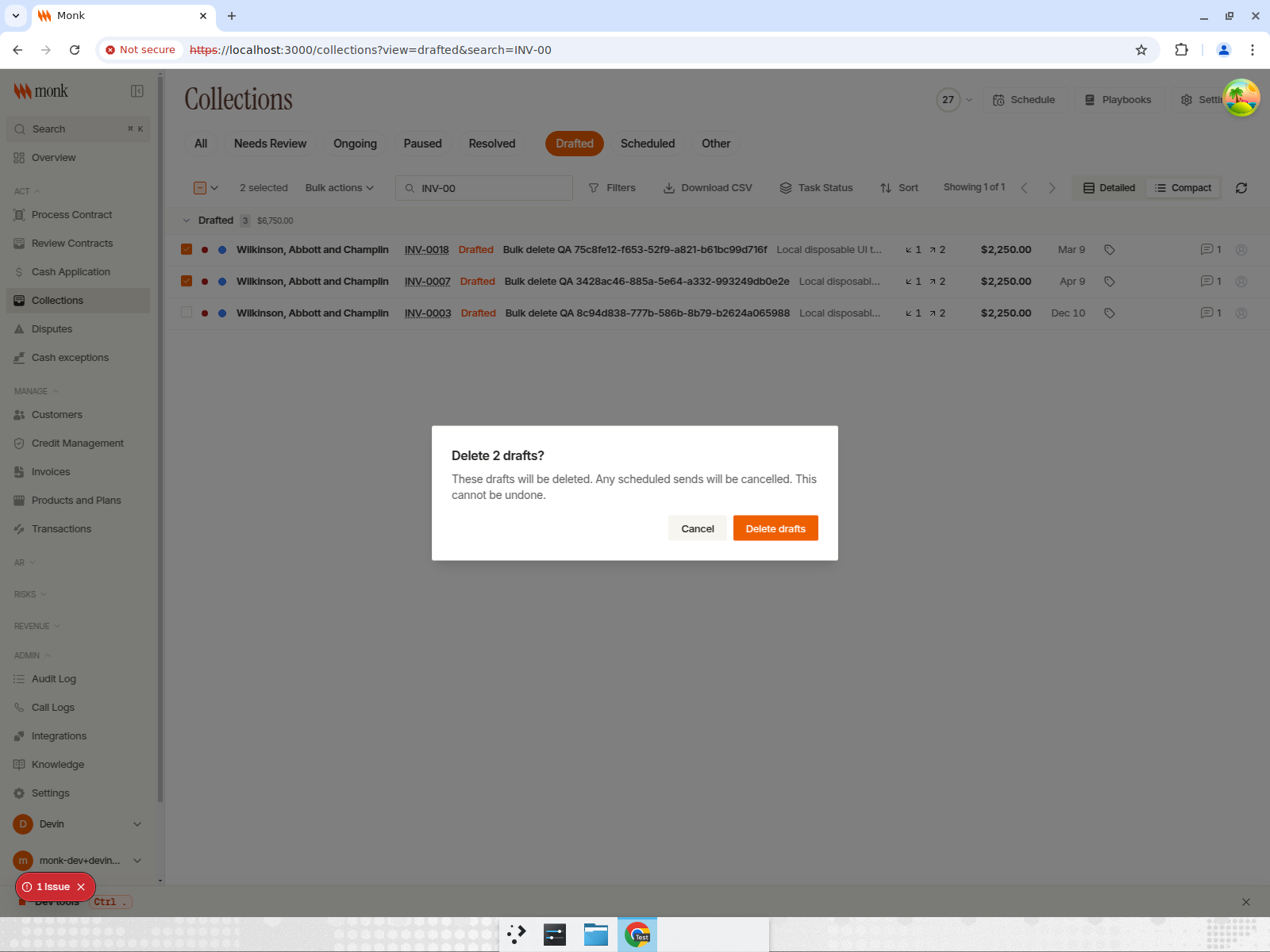
Select drafted messages and send them in one action, or delete a batch with a full audit trail. Drafted and scheduled emails now sit in one view instead of two.
Other Intelligent Collections Updates
- Invoices picked up throughout the day instead of once each morning, opt-in per org
- Weekend first drafts can be switched off
- Follow-up rules can target customers by tag
- Manual templates available for emails covering multiple invoices
- Payment portal invoice emails group by customer instead of one per invoice
- Recipient warning badge shows on the collapsed recipients row
- Invoice drawer header shows when an invoice or customer is paused
- Invoice drawer shows the invoice memo
- Unreachable contacts cascade across every scope that contact appears in
- Organization-level BCC on outbound collection emails
- Command palette searches contacts by name and email
- Collections filter drawer simplified
- AR manager access is scoped to their own accounts
Collections Fixes
- Draft attachments no longer drop on send
- Unsaved edits are no longer lost
- Stale scheduled drafts no longer send late
- Follow-ups no longer send after payment
- Replies no longer re-quote the thread
- List formatting and paragraph spacing hold in sent email
- Automated replies no longer suppress escalation
- Loop-in sends no longer count as sent-while-paused
- The assignee filter works again
- The portal link renders only when a template uses it
Payments & Reconciliation
Match Payments by Amount
Cash Application can now match on amount alone, using a find-by-amount rule you configure. Each invoice in a transaction now gets its own AI score instead of one score for the whole payment.
Pay One Invoice, Get the Link From Your ERP
Stripe hosted invoice links, Xero links, and ERP payment links now all resolve from a Monk invoice ID, so a customer clicking to pay lands in the right place.
Other Payments Updates
- Payment reconciliation prefers the earliest due date when allocating
- Payments recorded in your ERP no longer enter the Cash Application queue
- Remittance reruns include already-paid invoices and keep partial matches
- Applying an additional allocation preserves existing transactions
- Multiple credit memos can be applied to one invoice
- NetSuite import matches parent and child paid payments
- Credit card payment can be turned on or off for the whole organization, with a default option
Payments Fixes
- Pushed payments use the right date across timezones
- Transactions display in your timezone
- Credit memo notifications resolve recipients like invoices do
Billing & Invoicing
Invoice Tags
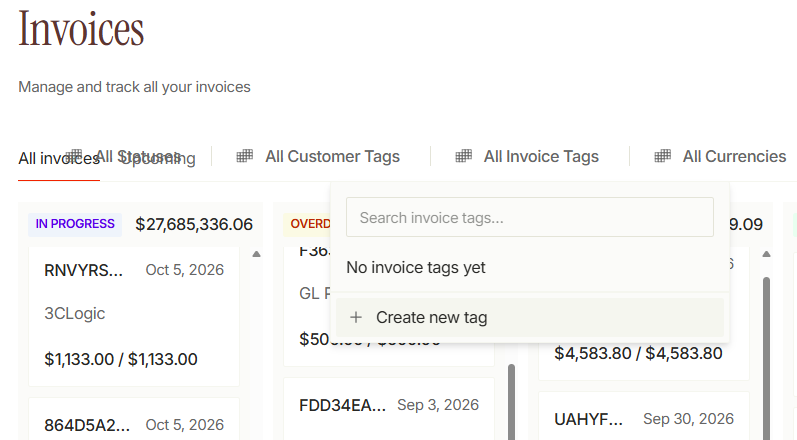
Create invoice tags for your organization, apply them from any invoice view, map them from ERP fields, and filter by them.
Other Billing Updates
- Customer CSV export includes account hierarchy and collection account
- Invoice exports include customer dimensions and invoice comments
- Organizations can define extra invoice statuses
- Auto-labeling covers up to 30 invoices at a time
- Invoice attachments can be resent
- Invoice list view improved
- Aging report Past Due column sorts by number, not text
- Unsent Campfire invoices import as drafts
Billing Fixes
- One-time service periods are no longer lost
- Invoice preview shows only that invoice's contacts
- The aging page scrolls again
Contacts
Import Contacts by CSV
Upload up to 2,000 contacts at once. Monk validates the file before anything is written.
Integrations
SAP Sync Now Handles Multi-Currency and Credit Memos
Cross-currency payments from SAP now import at the right exchange rate. Credit memo allocations carry through. And when an SAP balance and a Monk balance disagree, Monk tells you instead of letting it sit.
Other Integration Updates
- Cross-currency payments from SAP import with the correct exchange rate
- Salesforce handles every standard redirect on connect
- NetSuite pushes payments across multiple entities
- NetSuite balance drift checks refresh stale data before reporting a mismatch
- Xero invoice PDFs attach to collection emails automatically
- Xero and QuickBooks checkout links use clearer wording
- Slack integration tile shows live workspace connection status
Integrations Fixes
- The hourly auto-import no longer times out
- Xero initial follow-up settings appear in settings
Platform
Platform Fixes
- Failed sign-ins return you to sign-in, not an error screen
- Rate-limited requests and throttled PDF renders retry on their own
- Long subsidiary names no longer overflow
- Payment portal defaults survive org-level changes
Changelog: August 15 - August 31
Payments & Reconciliation
Document Packages
Multiple documents can now be bundled into a package and attached directly to a collections or manual email, instead of attaching files one at a time.
.png)
Other Payments & Reconciliation Updates
- Invoices can now display payment terms directly on the invoice.
- QuickBooks can be disconnected and reconnected directly from the integration page.
- Remittances are now linked back to the email thread they arrived in.
Intelligent Collections
Snooze Follow-Ups From the Inbox
Conversations can now be snoozed for follow-up directly from the inbox, for up to 14 days.
.png)
See Why a Draft Is Blocked
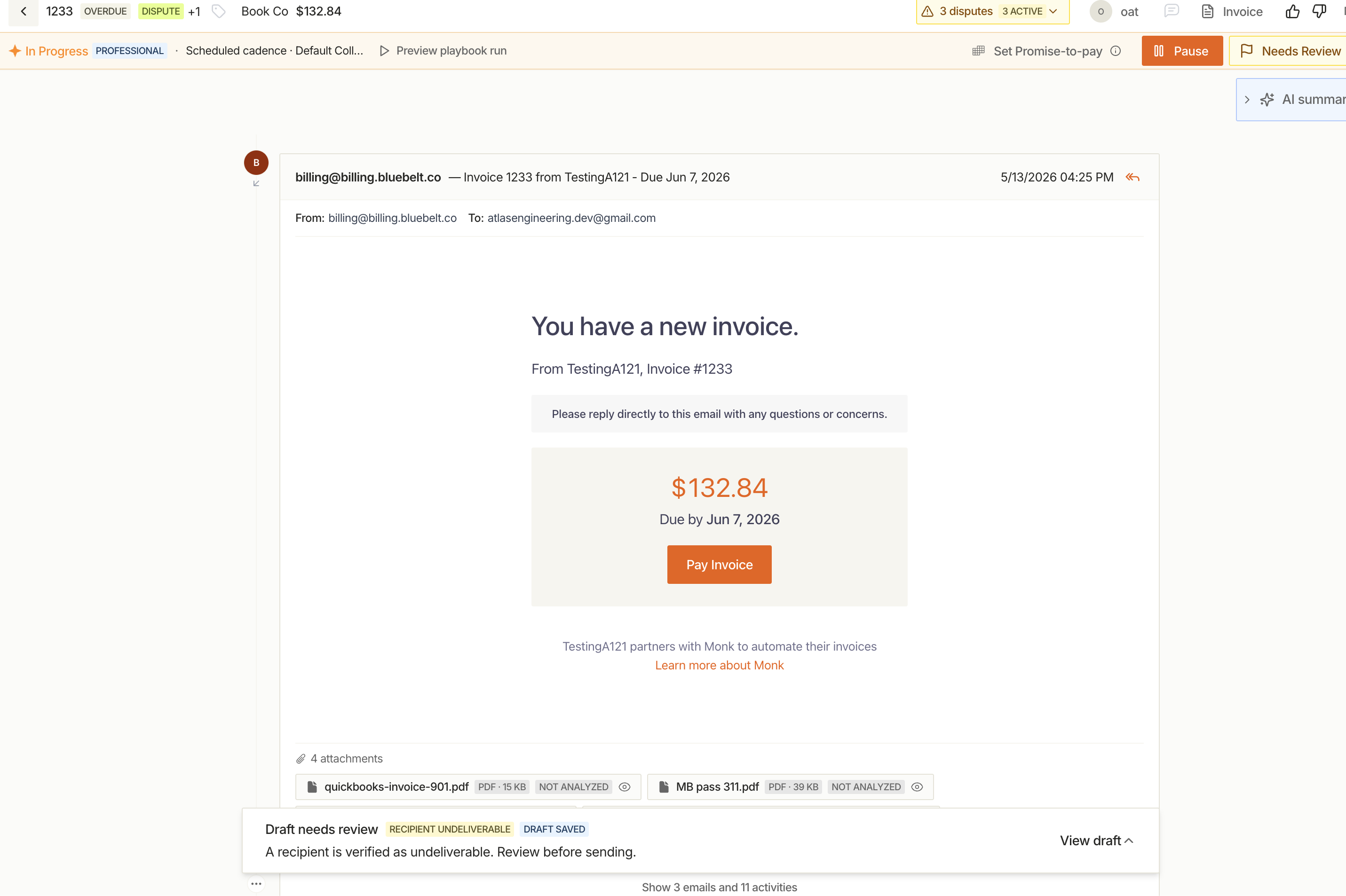
Drafts held for review now show the reason they were blocked, with a queue that surfaces every held draft so nothing sits without an explanation.
Other Collections Updates
- Invoices now sync from your accounting system faster, so outreach can start sooner.
- Manual replies can now be sent even while a conversation is paused.
- Escalation and loop-in email copy can now be customized per organization.
- Playbook send rate can now be configured.
- Tags now show matching colors for faster scanning.
- Monk now detects when a contact has left the company and stops emailing them.
Fixes
- Portal: fixed the document/PDF viewer crashing on refresh
- Invoices: fixed a bug affecting invoice upload extraction
- NetSuite: fixed currency and unit-price mapping issues
- Stripe: fixed credit note handling for connected accounts
- Cash Application: fixed currency symbol display issues
Changelog: August 1 - August 15
AR Reporting
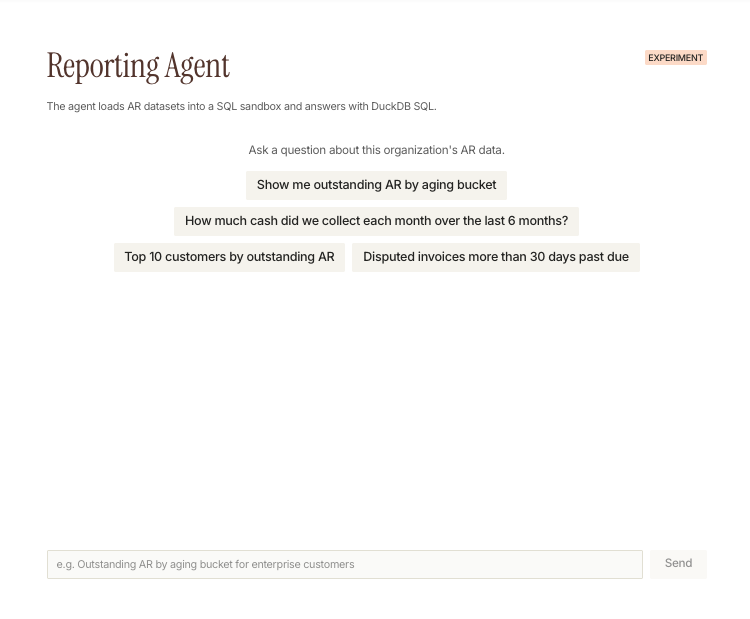
Ask Questions About Your AR Data, No Query Required
Ask about your AR data in plain language and get an answer with a chart, no report-building required. Try outstanding AR by aging bucket, monthly cash collected, top customers by AR, or disputed invoices past due.
Other AR Reporting Updates
- Bounce-rate trends are now visible in reporting, so you can spot delivery issues before they affect a collections cadence.
Payments & Reconciliation
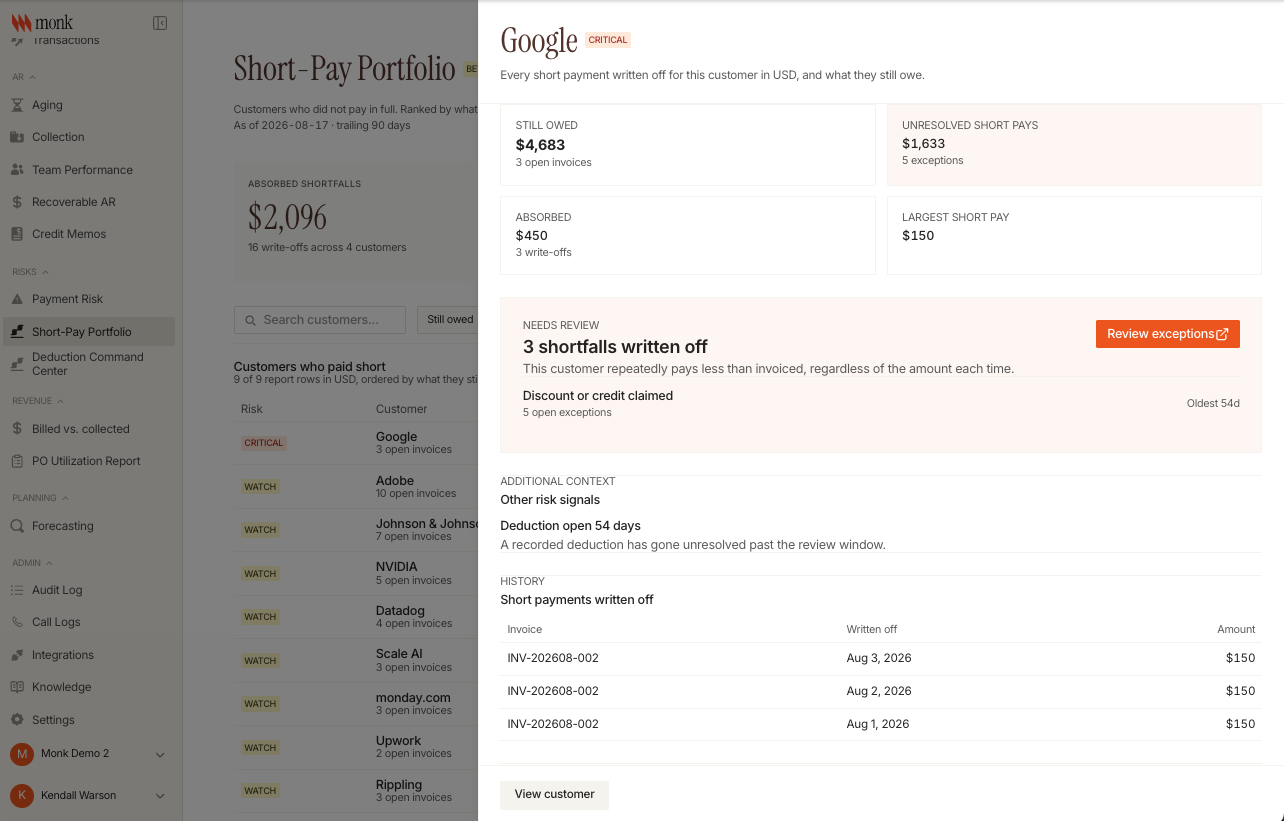
Short Pays and Deductions, Classified Automatically
Short pays and deductions are now classified by category automatically, with a review step to confirm or correct the result. The new Deduction Command Center prioritizes which ones need attention first, and the Short-Pay Portfolio report (beta) shows what's been absorbed versus what customers still owe.
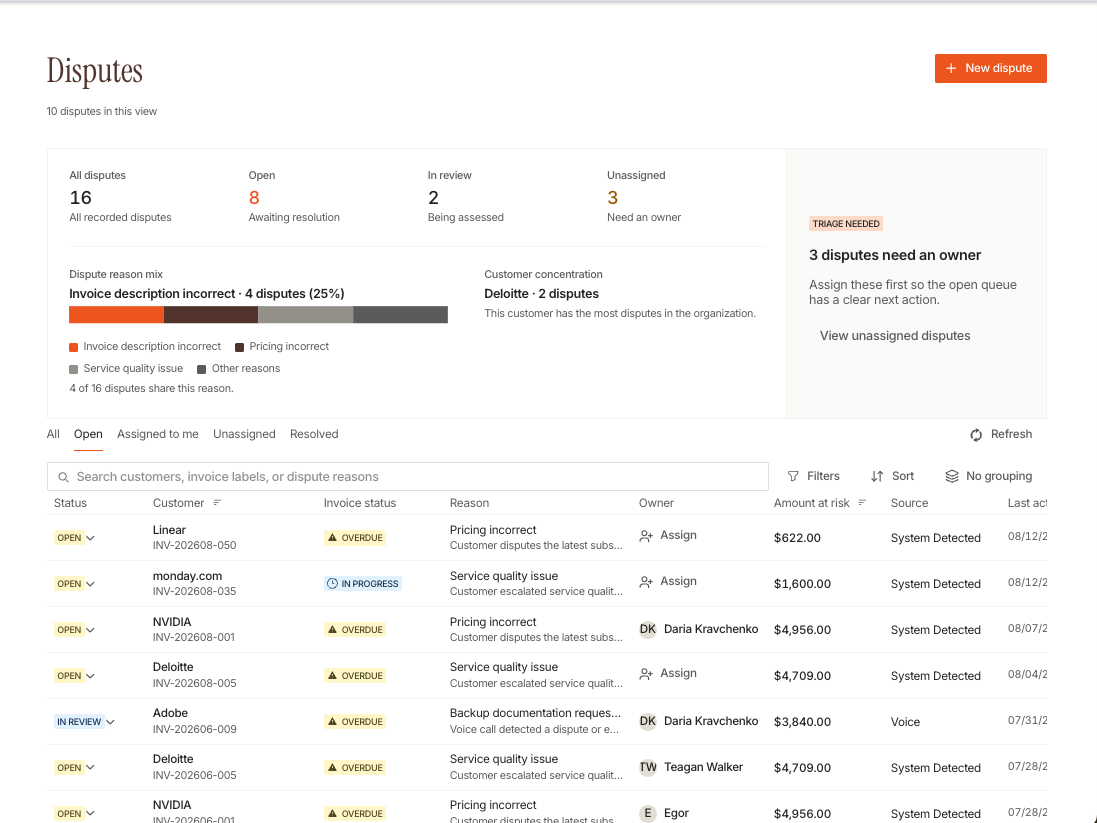
Dispute Queue, Now Filterable by Status and Customer
The dispute queue can now be filtered and grouped by status and customer, with sortable amounts and a direct link back to the source conversation as evidence.
Other Payments & Reconciliation Updates
- Stripe reconciliation now handles more complex scenarios automatically, including split-period billing adjustments and multi-line credit memos, so fewer need manual review.
- Account, customer, and collection summaries are now generated automatically, giving a quick recap without digging through the full history.
- Bank letters now resolve currency automatically and can be uploaded, emailed, or accessed through the customer portal.
Intelligent Collections
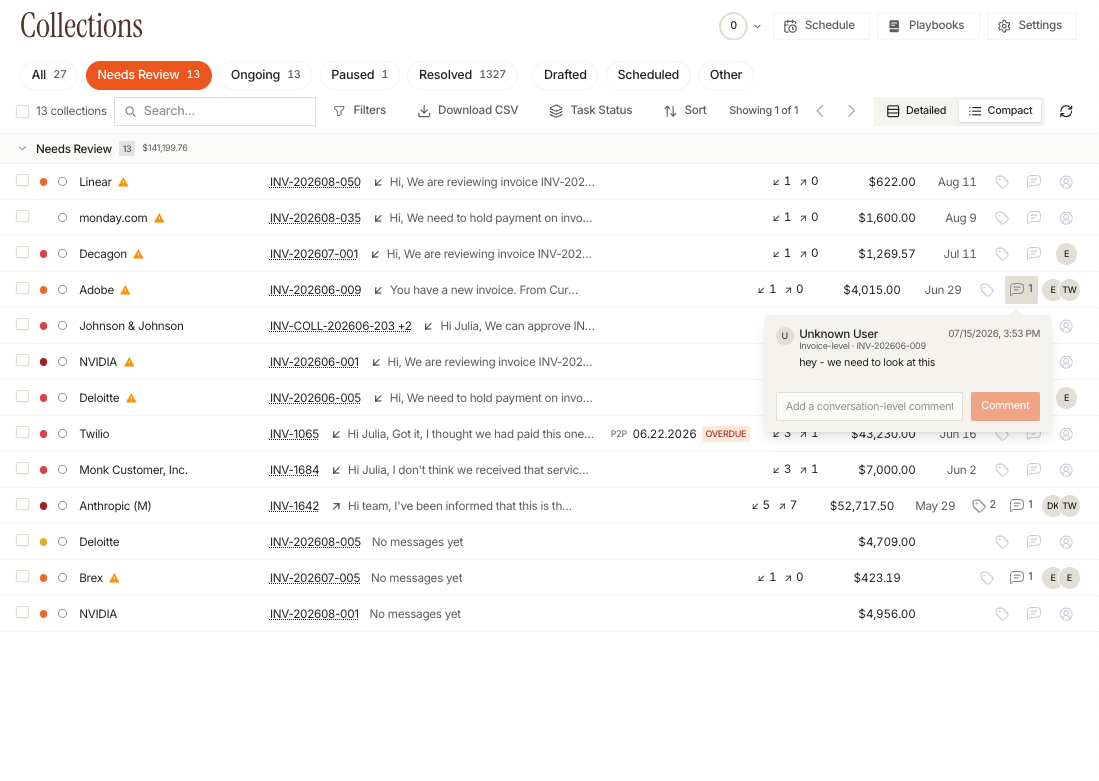
Comment Directly on Customer Conversations
Conversations can now be commented on directly, scoped to a customer or a single thread. A new way to leave internal notes or context without it becoming part of the outbound email.
Other Collections Updates
- The collections schedule view is now faster at higher volumes.
- The email composer now supports picking invoices with multiple attachments, recipient autocomplete, and drag-and-drop.
- Labels have been renamed to tags, with configurable routing rules.
Fixes
- Email: improved delivery reliability for edge-case send failures
- Contacts: fixed CSV imports failing on hidden whitespace characters
- Portal: fixed search feeling slow while results load
- Performance: fixed slow-loading schedule, portal search, and aging reports
Changelog: July 16 - August 1
Credit Management
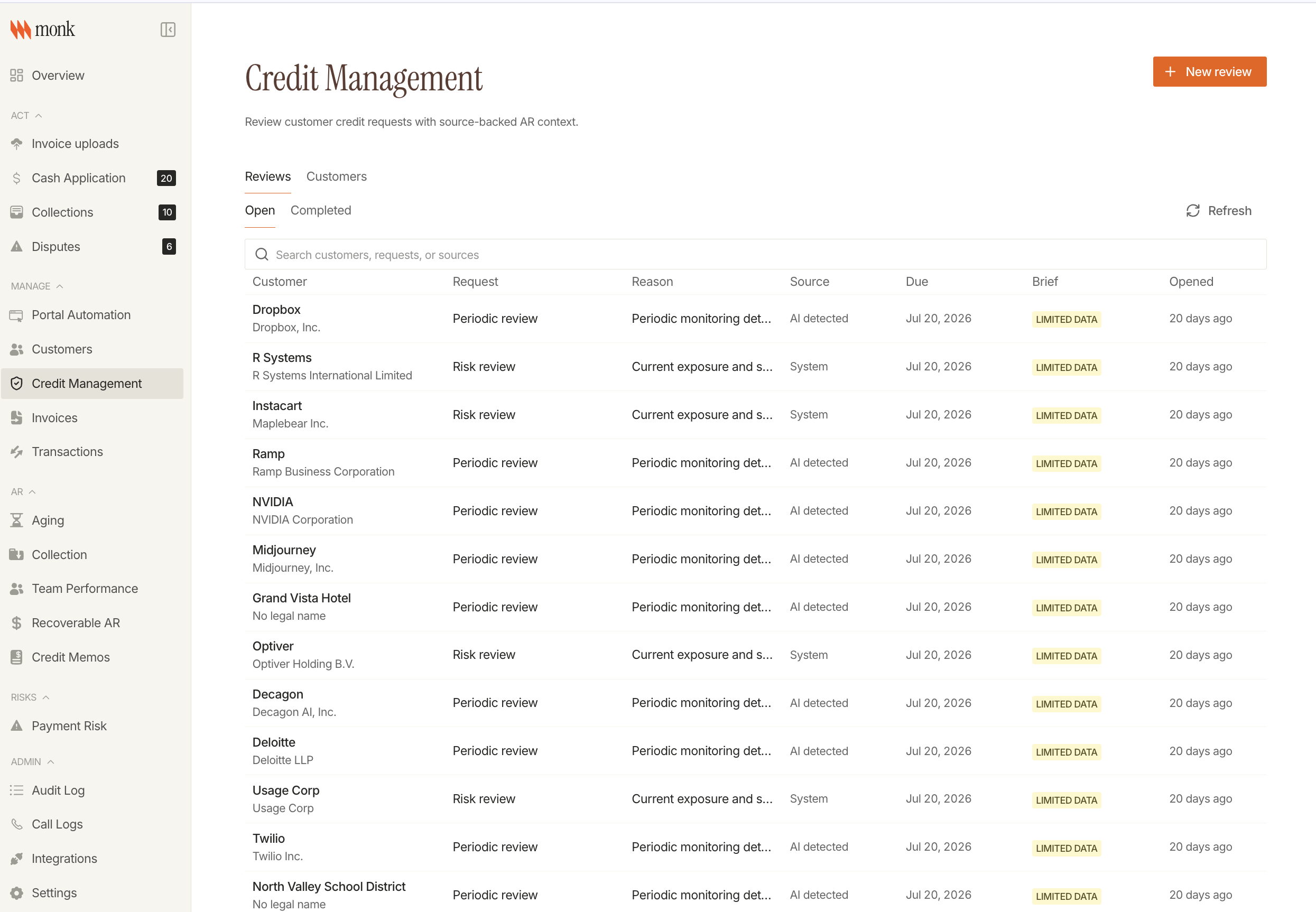
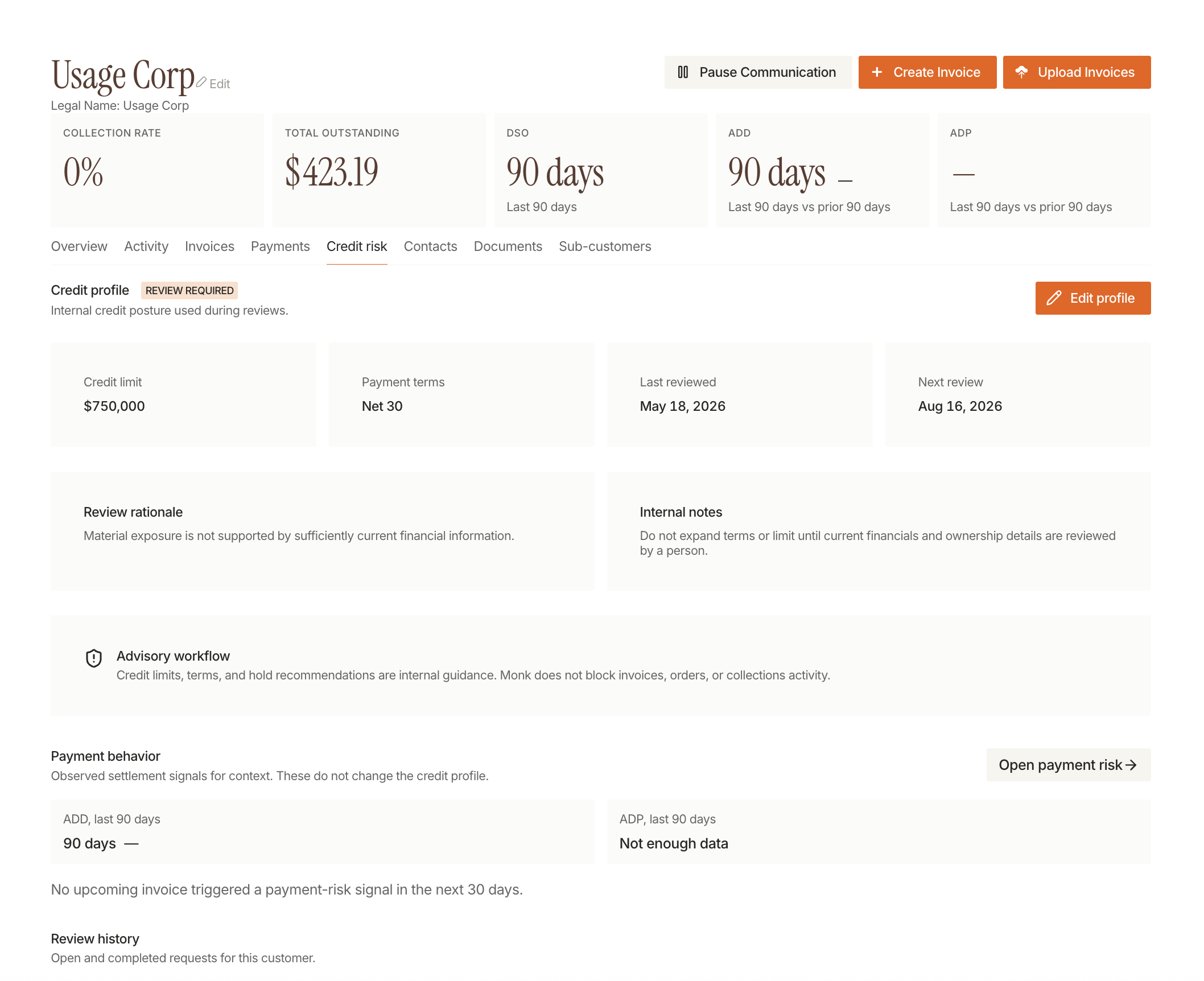
Customer Credit Gets Its Own Workspace
Credit management moves out of contracts and plans into its own workspace. Credit risk surfaces on the customer page instead of requiring a separate lookup.
Intelligent Collections
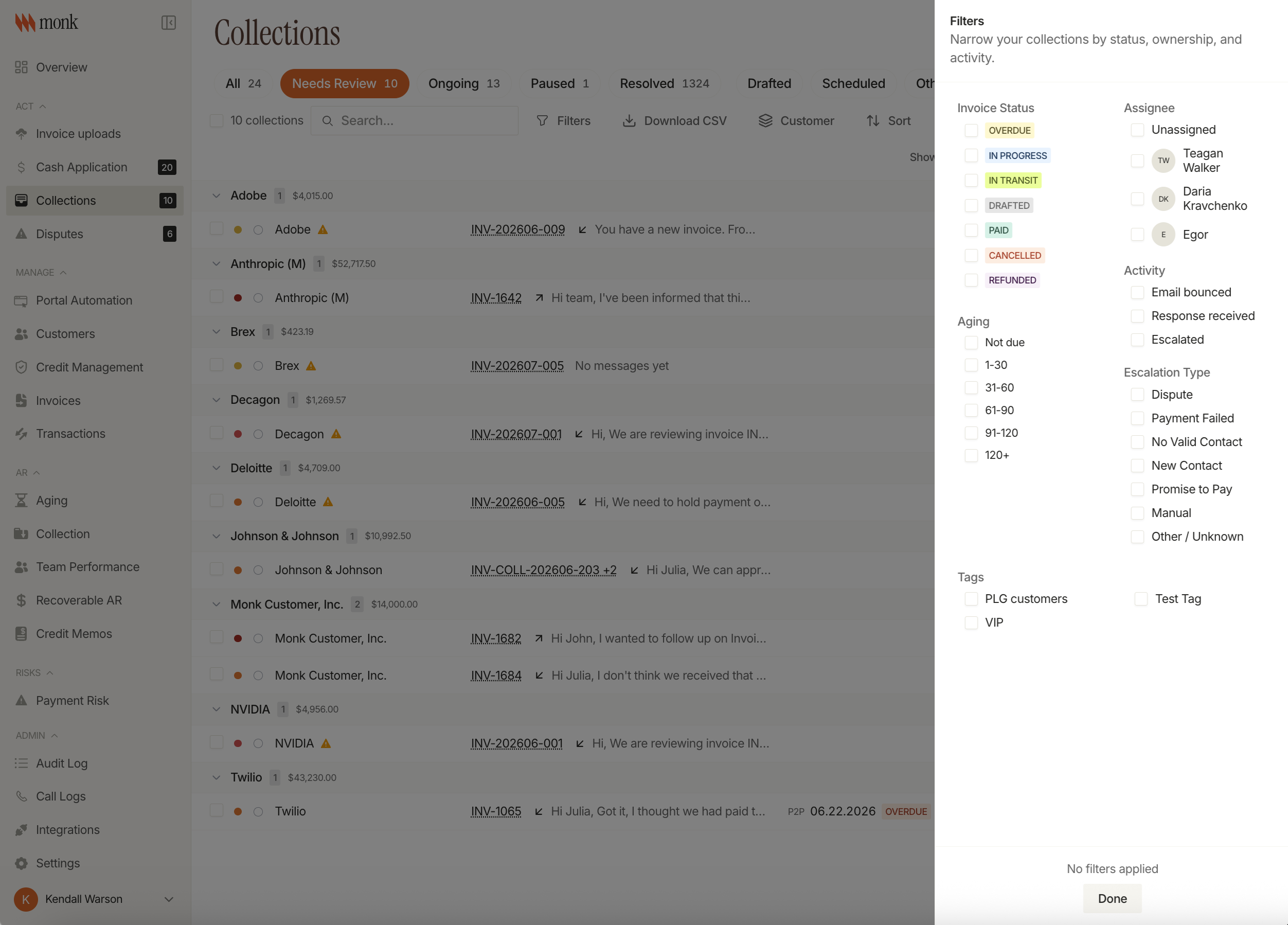
Collections Home Base, Rebuilt
Mission Control has been rebuilt as its own space, with the collections list built to handle much larger volumes without slowing down. A new customer activity timeline shows everything that's happened on an account, with filters and an export for audit purposes.
Playbook Previews
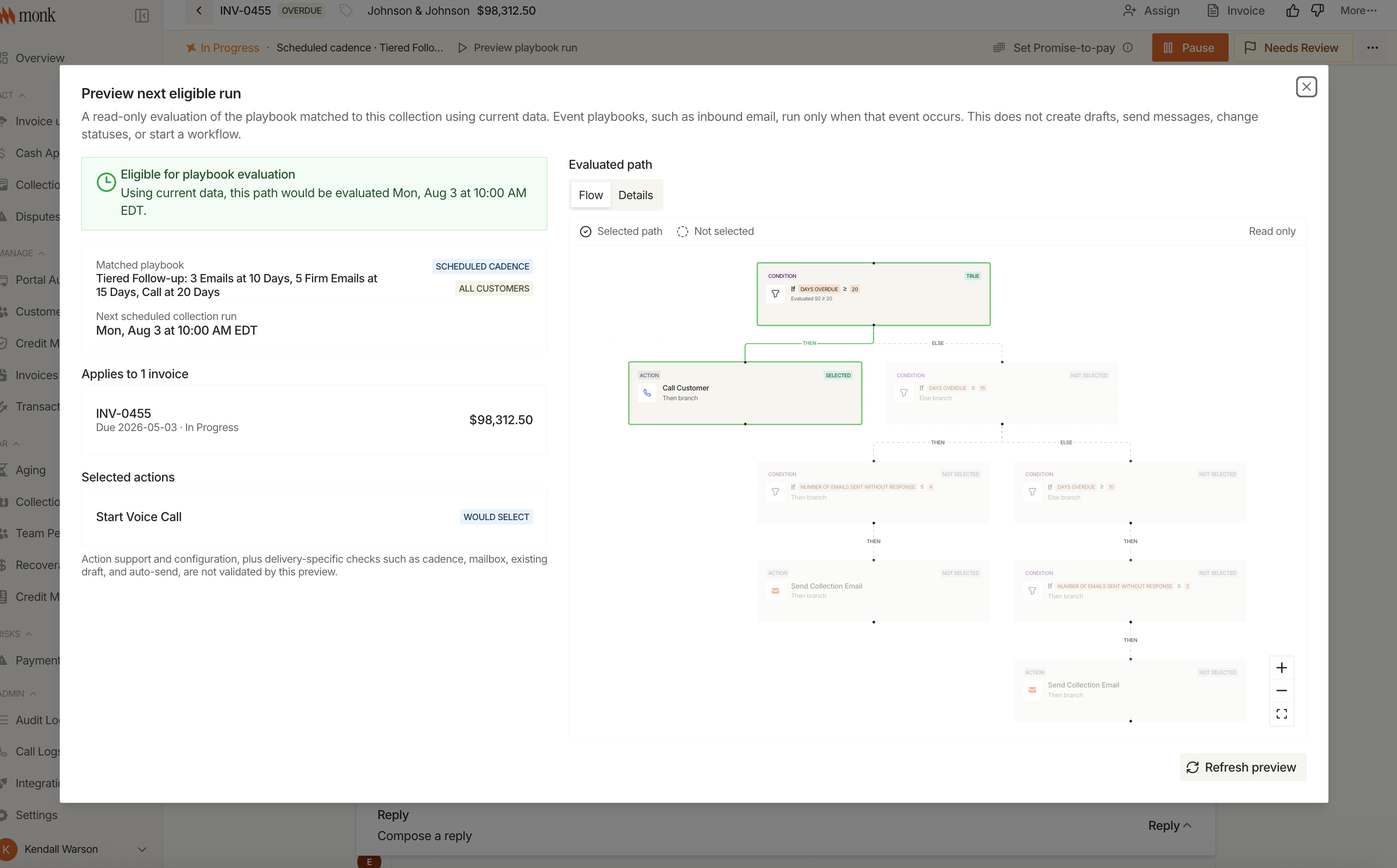
Playbooks can show a read-only preview of their next run before it fires, so you always have full visibility. The playbooks table also got sorting, filtering, and one-click duplication.
Other Collections Updates
- Recipients with repeatedly bouncing emails are blocked automatically, backed by more reliable delivery-event tracking
- Email disputes are classified directly in triage, with manual dispute creation and multi-status filtering on the dispute queue
- Email send volume can be capped, with advisory alerts before a limit is enforced
- First-draft timing can be set with a fixed cutoff date or rolling window, and promise-to-pay follow-ups have their own configurable buffer
Payments & Reconciliation
AI Matching Gets More Precise
AI-assisted payment matching works directly with remittance line items and fee or tolerance settlements, grounded in your actual settlement setup rather than just the top-line amount.
Multi-File Remittance Uploads
Upload remittance files together and Monk groups them for review, with an editable breakdown and automatic detection of remittances that don't have a matching payment yet.
Other Payments Updates
- Net-of-fee payments get dedicated handling from entry through reconciliation, with short-pay tolerance saved per account
- New Deductions & Short Pays report, plus a report for tracking cash application by payer alias
- Payer-alias matching hardened against false matches
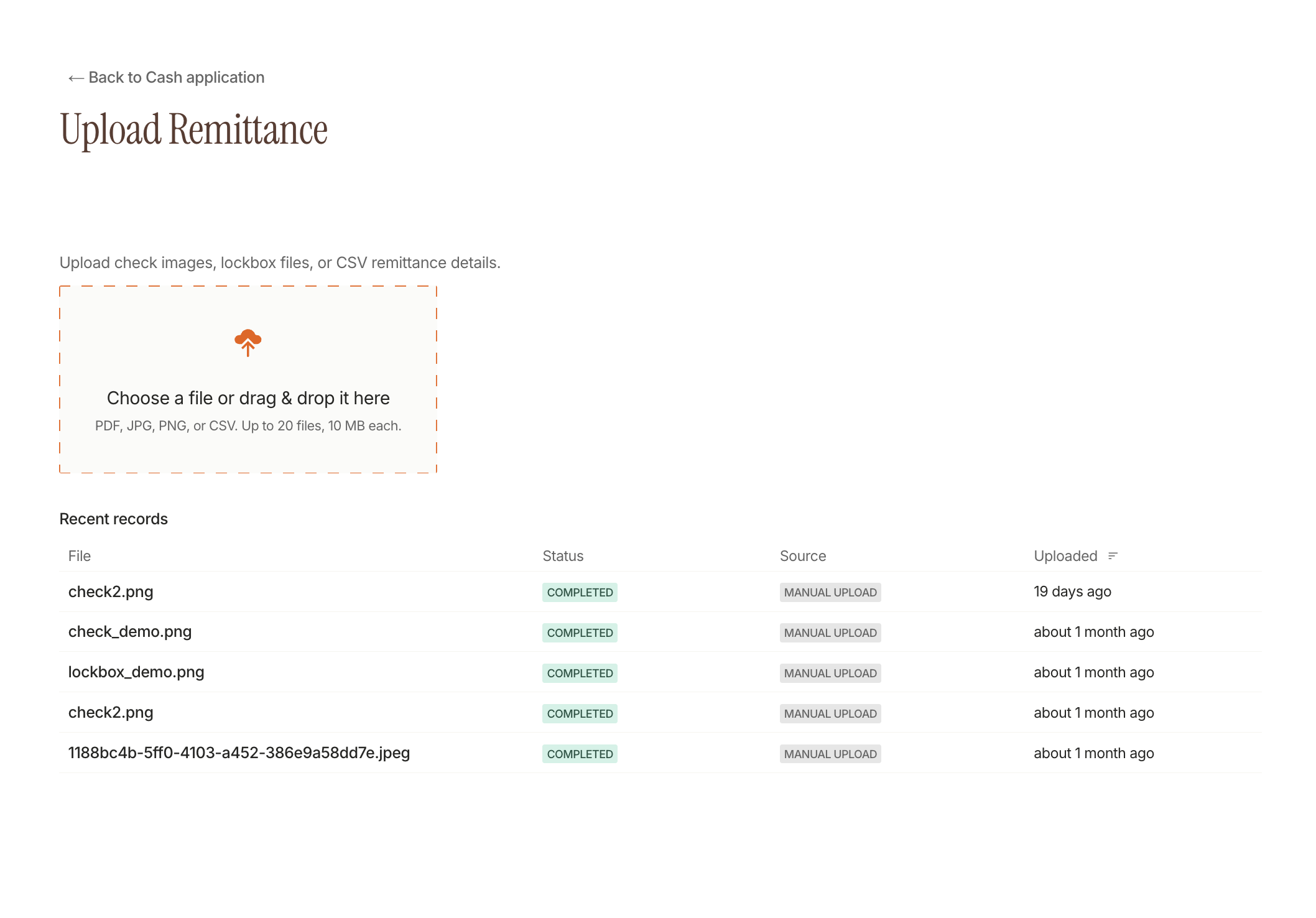
AR Reporting
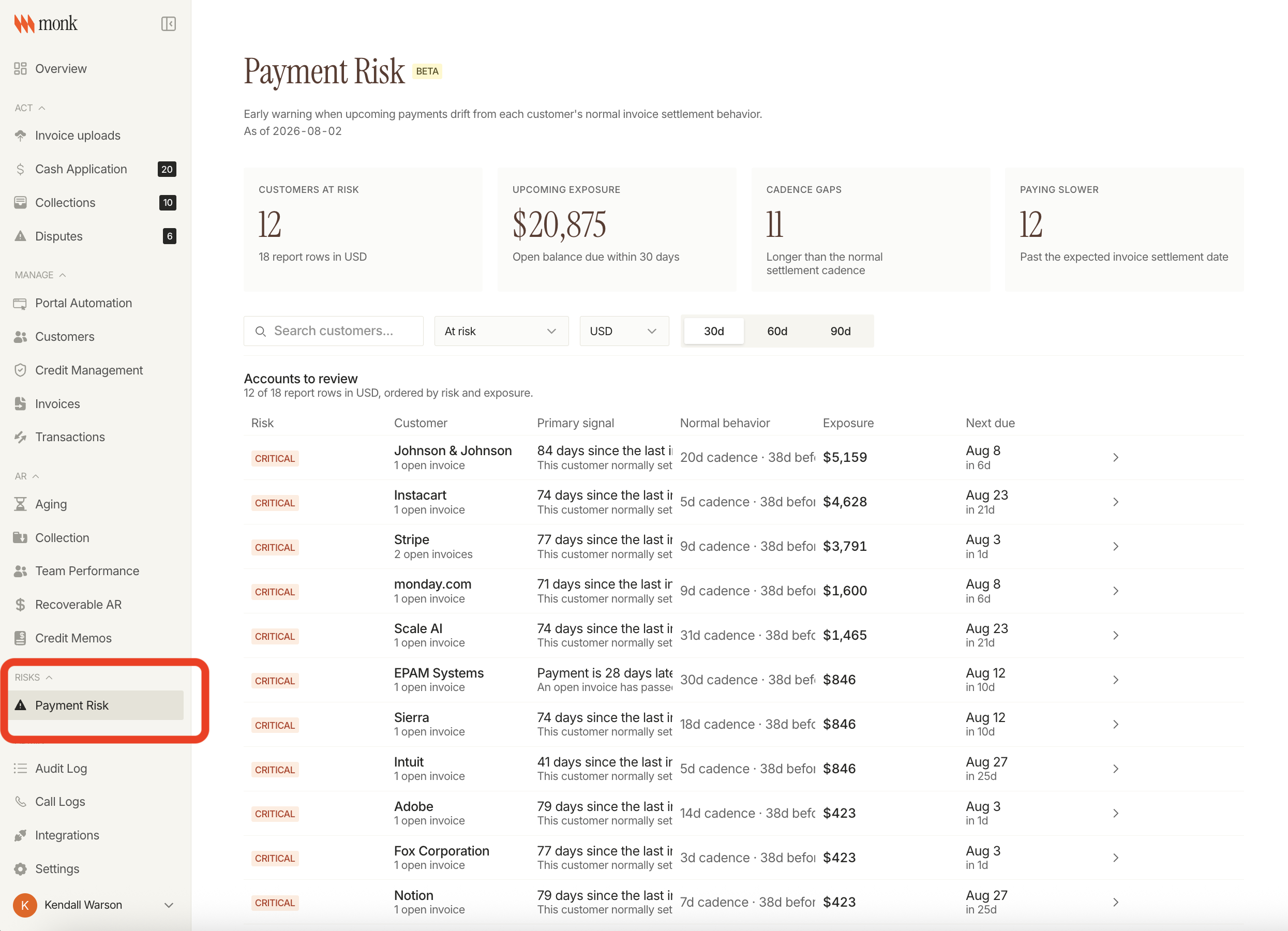
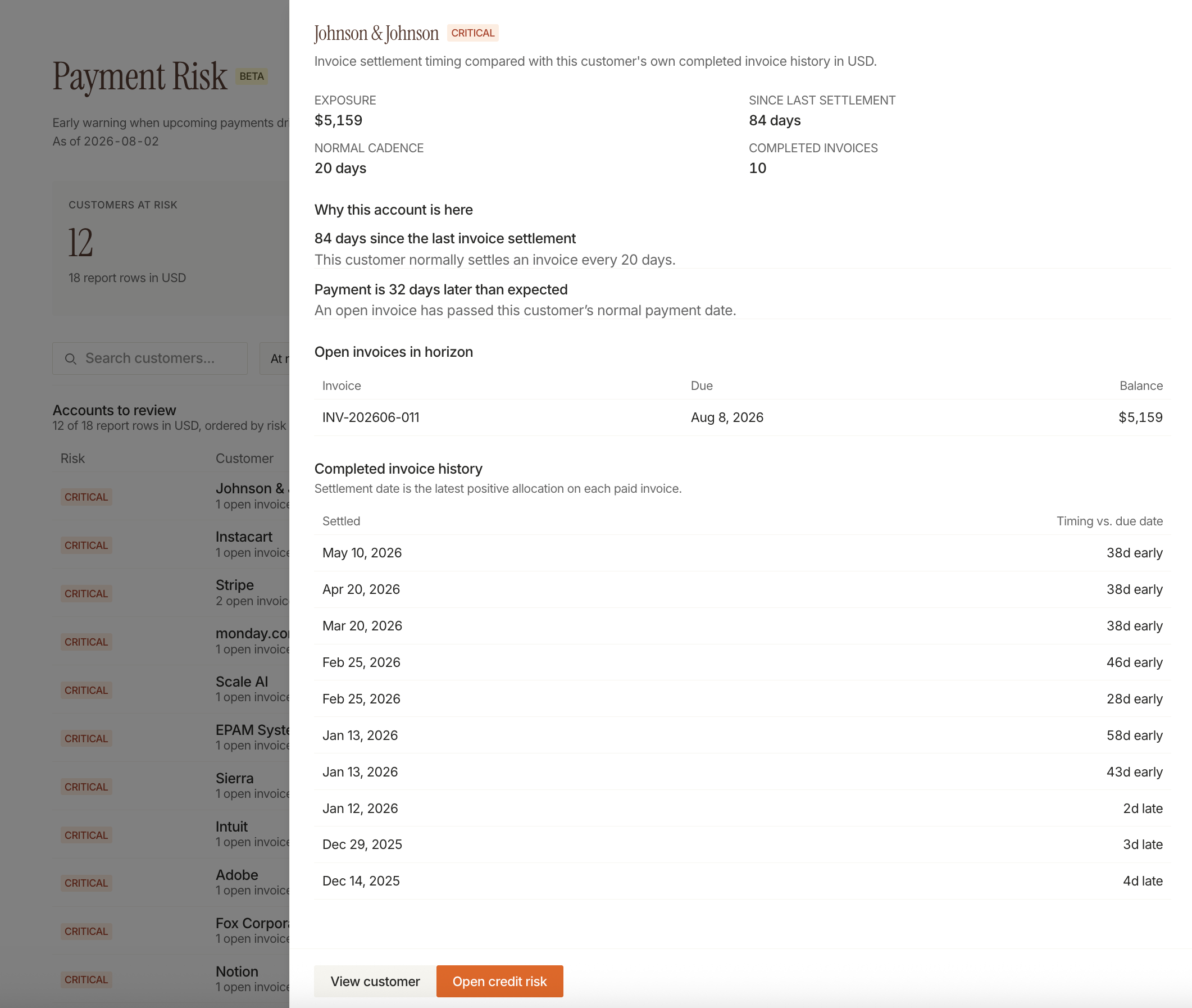
Payment Risk Report (beta)
A new Payment Risk report and set of signals surface accounts likely to pay late before they do.
Integrations
Rillet Is Live
Rillet is now generally available as a Monk integration, with sync, mapping, drift detection, payment push/pull, and credit memo allocation included from day one.
Sage Intacct
Sage Intacct's auto-import rollout continues, adding coverage for payments and credit memos.
Other Integration Updates
- NetSuite: payment void support, plus more reliable reconciliation for payments and credit memos that don't update an invoice's last-modified date
- Stripe: install and uninstall directly from the Stripe App Marketplace, with integration status visible to admins
Customer Portal
Portal Tasks, Refined
Building on the task workspace shipped earlier this month, task statuses now track blockers, and tasks and emails show as separate views instead of one combined feed. New portal customers can be created directly from a task.
Other Portal Updates
- Reply and task suggestions generate automatically from email conversations, plus a clearer signal for when someone's already looped in
- Email views load faster, with pagination and a quicker latest-message lookup
- Integration health has its own notifications and recovery tracking
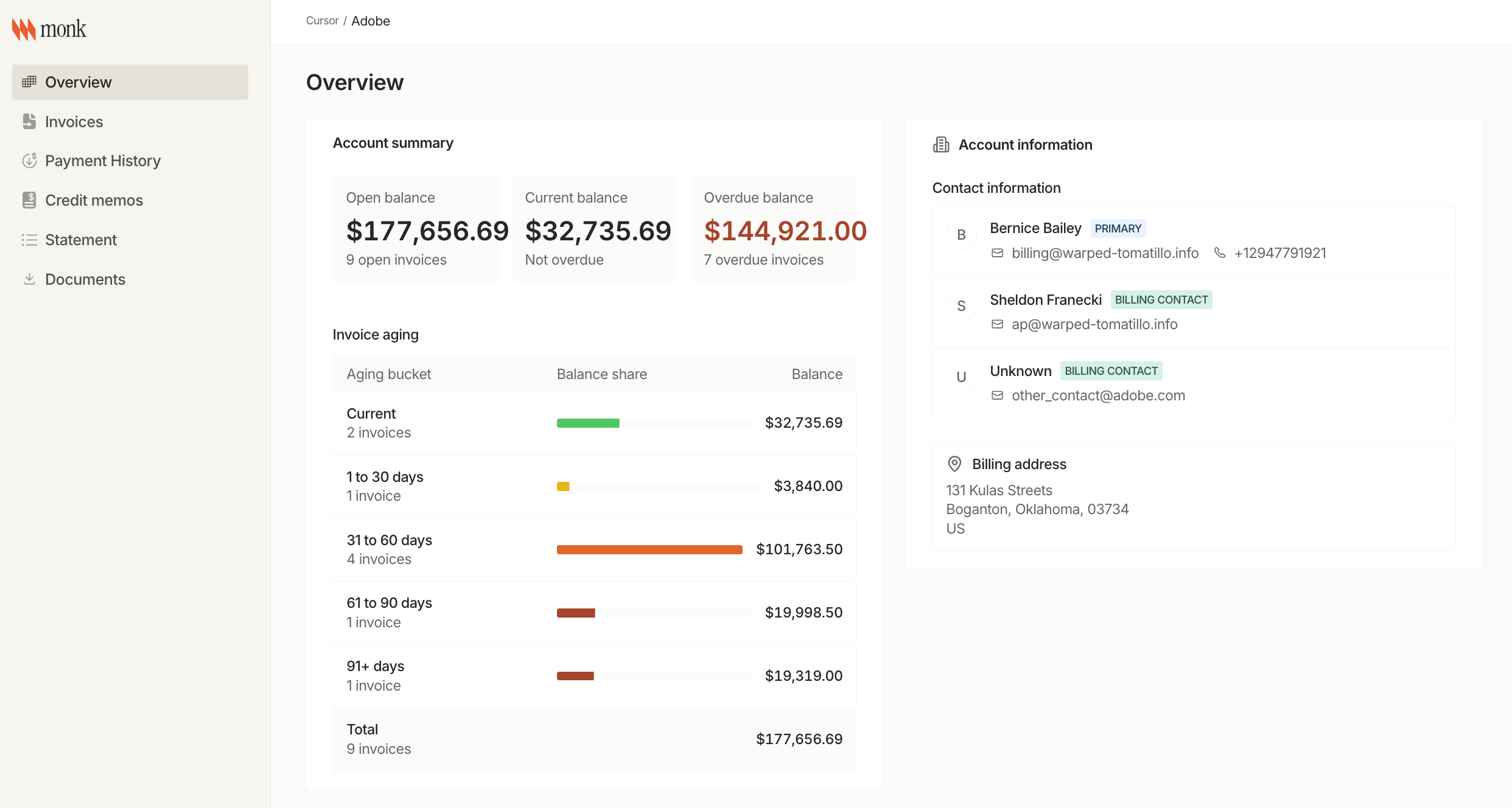
Fixes
- Invoices: fixed dates displaying incorrectly across timezones
- Invoices: fixed long line-item text overflowing instead of wrapping
- Customer records: fixed name links not opening in a new tab
- Portal: fixed slow-loading invoice previews with a faster route
Changelog: July 1 - July 15
Customer Portal
Payment Portal V2, Fully Live
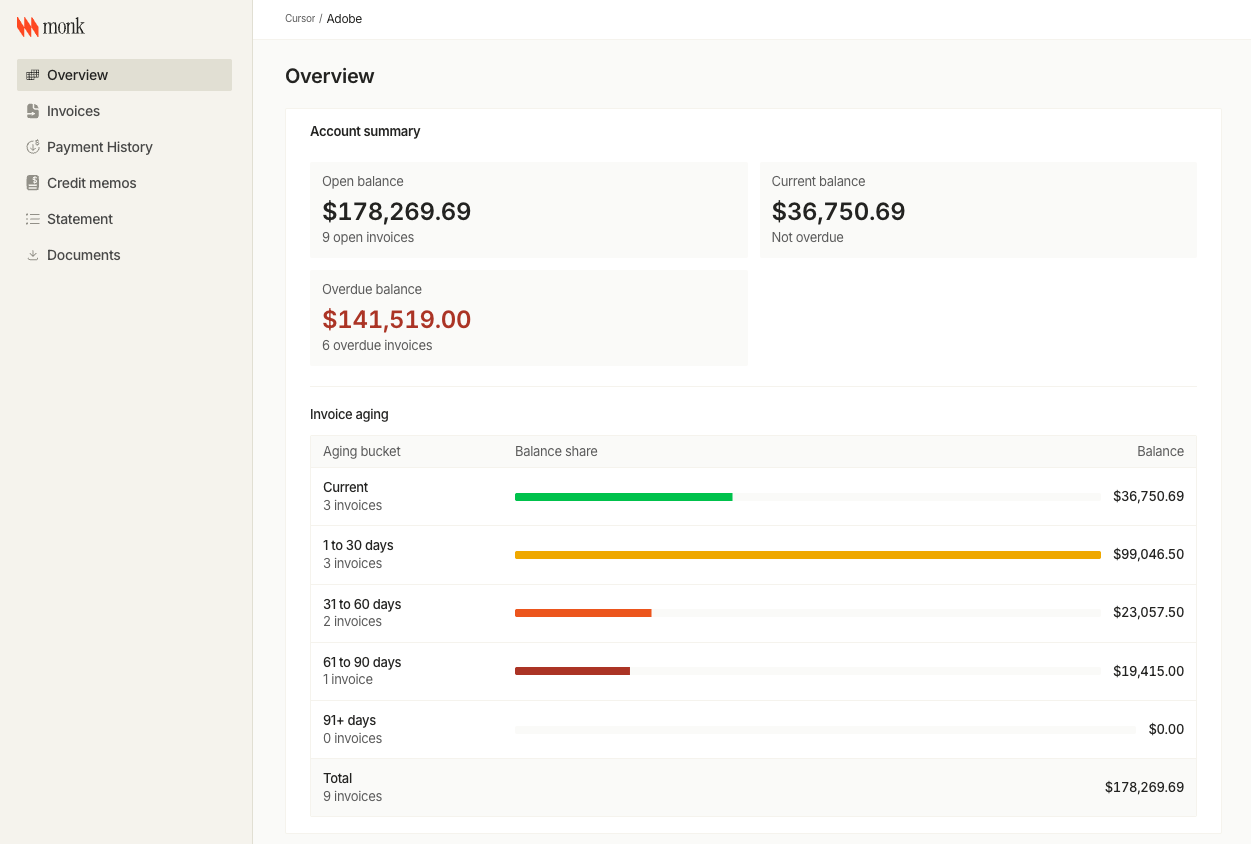
Invoices, statements, credit memos, documents, and payment history now all run through the rebuilt portal, matching Monk's core UI end to end. Clients can pull invoice and statement PDFs, see in-transit payment status directly on an invoice, and upload invoices themselves instead of emailing them in.
Portal Task Workspace
Inbound portal emails are now tasks. Each one is auto-triaged with a label and linked back to its invoice or conversation, and can be bulk-updated, closed out, or worked with attachments instead of sitting in a shared inbox.
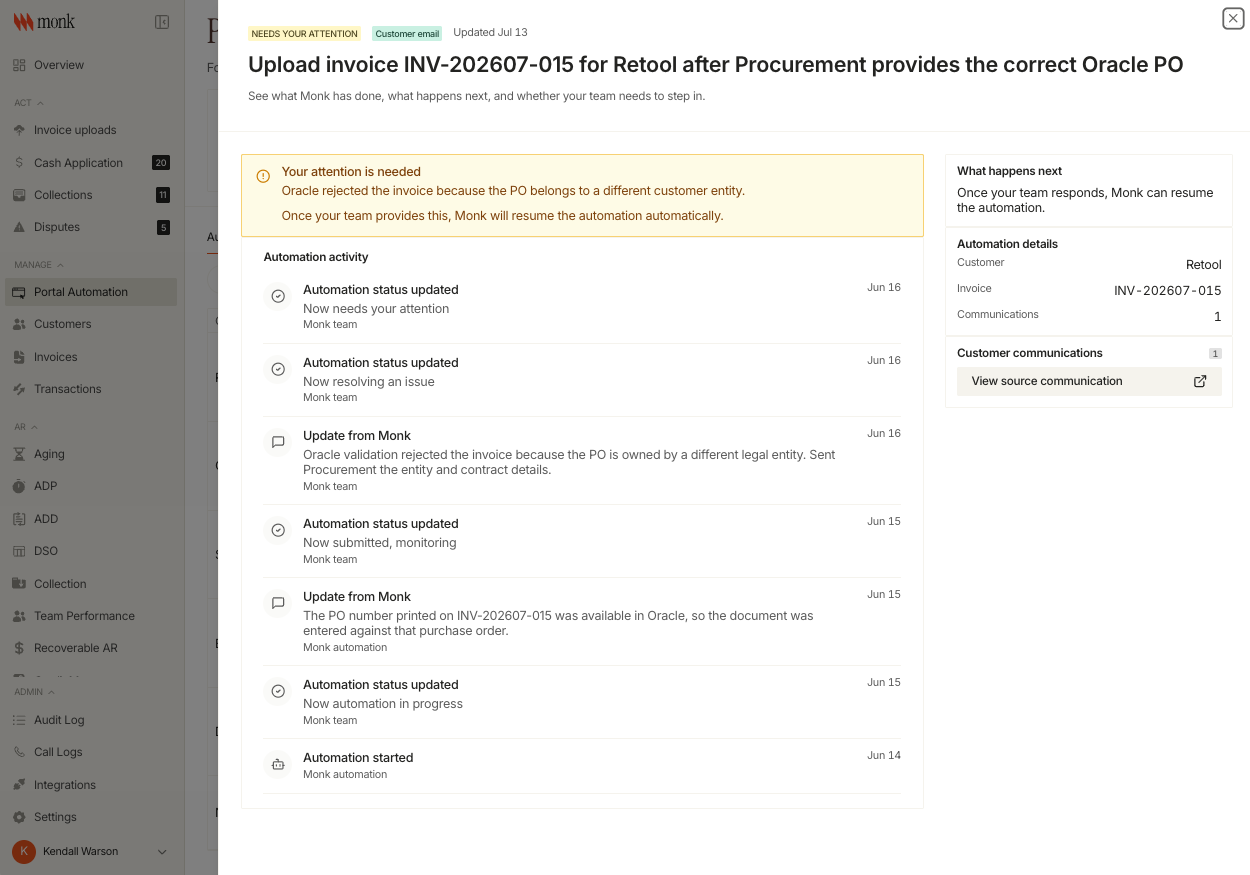
Other Portal Updates
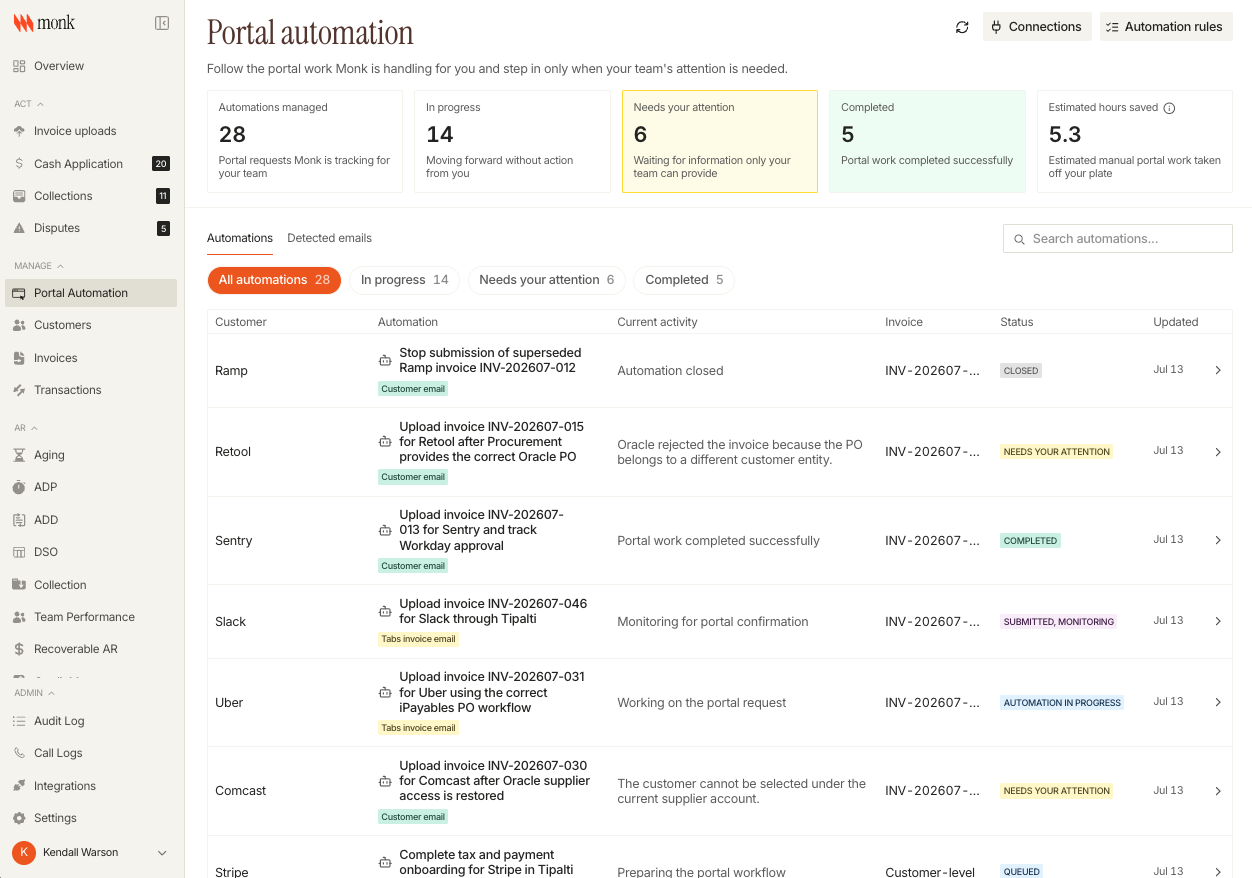
- Automation center in the customer portal redesigned for clarity
- Customers can see which of their inbound emails were auto-detected as portal-related
- Portal tasks can be relinked to a different customer or invoice
Intelligent Collections
Automated Health-Check System
Collections now runs its own checks against the send pipeline - bounce spikes, orphaned drafts, stuck kill switches - and flags them in Slack.
Product-Based Playbook Targeting
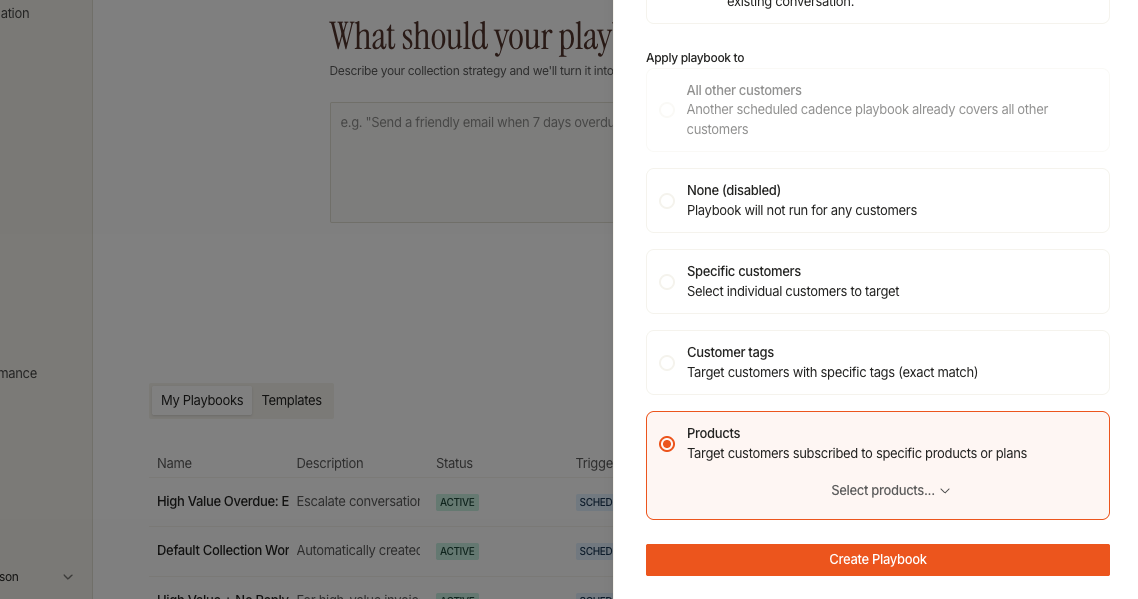
Playbooks can now be scoped by product, so a cadence built for one product line doesn't run against customers who bought something else.
Other Collections Updates
- Conversations can now auto-assign based on customer function
- Invoice-paid and voided-invoice emails close the loop automatically instead of continuing to send payment reminders for a resolved invoice
- Dispute alert tags flag disputed threads at a glance
- Shareable links for collection conversations
Payments & Reconciliation
Cash Exception Auto-Resolution
Unapplied cash exceptions now clear themselves: when the linked invoice closes or converts to a credit, the exception resolves automatically instead of sitting in the queue.
Other Payments Updates
- Subtotals added to the invoices list view
- Configurable lookahead window for upcoming invoices
- Sortable invoice-sent timestamps
AR Reporting
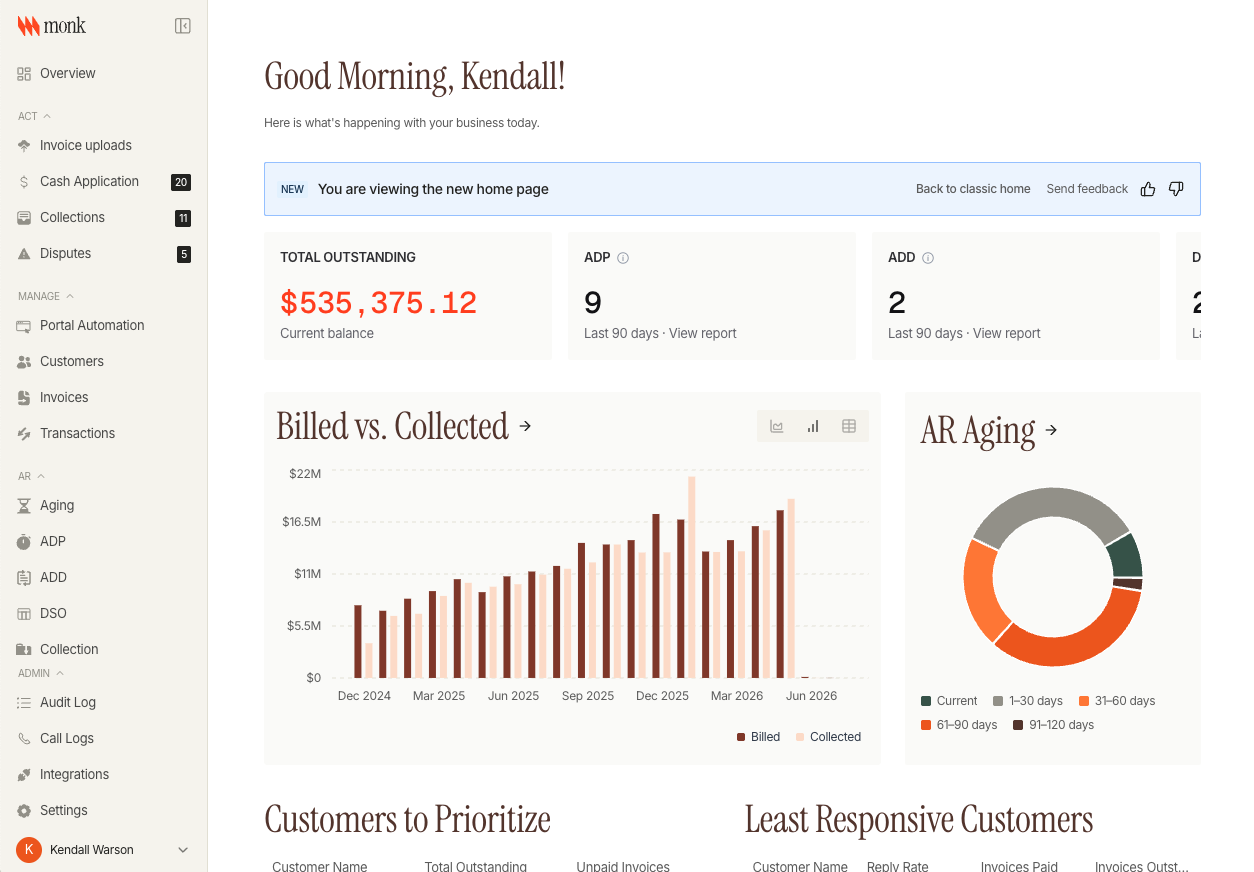
Overview V2
The AR Overview dashboard has been rebuilt around AR aging, billed-vs-collected, and Average Days to Pay in one view.
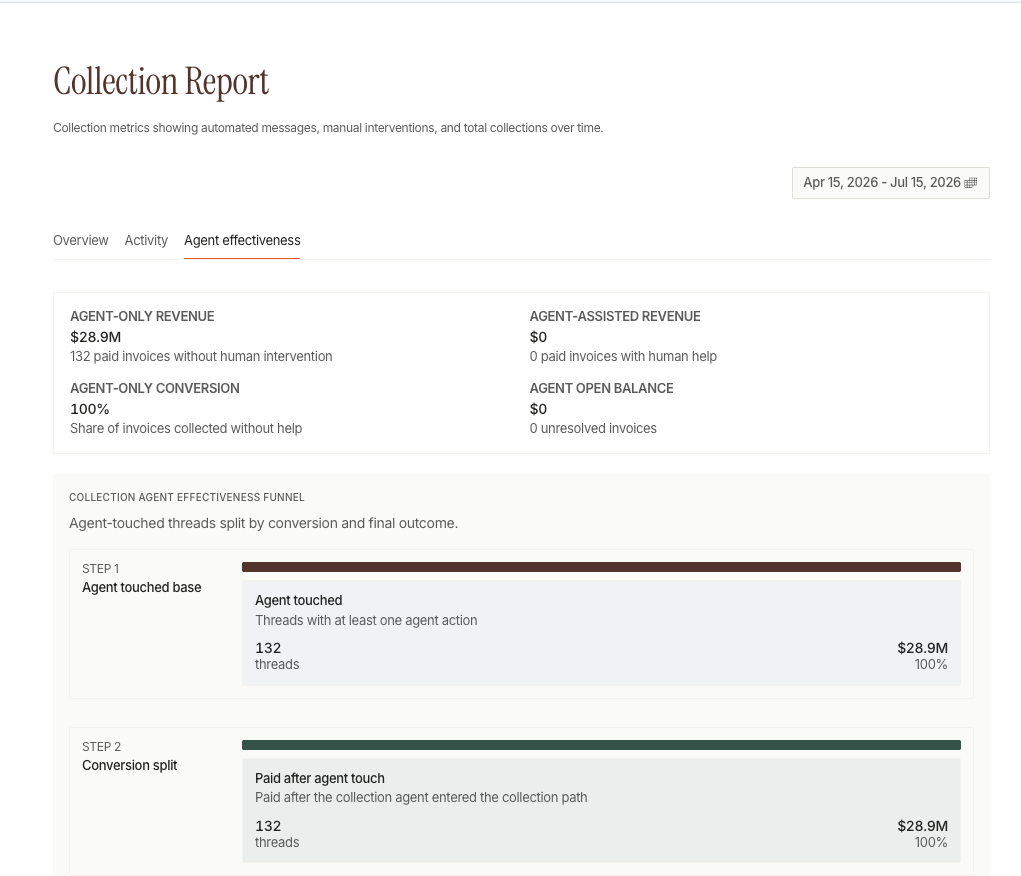
Agent Effectiveness Attribution
A new attribution pipeline ties AI-driven collections actions to invoice touches and payment timing, so you can tell which automated actions moved a payment.
Other Reporting Updates
- DSO and ADD reports now support per-customer filtering and a configurable day window (default 90 days), with search and sort added to the breakdown dialogs
- Customer detail page rebuilt on a new metrics engine, adding a financials card, recent activity feed, and open-tasks panel
Integrations
Sage Intacct & Campfire
Both run deeper and more reliably across customers, invoices, payments, and reconciliation.
Other Integration Updates
- NetSuite: subsidiary-aware invoice routing, contact-deletion handling
- QuickBooks: batching and automatic mapping upgrades
- Every integration card now shows a live health status, backed by nightly automated checks
Billing
- Account Manager contact role now included in customer contact exports
- Draft invoices now excluded from autopay
- Collapsed invoice page filters for a cleaner list view
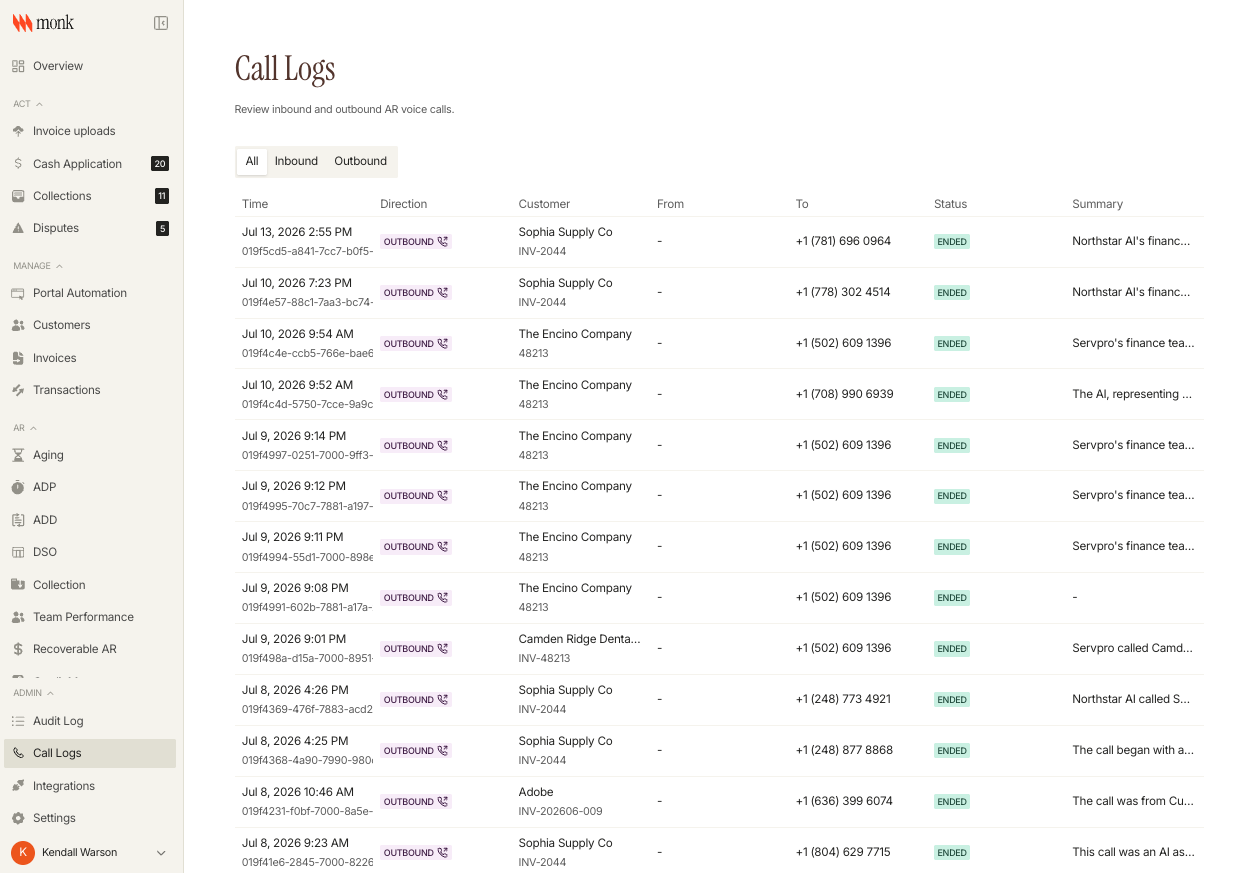
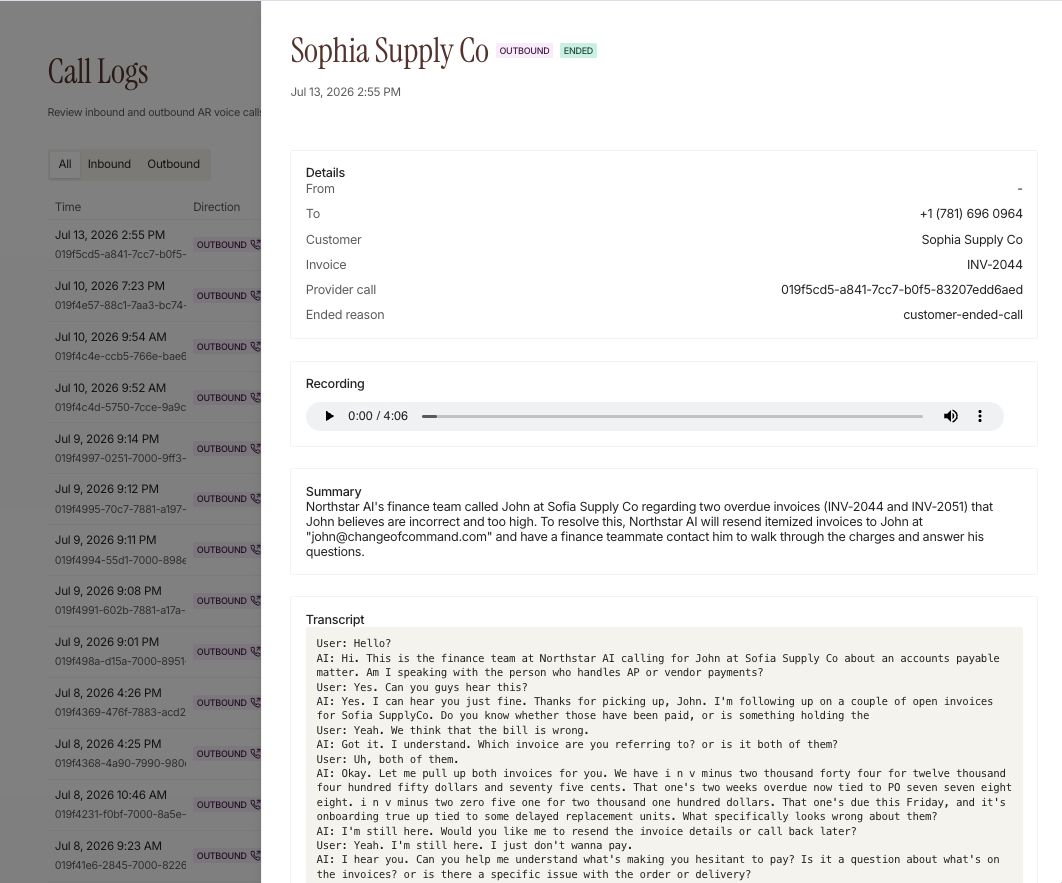
Voice Support (Beta)
A dedicated inbound phone number now handles AR voice support, including automated invoice-verification calls. Call logs appear on the customer record.
Fixes
- Payment Portal: fixed statement empty state and Stripe partial-payment sync
- Collections: fixed overlapping text in the collections view
- Autopay: fixed duplicate-charge risk on the current invoice
- Stripe: fixed invoice-paid dispatch and feedback email attribution
- AR reports: fixed Average Days to Pay returning 0 instead of null when there are no invoices
Changelog: June 15 - June 30
Payments & Reconciliation
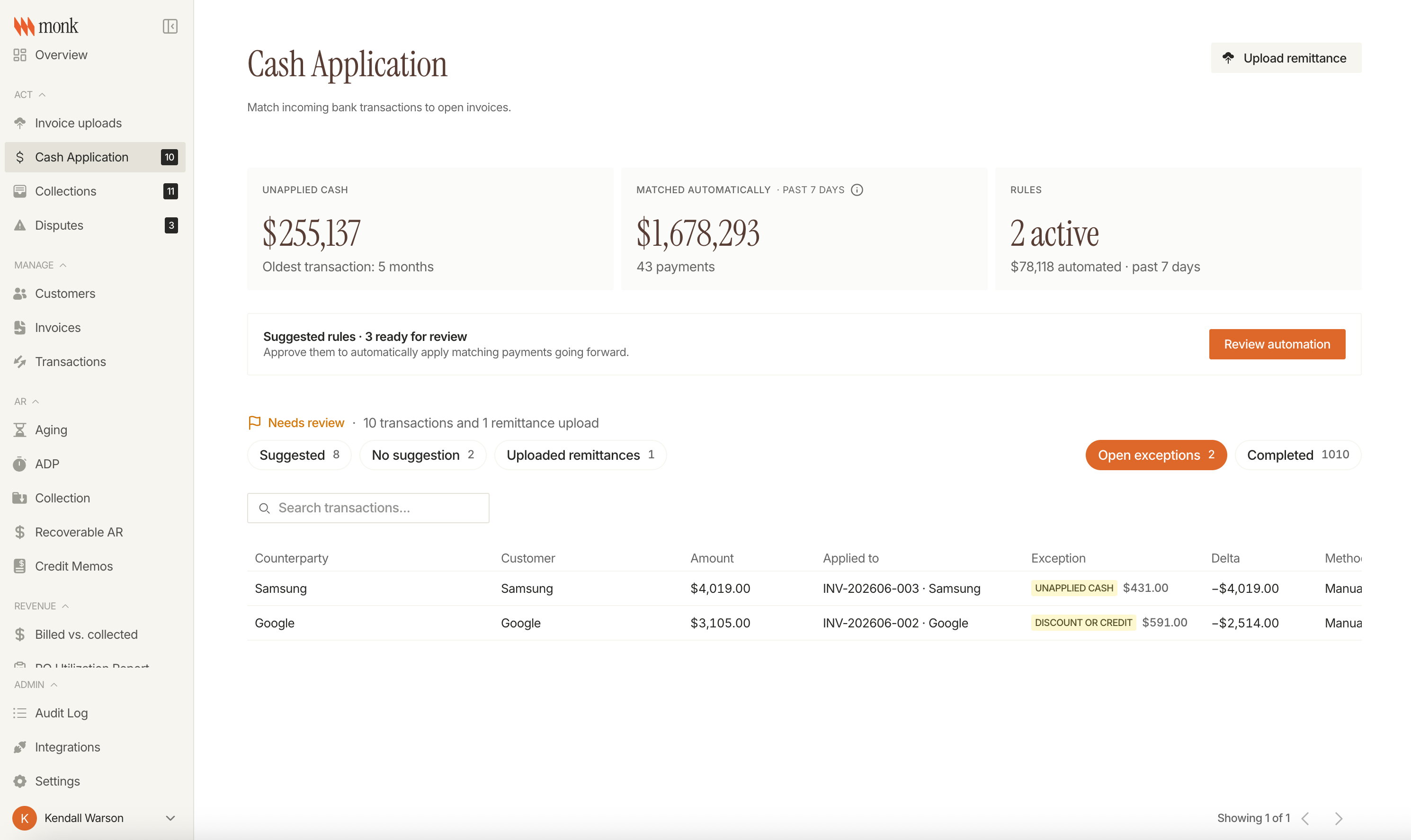
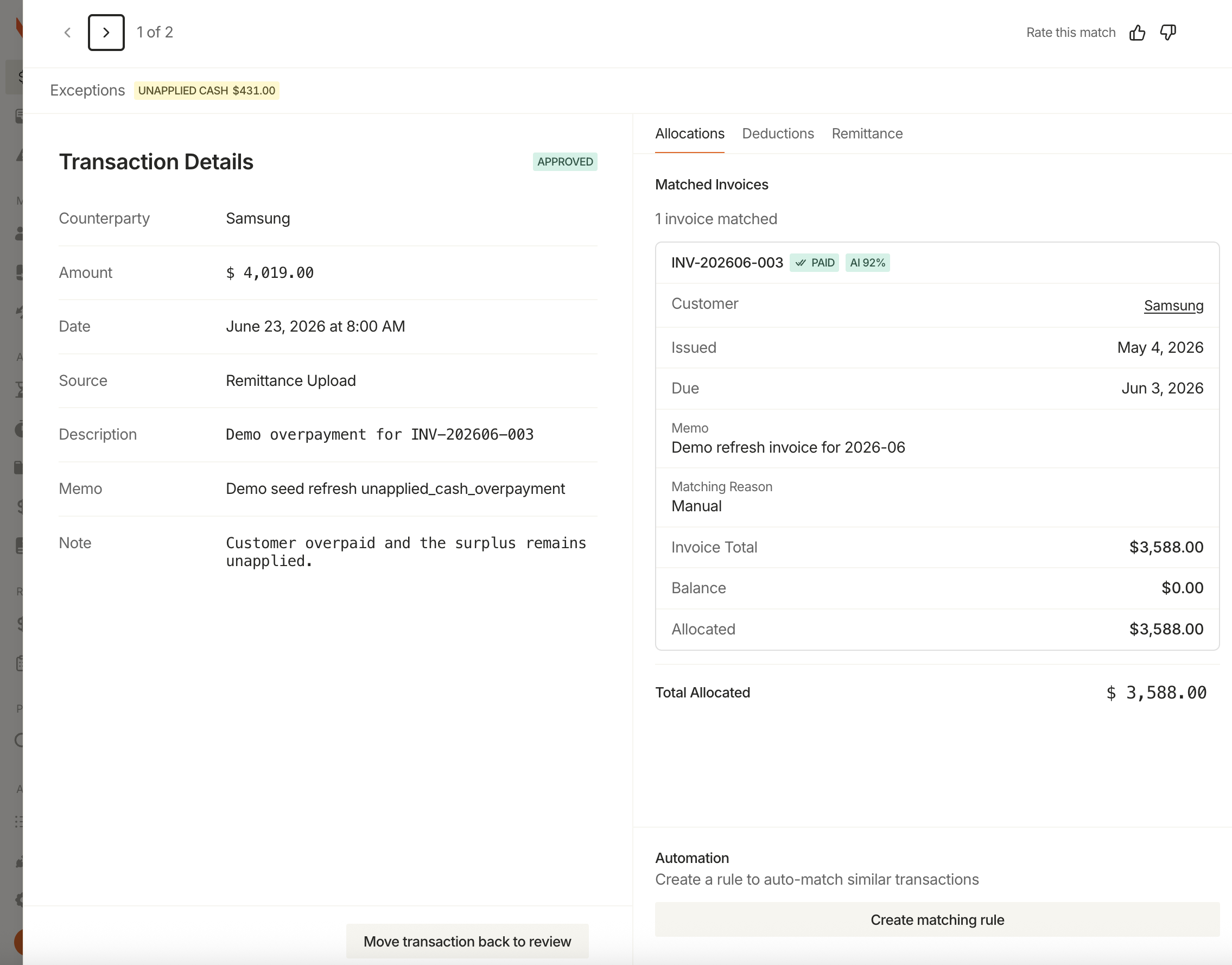
Cash Application Exceptions Queue
Transactions that can't be matched to an invoice now surface in a dedicated Exceptions queue, separate from the main review list. Each exception shows the reason it couldn't match and follows a structured workflow to resolution.
AI Rule Suggestions
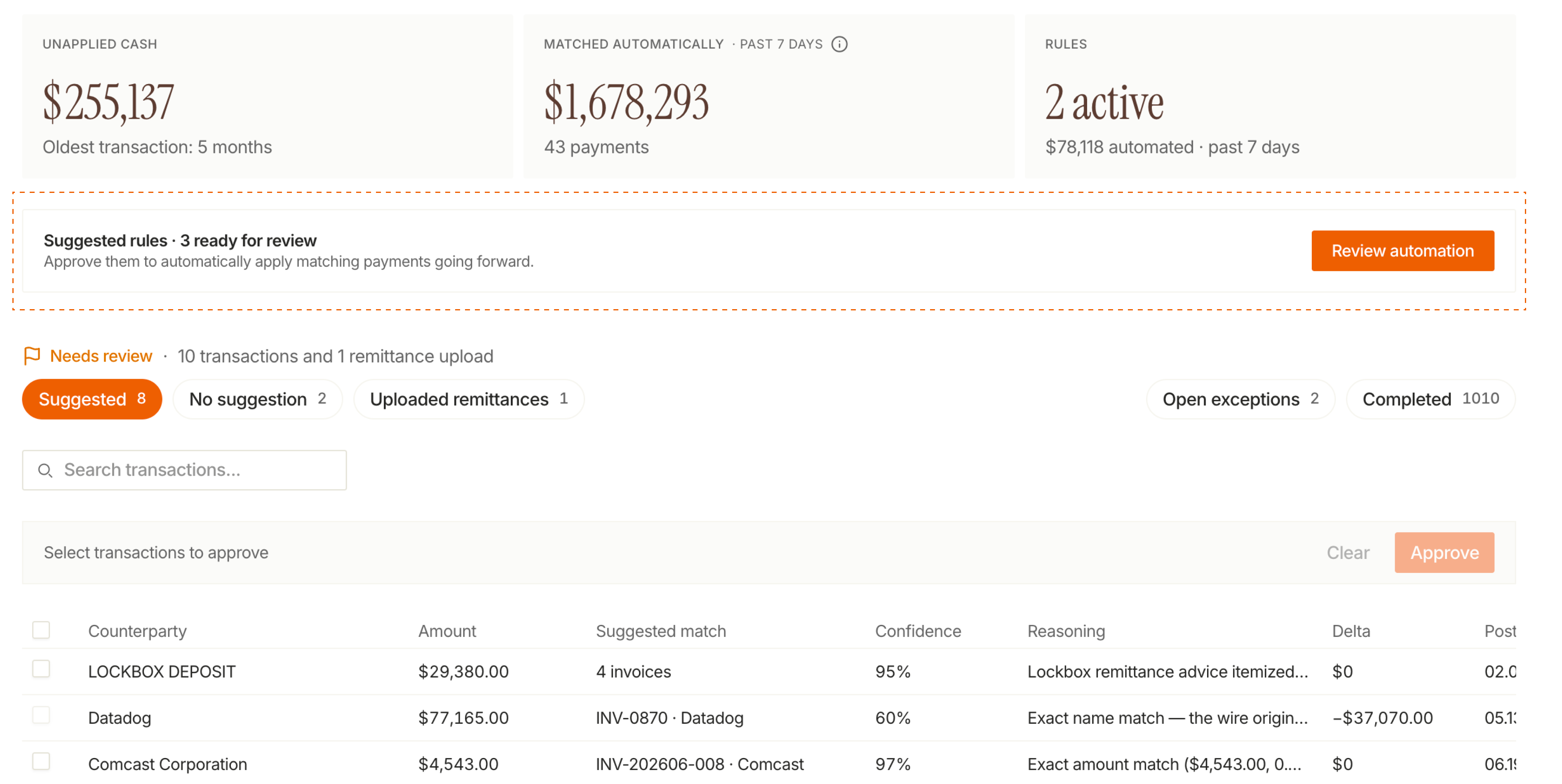
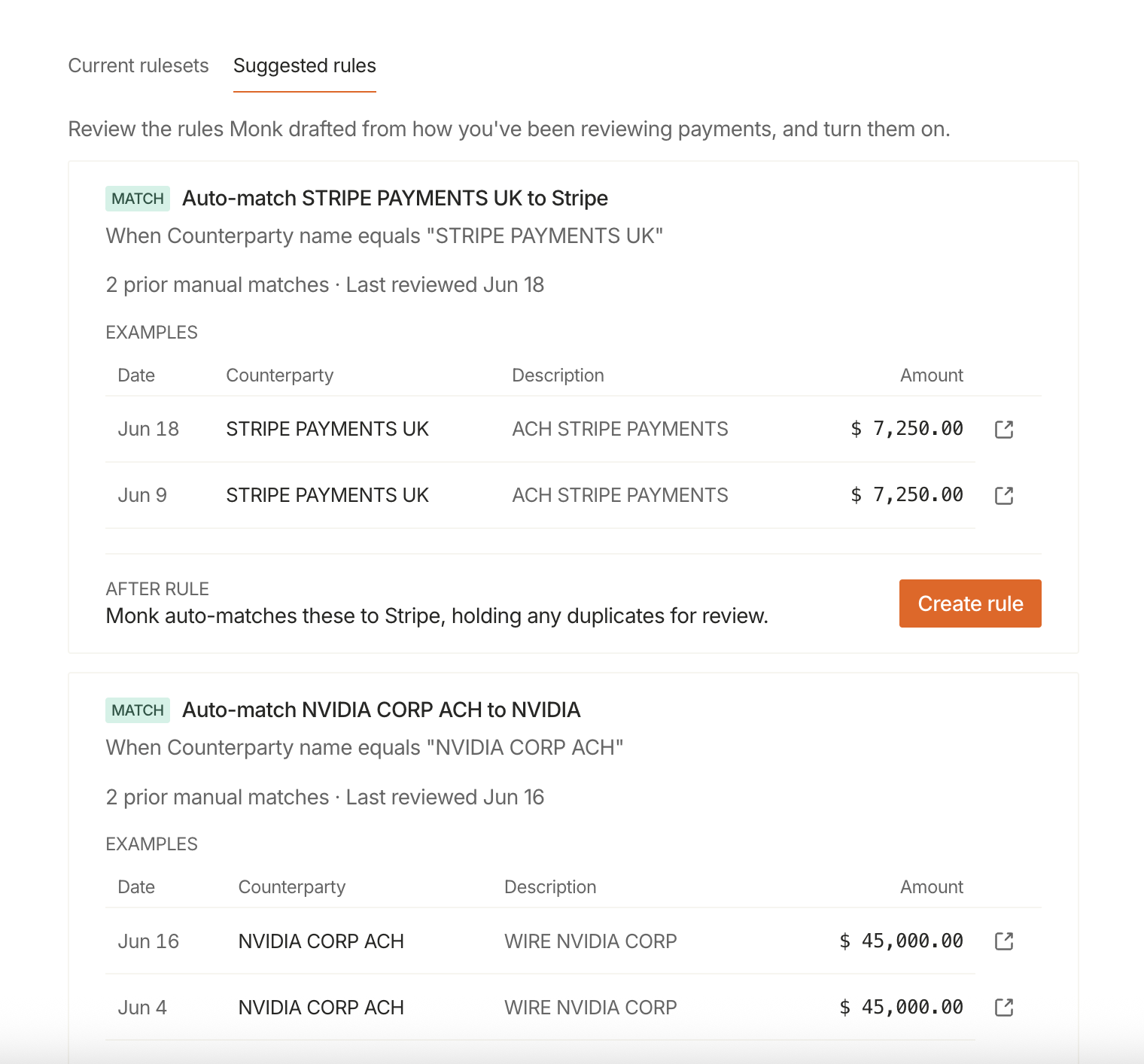
Cash Application now surfaces automation rules ready to review, generated from your repeated manual decisions on unmatched transactions. Each suggestion shows the real transactions behind it. Accepted rules are logged in the audit trail.
Other Payments Updates
- Keyword search across all Cash Application queues (Needs Review, Completed, Exceptions)
- Create transactions directly from reviewed remittance files
AR Reporting
DSO & ADD Analytics
Days Sales Outstanding and Average Days Delinquent are now tracked natively in Monk. A new AR Overview dashboard shows a live DSO card with a trend chart, and the per-customer table adds ADD and sortable payment counts so you can see which customers are trending late without a spreadsheet.
Other Reporting Updates
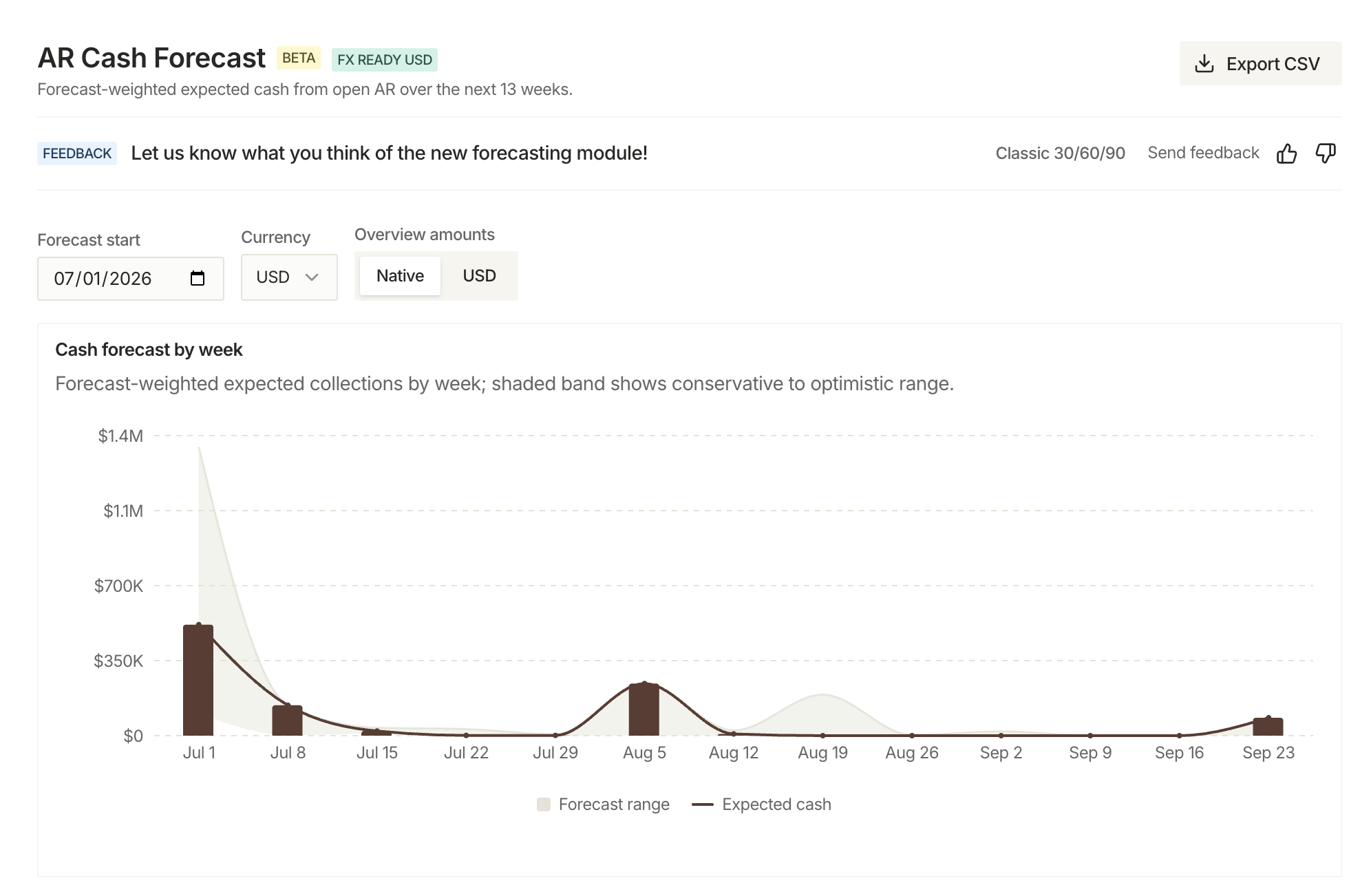
- Cash Forecast now uses real-time exchange rates to estimate expected receipts in your home currency
Integrations
Sage & Xero Improvements
Sage Intacct is now fully supported for syncing invoices and customer data. Xero now syncs payments both ways so what you record in Monk shows up in Xero, and vice versa.
Other Integration Updates
- Dynamics 365: payment mode now configurable per connection, plus FX rates for realized gain/loss and improved reconnect UX
Billing
- Invoice date can now be edited after creation
- Billing contacts included in invoice CSV exports
- Invoice download options consolidated into a single menu
Intelligent Collections
- Escalation rules can now trigger again automatically after a follow-up goes unanswered
- Improved dispute drawer with inline status updates and cleaner assignment UI

Fixes
- Collections: fixed duplicate rows in the collections table
- Email composer: fixed email tables not rendering
- Invoice PDF: fixed rendering errors on certain amount formats
- Invoice numbers: fixed duplicate numbering under high load
- Payment links: fixed rate-limit error when creating links in bulk
Changelog: June 1 - June 15
Intelligent Collections
Disputes now have a dedicated home
Edge cases drive 39% of the slowdown in cashflow, and disputes are the messiest of them.
Most AR tools have a place to manage them. The problem is getting things there. Someone still has to catch the reply, recognize it as a dispute, and log it manually.
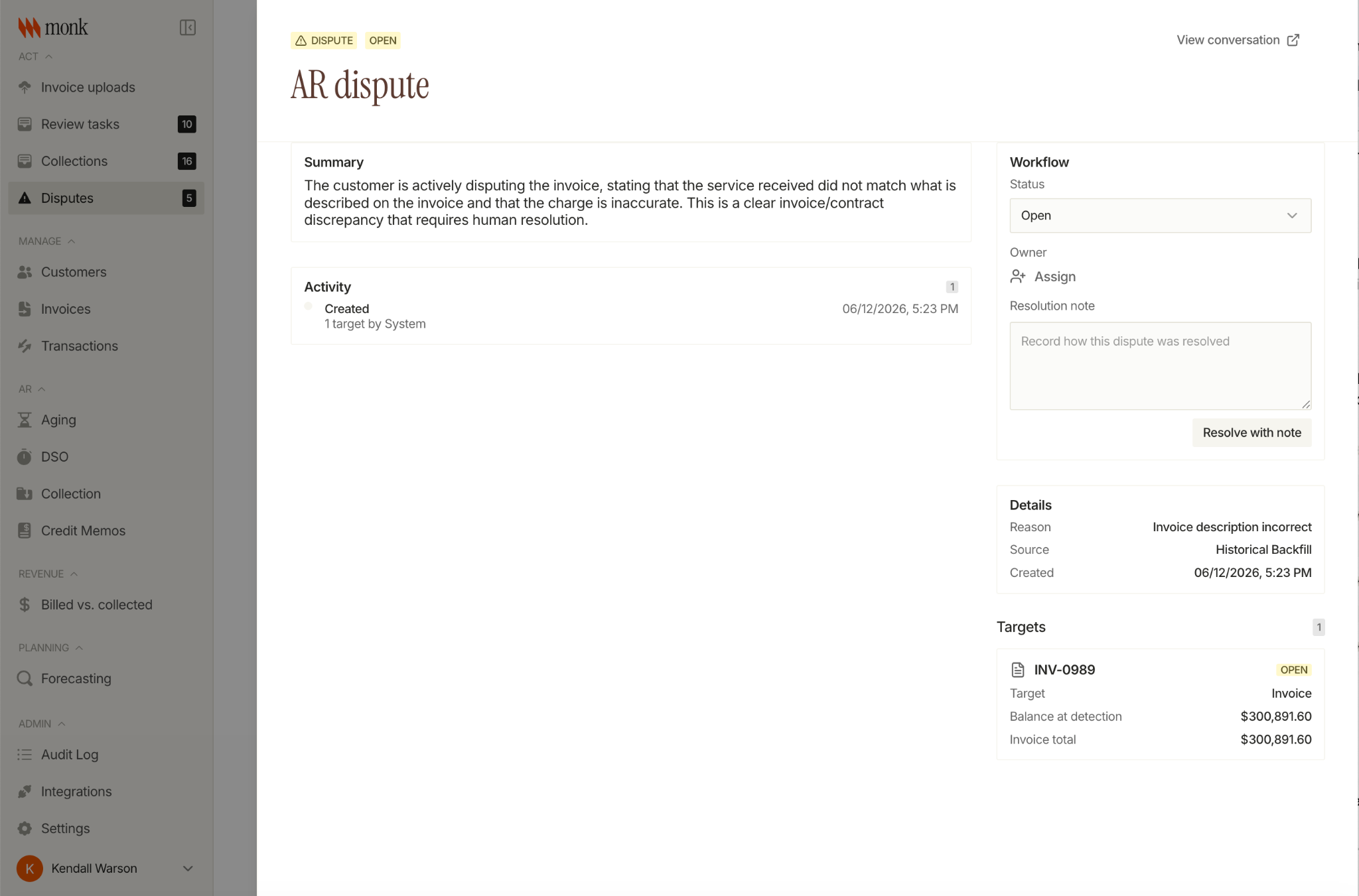
Monk already catches disputes inside the collections conversation. When a customer replies to flag a wrong PO, a deduction, or a pricing question, the agent recognizes it and escalates. Every dispute opens in a dedicated view, with its reason, the linked invoice, an owner, the full thread, and a clear status from open to resolved. Collections keeps running on everything else.
No portal for the customer to log into. No manual routing step. The dispute surfaces where it started.
Conversation Tags
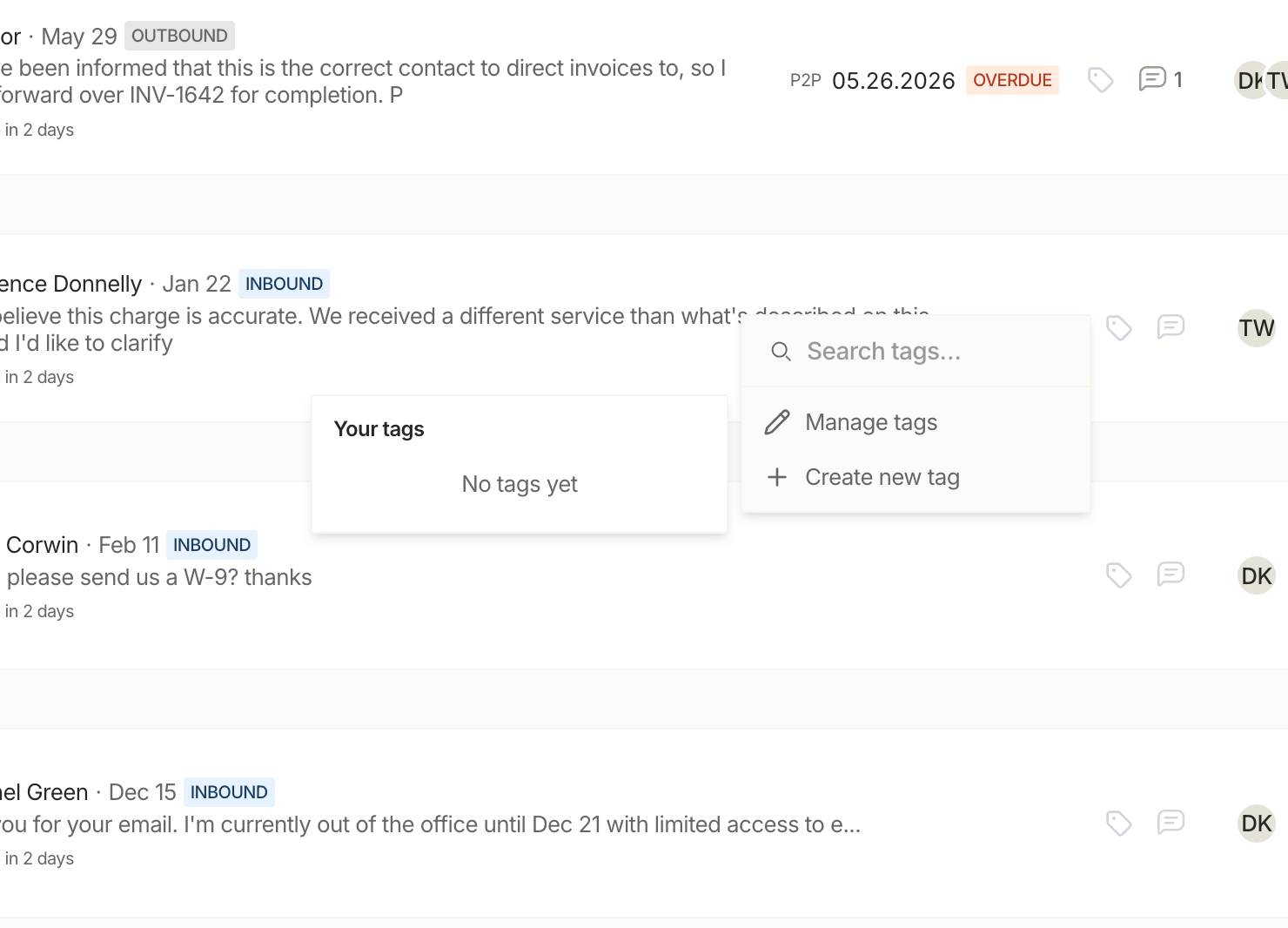
Tag AR conversations directly from the collections list. Create org-wide tags, apply them from the row view, and filter your queue by tag to focus on specific customer cohorts or issue types.
Other Collections Updates
- Colored overdue dots (>30, >60, >90 days) now appear on collection cards
- Promise-to-pay tag now showing in collections view
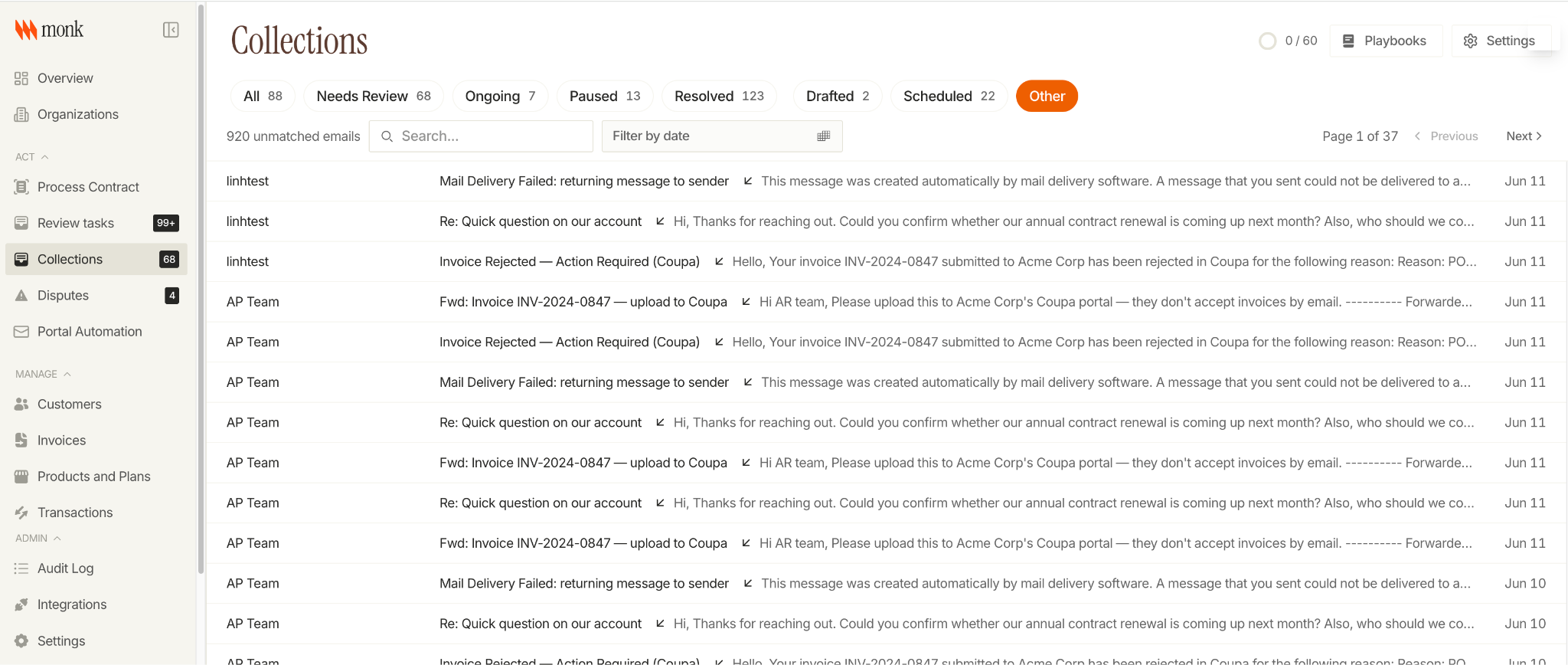
- A new "Other" tab in the Collections hub surfaces inbound emails that didn't match any invoice or customer, so your team can review and act on them without leaving collections
- Collections now has a Download CSV button. The export includes email bounce status per invoice.
Payments & Reconciliation
Remittance Uploads and Matching
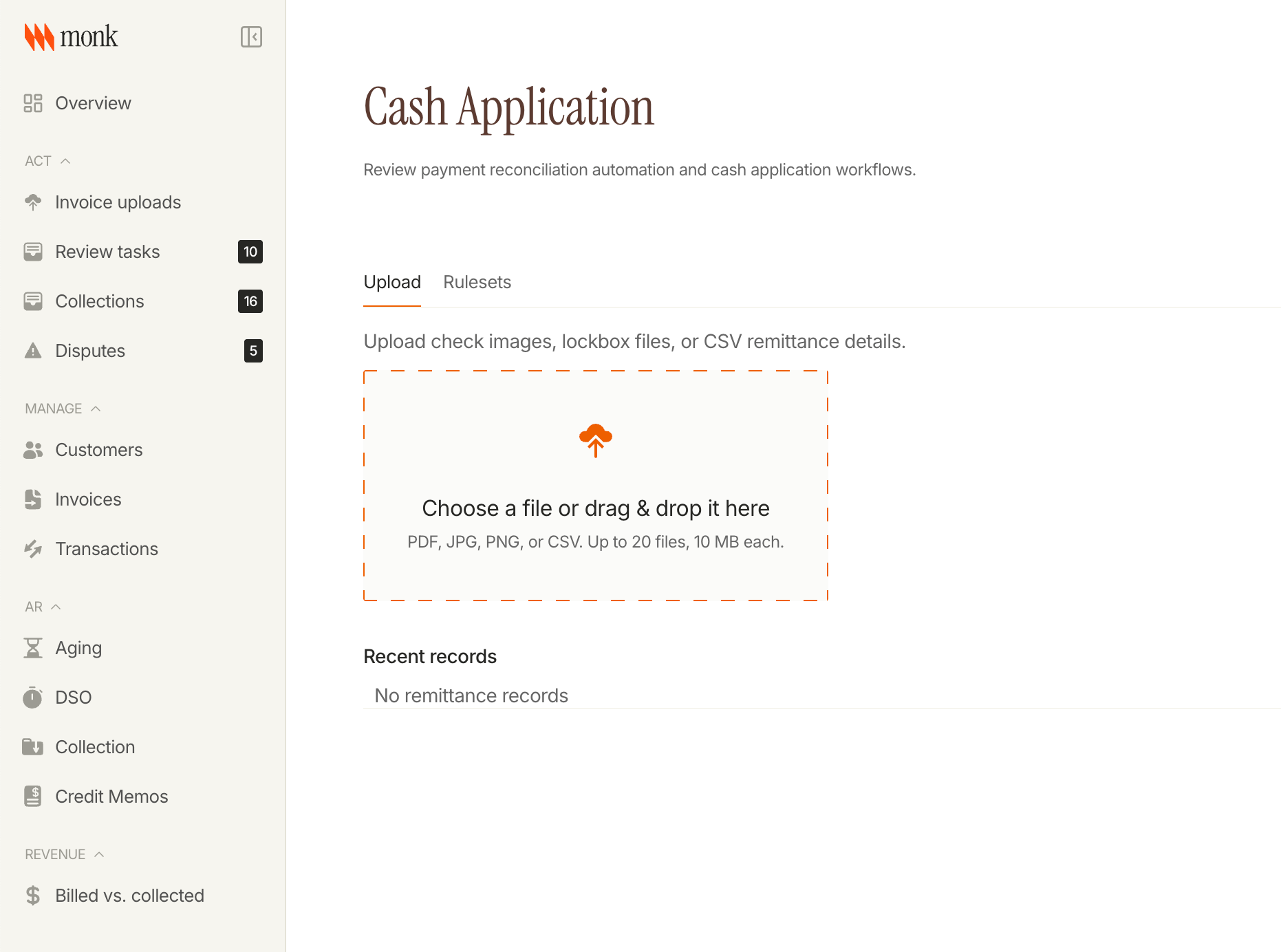
Upload check images, lockbox files, and CSV remittance details directly from Cash Application. Monk extracts the line items and surfaces matching bank transactions narrowed to exact-amount candidates. Each document is tracked by review status so nothing slips through unprocessed.
Other Payments Updates
- Monk now suggests new matching rules based on your unmatched transaction history. Accepted suggestions are logged in the audit trail
- Cash Application report now includes a ruleset summary and trend chart, so you can see how your matching rules are performing over time
Billing
Timed Invoice Pauses
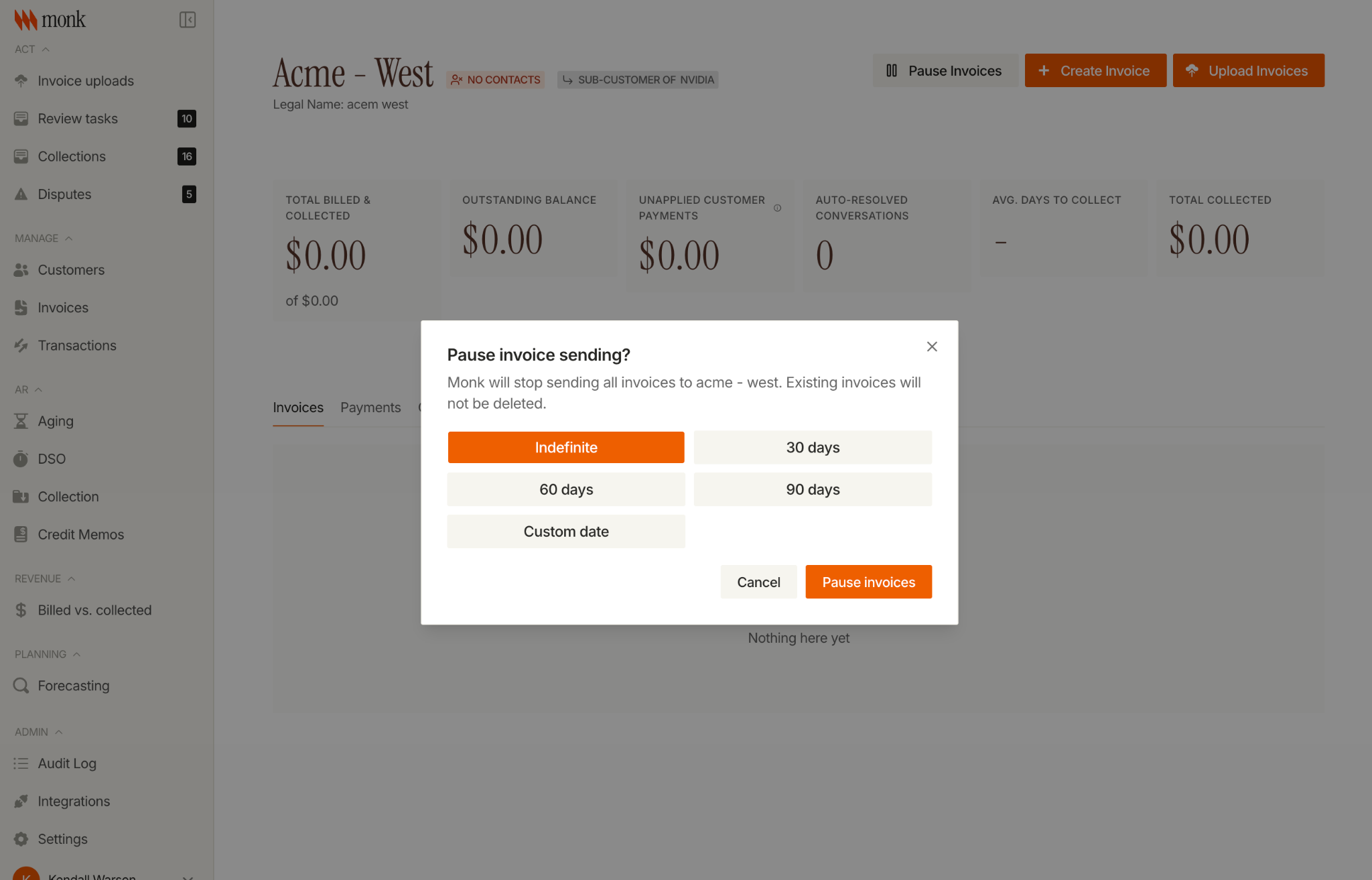
Invoice pauses now have an expiry date. Choose 30, 60, or 90 days, pick a custom date, or leave it open-ended. Monk auto-resumes sending on schedule with no manual follow-up required.
Other Billing Updates
- Beta: upload invoices via CSV directly from the billing module
- Exchange rates from ERP imports are now stored as snapshots on invoices and payments, for accurate historical FX reconciliation
- Orgs can now set a functional currency for FX conversions when the ERP doesn't supply an explicit rate
- Updating a customer record now applies address changes to in-transit and in-progress invoices, not just drafts. A confirmation shows the affected invoices before you save.
Planning
AR Cash Forecast v2 (Beta)
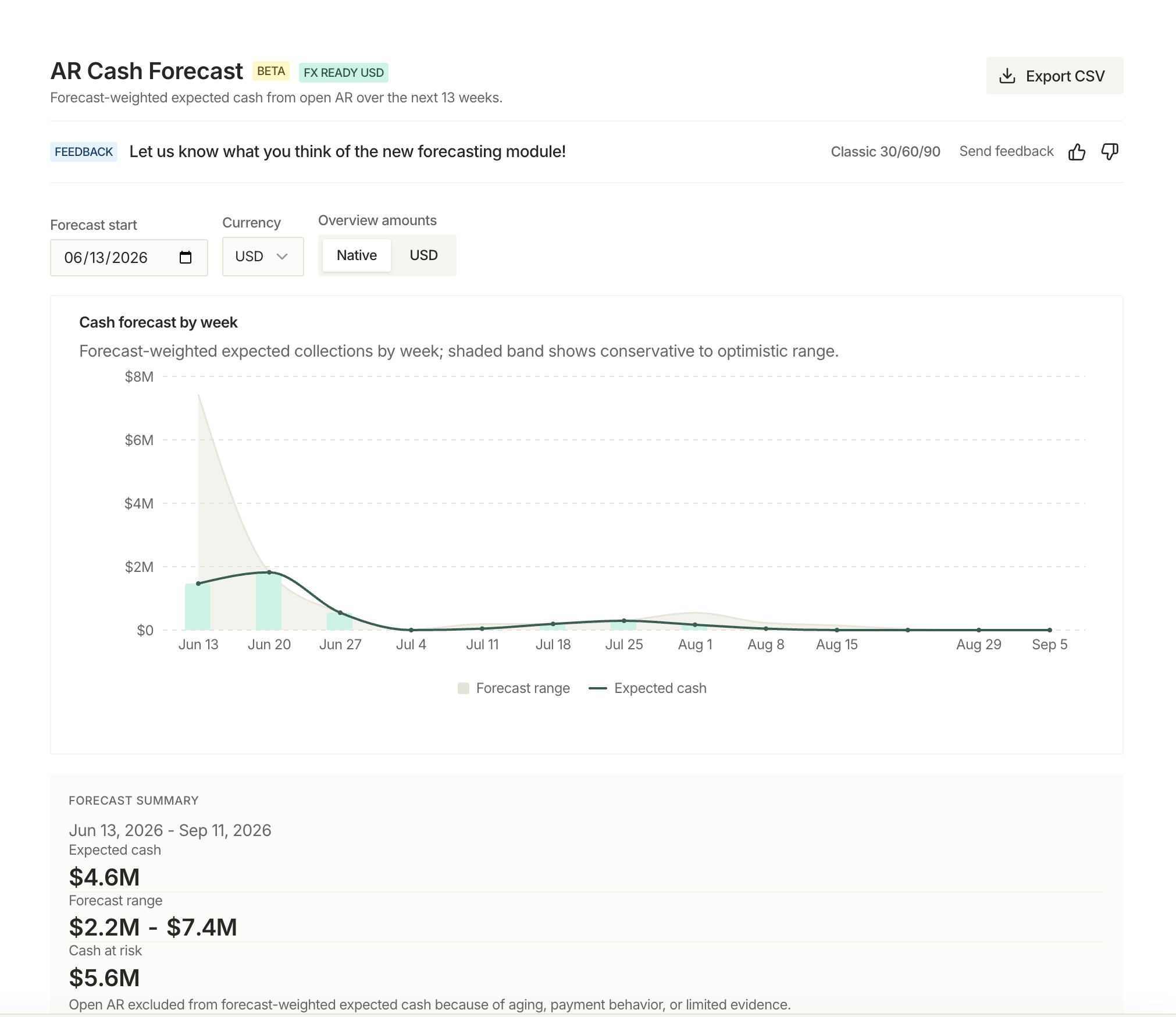
A new 13-week cash forecast is now available in beta. The v2 report shows expected receipts against amounts actually received, so you can see where cash is tracking against plan. It draws on more signals from your collections activity, payment history, and risk projections than the classic view. Toggle between the 30/60/90 forecast and v2 from the Forecasting page, and share feedback directly from the report.
Integrations
Outlook and Microsoft 365 email
Teams on Microsoft 365 can now connect their AR mailbox to Monk and run collections straight from Outlook. Outbound follow-ups, inbound replies, and full two-way collection conversations flow through your existing Outlook mailbox, with the same playbooks, pacing, and reconciliation Gmail users already have. No mailbox migration, and no new sending domain to set up.
Microsoft Dynamics 365 Business Central
Dynamics 365 Business Central as a supported ERP integration has been updated. Now you can connect your Dynamics environment to sync invoice and customer data into Monk, using the same setup flow as QuickBooks and NetSuite.
Fixes
- Collections: fixed dispute conversation colors not displaying in the detail view
- Email templates: fixed rendering issues for Superhuman email clients
- Invoice preview: fixed errors on invalid preview requests
- Audit log: fixed a missing entry when inviting new users
- Playbooks now ignore quoted reply history when triaging inbound emails, improving accuracy on long threads
Changelog: May 17 - May 31
Intelligent Collections
Playbooks now respond to inbound emails
When a customer replies to a collection email, Monk can automatically run a playbook based on what they said: escalate a dispute, pause follow-ups when they commit to a payment date, or trigger any other action in your sequence. Two-way collection conversations now close the loop on their own, with no one manually reviewing and acting on each reply.
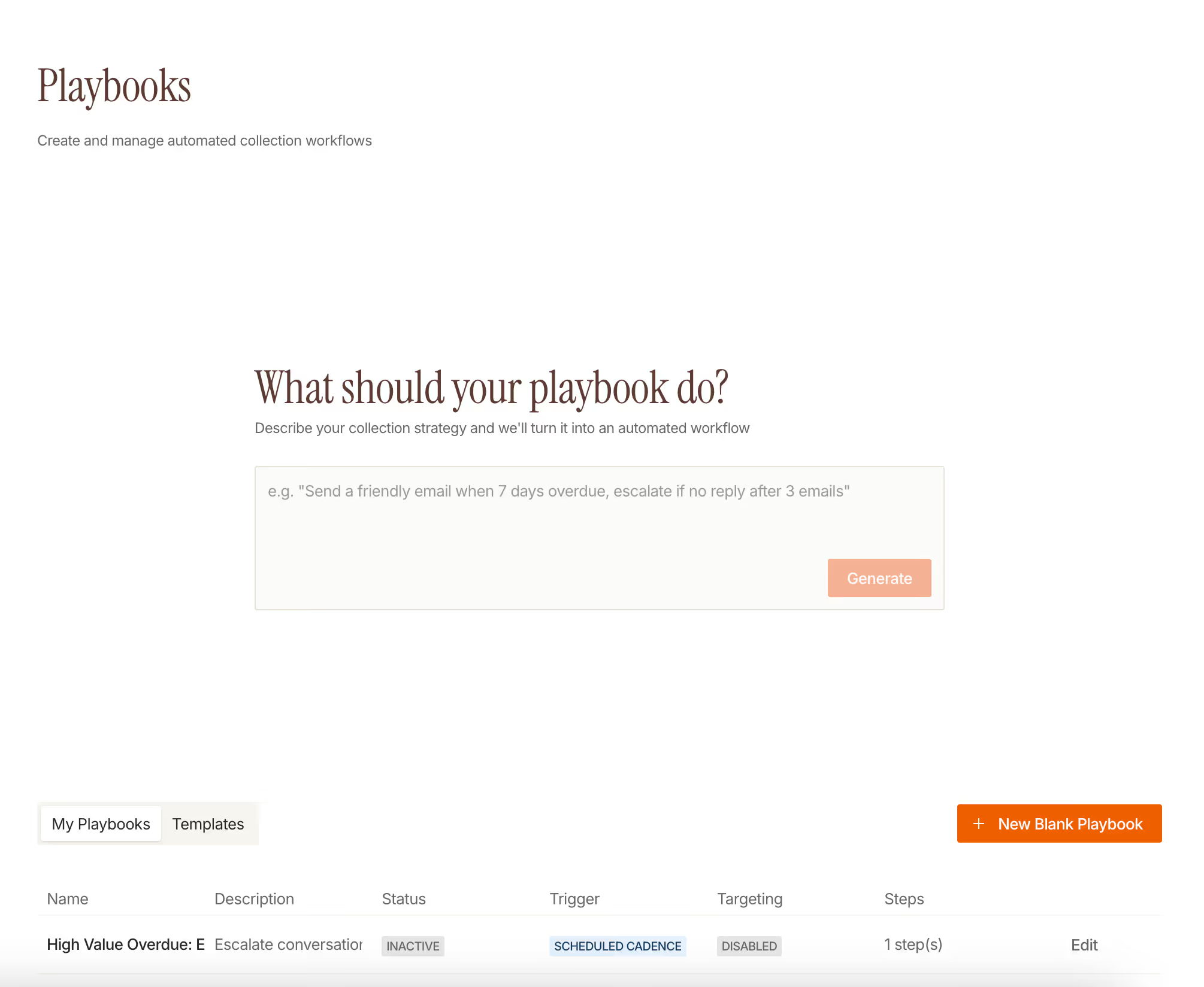
Automatic contact change detection
When a customer replies from an unexpected address, flags the current contact as wrong, or triggers a hard bounce, Monk now detects the change and demotes the stale contact automatically. The original contact name is preserved in the conversation thread so collections history stays readable, and a redirect event is logged for audit.
Other Collections Updates
- Inbound emails are scanned for attachments like remittance advice and payment confirmations, and the context is surfaced in the conversation thread
- Invoice amount and inbound/outbound message counts now appear in the collections compact view
Payments & Reconciliation
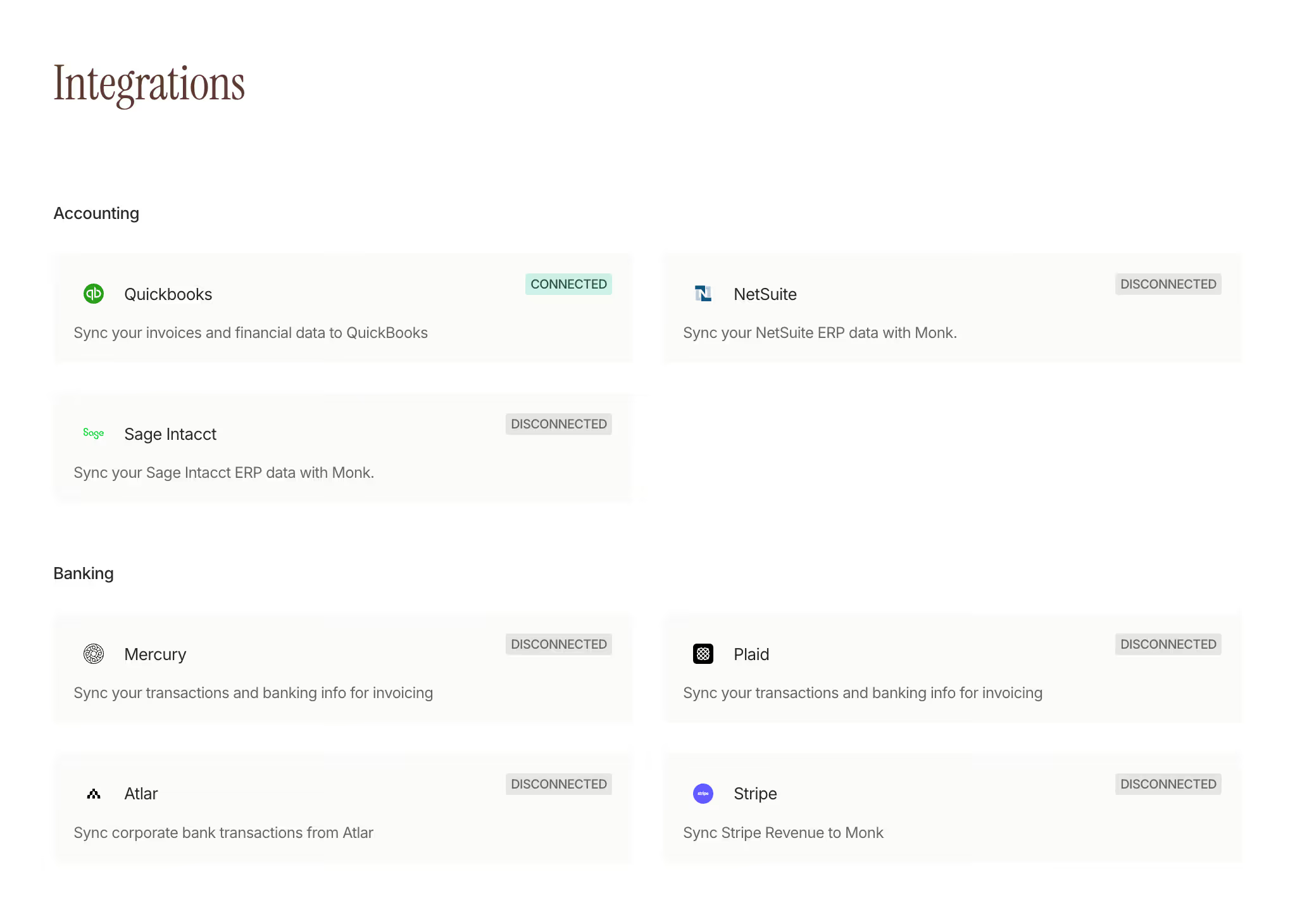
New banking integrations
We've added new banking integrations and improved multi-account support, so you can connect more of your accounts, bring transactions into Monk, and reconcile across accounts and entities more easily.
Cash application rulesets
A new rulesets page lets you configure how Monk matches bank transactions to invoices. Create exclusion rules to filter out internal transfers, payroll, and noise before matching runs, and matching rules to consistently tie a customer's transactions to their invoices. Monk analyzes your unmatched transaction history and suggests exclusion rules to get you started.
Other Payments Updates
- The Slack transaction-review notification now itemizes each transaction with its top invoice match candidates and a direct approve link, instead of just flagging that items are waiting. Configure delivery frequency and choose detailed or compact format.
- Ruleset usage now appears in cash application reports, so you can see how often each rule fires
- Payments can be applied to invoices still in draft status, which helps when cash arrives before an invoice is formally sent
Billing
Currency shown across invoices, payments, and accounting sync
Invoice currencies now appear throughout the product: timeline events, the invoice picker, generated PDFs, wire instructions, payment portal pages, and ERP sync review screens. QuickBooks creates and descriptions use the correct invoice currency, exchange rates from QuickBooks are captured for FX tracking, and currency is carried correctly through bulk invoice extraction and ERP imports.
Other Billing Updates
- Currency labels added to review tasks, the command palette, and payment allocation confirmations
- Invoice picker now defaults to AI-matched customer candidates when opened from the reconciliation flow
- Inactive contracts can be renewed or amended without reactivating them first
Integrations
Postmark email deliverability
Gmail users can now set up Postmark as their outbound email sender directly from Gmail settings, with no admin assistance required. Sender domains sync automatically from Postmark, per-mailbox sending limits are enforced, and a configurable display name appears on outbound emails.
Other Updates
- Multiple Gmail mailboxes can now be connected and managed within a single org
Fixes
- Collections detail page: fixed a display issue on conversation threads
- Sync schedules: delete action is now available
- Transactions table: rows-per-page setting now updates correctly
- Address forms: country validation is now enforced on save
- Draft autosave: fixed a race condition that could drop edits on fast saves
- QuickBooks import: credit memos are now applied before payments so paid invoice status reflects correctly
- Line item names and descriptions now display correctly after editing
Changelog: May 2 - May 16
Intelligent Collections
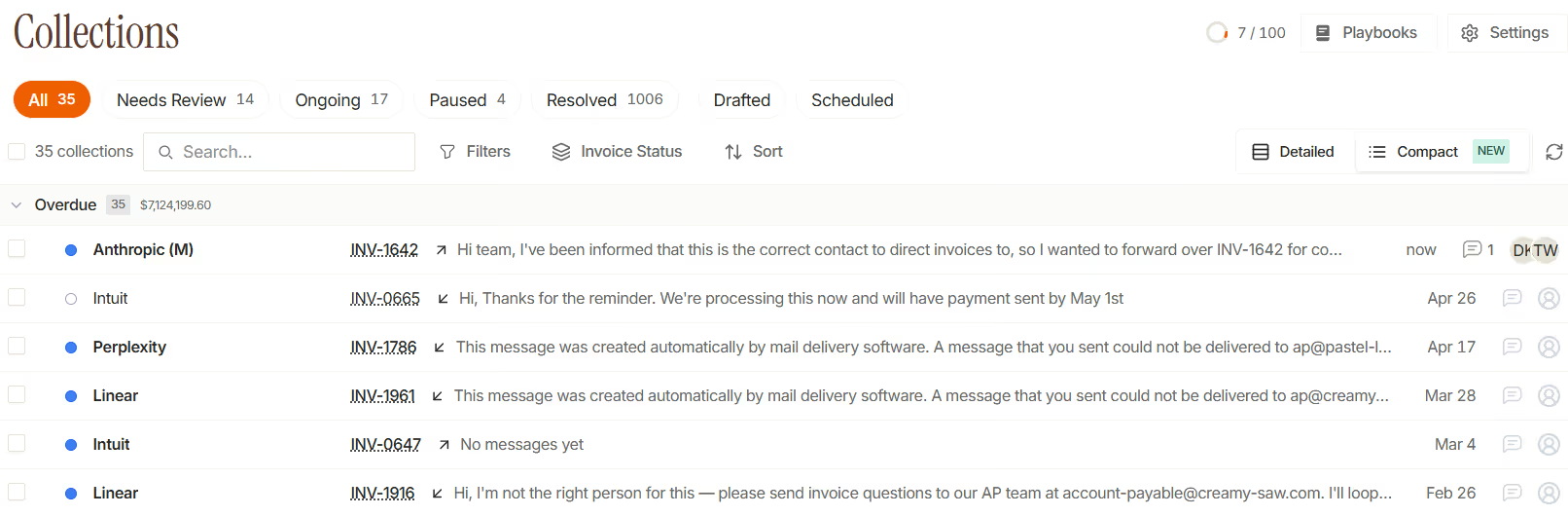
Read and Unread, Just Like Gmail
The collections inbox now tracks read and unread state. Unread conversations show a blue dot and bold name; opening marks read automatically. Mark as unread from the menu, bulk actions in the toolbar, and a new "Read vs Unread" group-by. Customer replies flip conversations back to unread automatically.
Other Collections Updates
- The "Send Slack Message" playbook action has a new "also send to channel" toggle. Thread replies stay in the thread by default instead of being broadcast back to the parent channel
- Grouped follow-ups now detect promise-to-pay on a per-invoice basis, so a promise on one invoice no longer suppresses the next nudge for an unrelated invoice in the same group
- Assign a conversation to a teammate directly from the conversation header
- Invoice comments are accessible from the card and compact row views. The comment icon dims when there are none and lights up when comments exist
- Portal-delivered invoices now show a Via Portal badge on collection cards, so it's clear at a glance which invoices were sent through the customer portal vs. email
- Sortable columns added to the collections page; the collections page also now defaults to the kanban view
- Faster collections page load
Billing
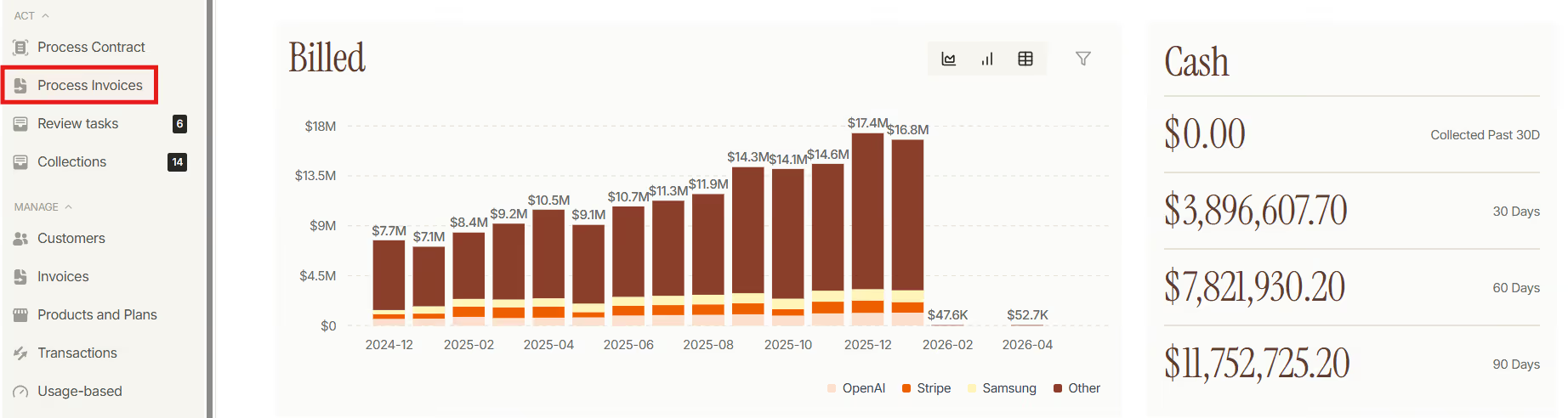
Upload Invoice PDFs and Let Monk Extract Them
Upload up to 500 invoice PDFs at once. Monk extracts line items and amounts and creates drafted invoices, no contract or payment schedule required. A new Documents tab on the customer record gives you Cards or Table views of every uploaded PDF with status badges, sorting, and a detail drawer with inline preview and one-click retry for failures.
Partial Payments and Overpayments, Handled Cleanly
When a payment doesn't exactly match an invoice, Monk now records it as a partial payment without flipping the invoice to paid. Surplus cash on a transaction can be left as-is or minted as a customer credit at approval time. Write-offs and credit applications now appear as first-class events on the invoice timeline.
QuickBooks Credit Memos Flow into Monk Automatically
Credit memos applied in QuickBooks now sync into Monk automatically. Created when applied, removed when unapplied, and stable on re-runs. No more manual allocation cleanup.
Other Billing Updates
- Manual tax overrides on an invoice are now preserved through subsequent recalculations
- ERP amount adjustments (changes made directly in QuickBooks or NetSuite) appear inline in the invoices list and invoice drawer, so you can see why a Monk number differs from your ERP without leaving the page
- New manual Refresh from QuickBooks button on the Invoice-to-Cash settings page for pulling the latest cache on demand, and a redesigned QuickBooks settings page
- QuickBooks payment push now works against invoices in closed accounting periods, so legitimate payments aren't blocked by period locks
- Reapplying or un-applying a transaction in Monk now voids and re-pushes the corresponding ERP-side payment automatically. No orphaned QuickBooks payments when allocations change
- QuickBooks discount lines are now imported alongside invoices and credit memos
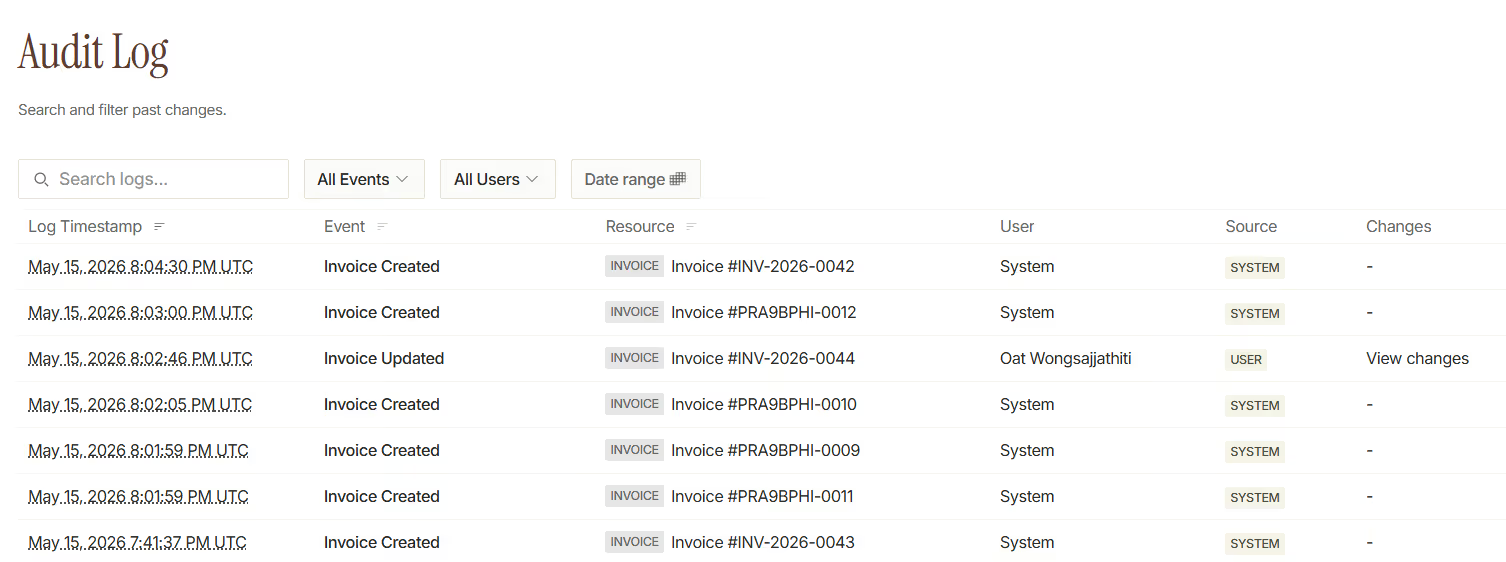
- Customer-credit operations (grants, deductions, adjustments) now write to the audit log so you can trace who did what
Other Updates
- Gmail integration shows an amber warning banner when the connection breaks with a one-click Reconnect Gmail button. No more silent stalled inboxes
- Stripe integration page now has a one-click Disconnect button with a typed-confirmation dialog
Fixes
- Fewer orphaned replies on long email threads
- Gmail attachment IDs from older threads now resolve correctly
- Email recipient resolution no longer fails when an invoice has no contract
- Duplicate inbound email processing resolved
- Initial follow-up job no longer drops drafts under specific timing conditions
- Faster page load on the invoice-draft flow for large customer accounts
- Draft cancelling and Slack-side draft handling for collections work correctly
Changelog: Apr 12 - May 1
Intelligent Collections
Smart Email Pacing Across Business Hours
Outbound collection emails now spread evenly across a configurable business-hours window (default 9am to 5pm in your org's timezone) instead of firing all at once. Monk holds back a 20% capacity reserve for playbook and manual sends, so urgent follow-ups always have room to go out. Set your org's collection timezone in Follow-up Settings.

Close the Loop on Paid Invoices
When every invoice in a conversation gets paid, Monk now sends an automatic thank-you reply and resolves the conversation. Toggle it on under Follow-up Settings.
Other Collections Updates
- Smarter inbound reconciliation: replies from generic addresses now anchor on the customer first and still match the right invoice
- Promise-to-pay flows correctly handle bounced emails and complete contact discovery before exiting
- "Pause conversation" is now a playbook action you can drop into any rule
- New Group by direction dimension in the collections hub
- Pause and escalate playbook automatically when a contact becomes unreachable
Billing
Auto-Import Payments from QuickBooks
Monk now pulls payment records straight from QuickBooks the moment your ERP cache refreshes. Multiple partial payments against a single invoice are supported, and reconciliation runs automatically to match each payment to the right Monk invoice. No more manual payment entry when QuickBooks is your source of truth.
Use Your Accounting System's Invoice PDF
A new attach accounting system invoice PDF toggle in invoice settings tells Monk to send the PDF generated by QuickBooks instead of Monk's own template. The PDF is fetched live at send time, so any updates made in your accounting system flow through automatically.
Other Billing Updates
- Invoices can now be created without a contract, useful for one-off charges and ad-hoc billing
- Average days-to-pay reports now default to a 6-month window instead of 3 for a more representative trend
- Invoices page now defaults to the table view instead of kanban
Integrations
- Stripe invoices in cancelled state can now transition back to in-progress states
- Slack integration now has a one-click reconnect button
UX & Customer Love
- New Group by tag dimension on the aging report
- Sidebar logo now opens the home page
- Improved copy on the "hours saved" callout in the collection report

Fixes
- Fixed the product selector on the plan page
- Fixed the pause invoices button not showing on the customers page
- Fixed an upcoming invoices caching bug
- Invoice PDF generation now shows a clear error message when generation fails
Changelog: Mar 23 - Apr 11
Intelligent Collections
New Collections Hub
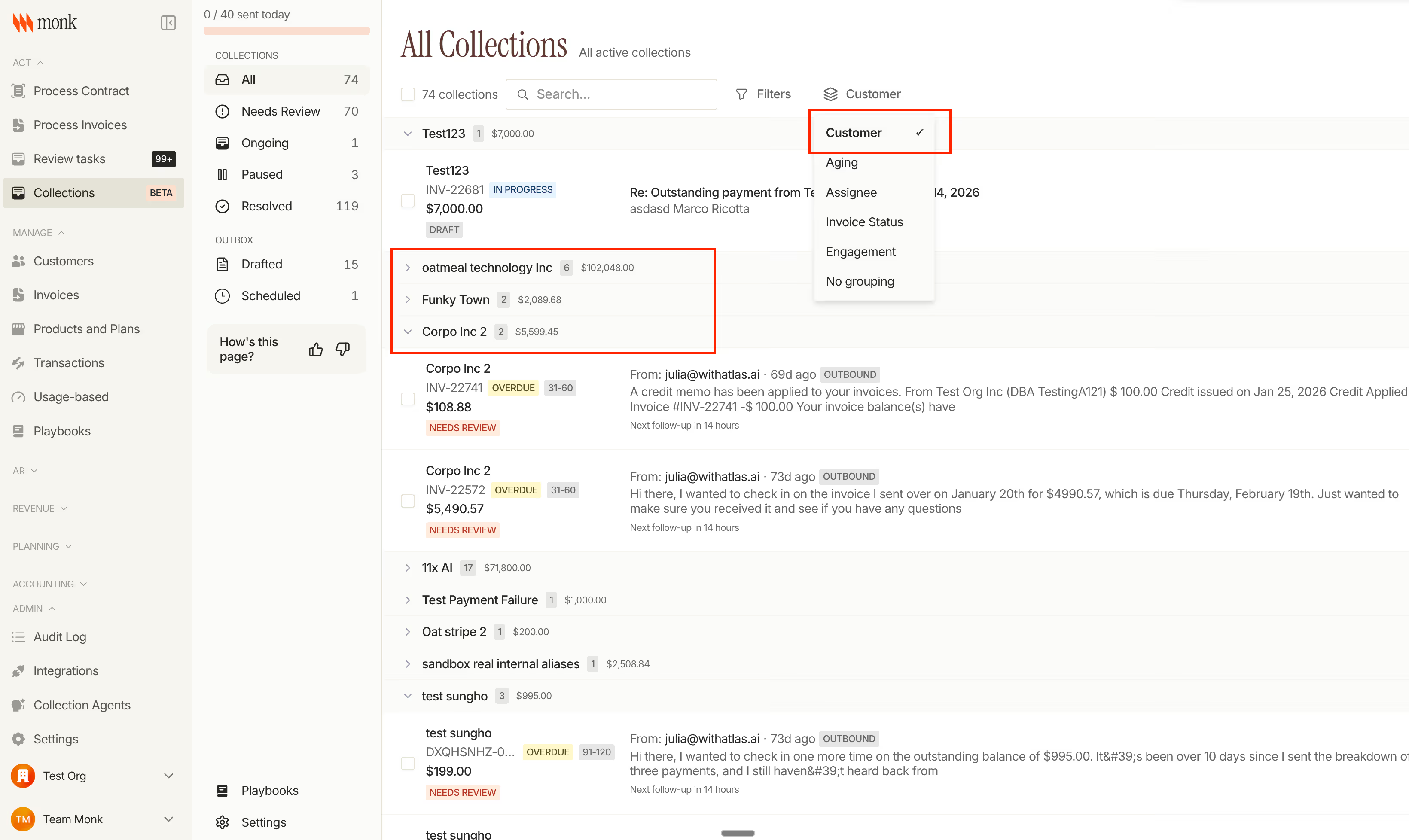
Everything collections (conversations, playbook settings, and outbox) now lives in a single page with tabs. Collections are grouped by customer by default, with options to switch to aging, assignee, or engagement grouping, and you can pause any collection with a single click.
Natural Language Prompt Playbooks
Create and edit collection playbooks using natural language. Describe your strategy conversationally and Monk generates the full configuration automatically, including conditions, actions, and targeting rules. The AI chat interface maintains conversation context, supports undo, and lets you review the full history of changes.

Billing
Contract adjustments now widely available
Add products, change quantities, update pricing, or extend terms mid-contract. Monk automatically calculates proration, regenerates invoices, and creates credit memos. The adjustment flow shows a complete preview before you commit, and audit logs capture every change for compliance.

Recurring and one-time credit grants on product plans
Product plans now support recurring credit grants that refresh each billing period and one-time grants issued on the first invoice with configurable expiration. Grants can apply to all usage or specific meters, and prepaid credits appear as line items while promotional credits show as $0 bonus line items.
Stripe Smart Retries for failed payments
When an auto-pay charge fails, Monk starts a 24-hour retry window instead of immediately disabling auto-pay, with status visible in the invoice drawer. Non-retryable failures skip retries, and if all retries fail, Monk triggers your configured collection workflow.
Other Billing Updates
Percentage-based discounts with auto-calculation, daily billing intervals, and editable PO numbers and memos on finalized invoices.
Integrations
HubSpot and Salesforce live mode
"Live mode" automatically creates contract review tasks when deals reach your specified CRM stage, with Monk inferring contract type based on existing customer mappings. Matched CRM accounts are pre-selected and locked in the review flow to prevent mismatches.
Redesigned contract review queue
Queue-based workflow with triage badges showing match status, data completeness, and data source, plus a pre-review step that surfaces extraction quality before editing. Contracts can be reviewed from CRM data alone, and data source badges show whether fields came from a document, CRM, or DocuSign.
Fixes
- Fixed overdue invoice status display in the invoice drawer
- Fixed Slack collection message UI to match new design standards
- Fixed collection settings tab not persisting when switching between sections
- Fixed billing schedule missing advance line item on last rolling invoice
- Fixed PDF parsing fallback for corrupted files
- Fixed batched invoices promise-to-pay display
- Fixed payment reconciliation approval when invoices have no allocation
Changelog: Mar 2 - Mar 22
Intelligent Collections
Collections table improvements
Group your collections view by engagement status to quickly see which customers need attention. The table now shows clearer status indicators and supports filtering customization, letting you focus on accounts that matter most.

Billing
Credit wallet enhancements
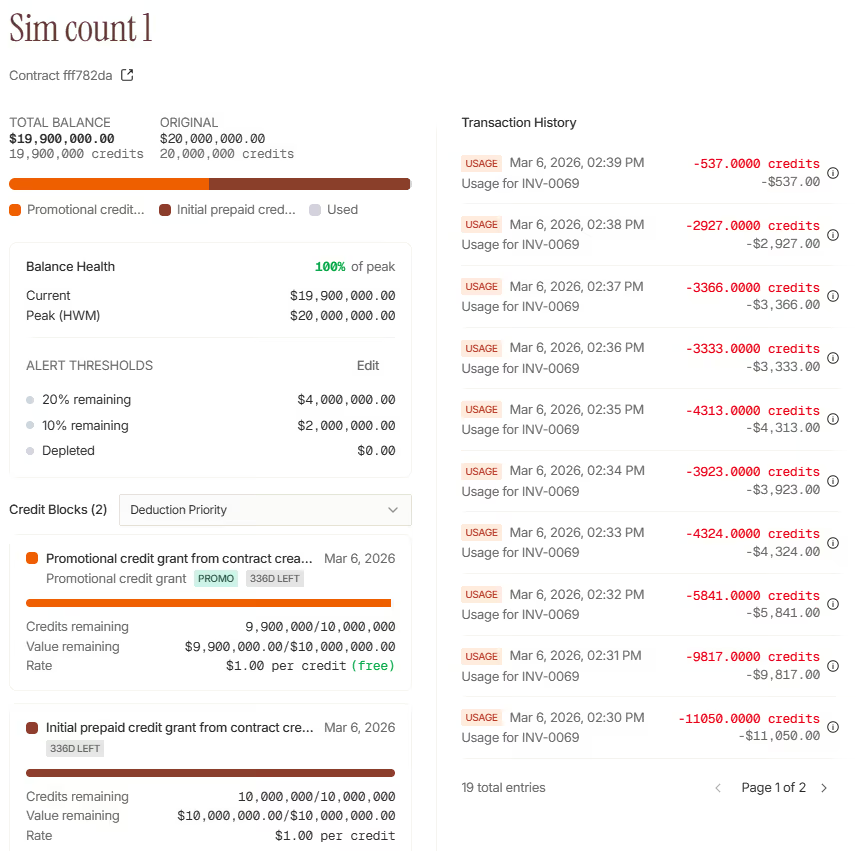
Managing prepaid credits just got easier. Sort credit grants by priority, creation date, expiration, or remaining balance to find what you need fast. The credit drawer now shows a complete breakdown of how credits apply to each meter, so you always know where usage is going.
New threshold alerts notify you when a customer's credit balance drops below a set amount, giving you time to reach out before they run dry.
Sample event preview for meters
Testing usage-based billing is now simple. Click any meter to preview a sample event with the exact payload. No more guessing at field names or digging through docs.
Invoice drawer improvements
The invoice drawer now shows a clear cost breakdown: subtotal, shipping, discounts, and tax all in one view. You can see exactly how the total was calculated without opening a separate report.
UX & Customer Love
Customer logos in invoice emails
Invoice emails now display your customer's logo when uploaded, making communications feel more personal and professional.
Image support in email signatures
Add images to your email signature directly in Monk. Upload your logo or headshot and it appears in every outbound email.
Contact selection in email preview
When previewing an email, you can now select which contact to send to, making it easier to test how messages look for different recipients.
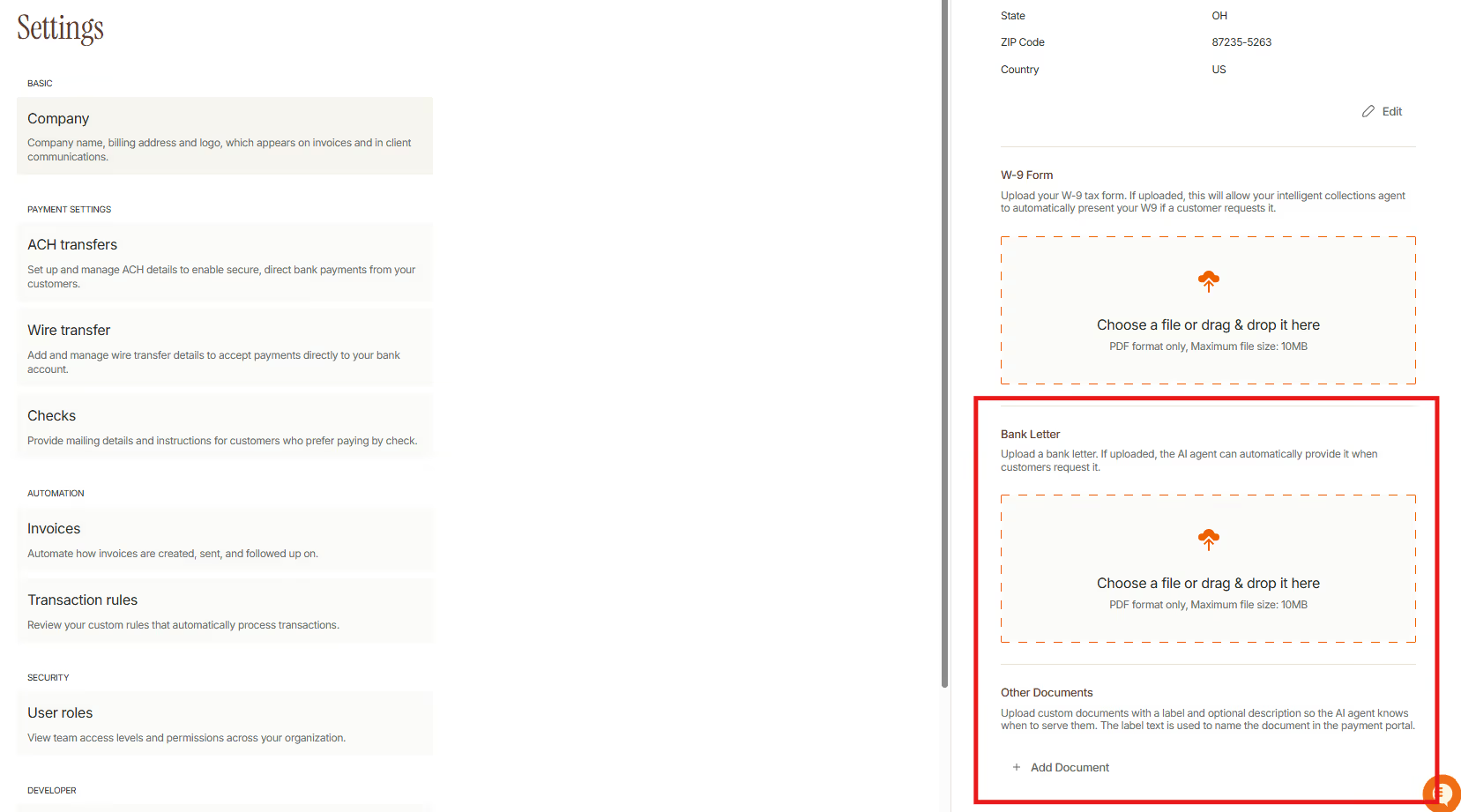
Bank letter document type
Upload and manage bank letters as a dedicated document type. Set visibility options to include them in the payment portal or attach them to invoice emails automatically.
Custom document types
Need to share certificates of insurance, onboarding materials, or other documents? Upload any PDF with a custom label and description. Monk's AI agent uses the description to know when customers ask for that document.
Integrations
Mercury reconnect
Lost connection to Mercury? You can now reconnect or disconnect your Mercury integration directly from Settings.
Fixes
- Improved loading states across the billing dashboard
- Fixed date picker time-zone handling in reports
- Fixed email preview modal closing unexpectedly
- Improved error messages when payment processing fails
- Fixed collections table filters not persisting after navigation
- Resolved duplicate webhook deliveries in edge cases
- Fixed PDF rendering for invoices with long line item descriptions
- Improved mobile responsiveness in the payment portal
Changelog: Feb 23 - Mar 1
Billing
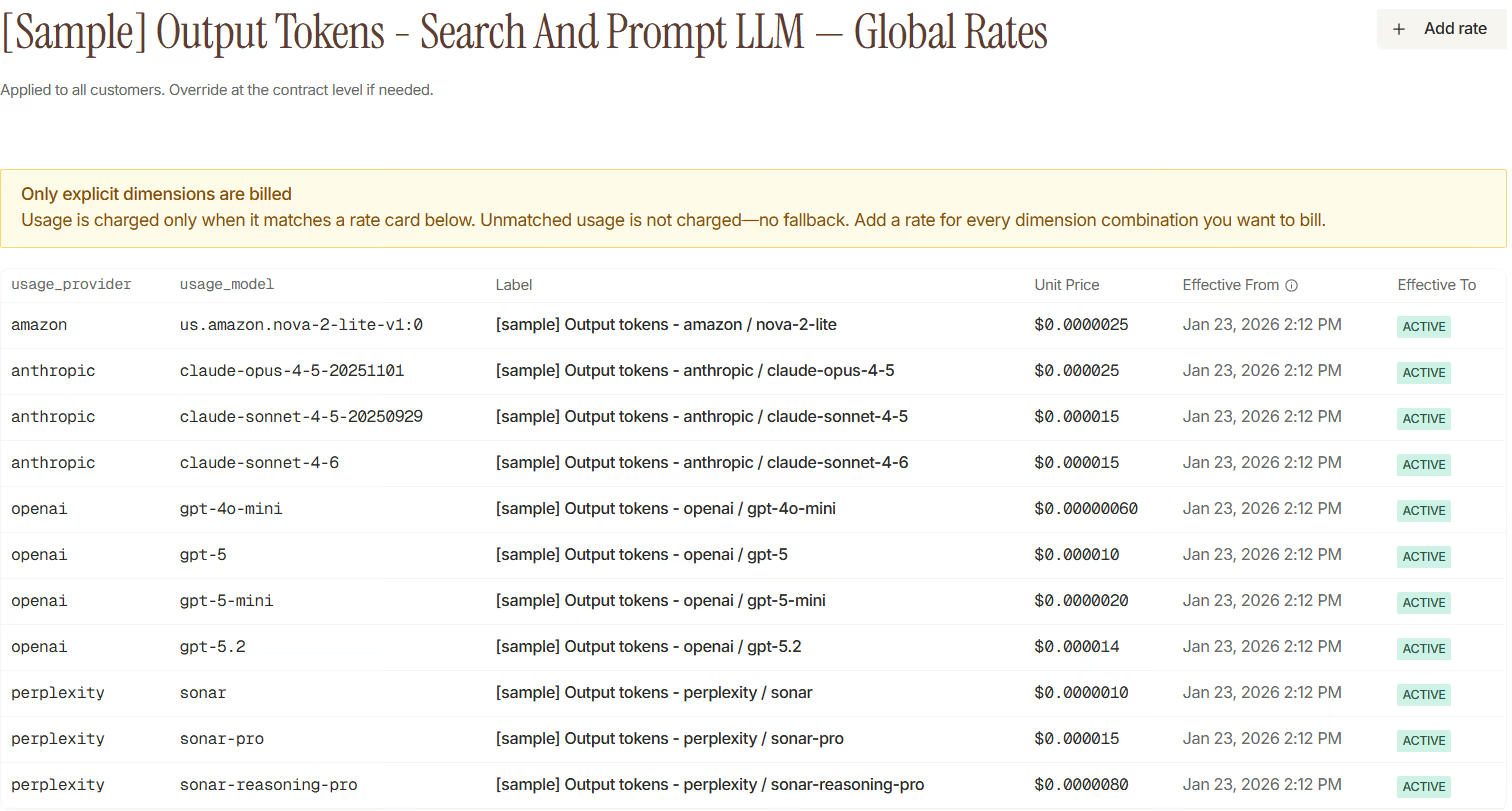
Dimensional Pricing & Rate Cards
Build sophisticated pricing models that vary by customer segment, region, product tier, or any custom dimension. Rate cards now support dimension filters that automatically match the right price to each usage event.
- Create rate cards with dimension filters
- Set graduated pricing tiers within each rate card (e.g., first 1,000 units at $0.10, next 10,000 at $0.08)
- Let Monk find the best match using most-specific-filter logic when events match multiple rate cards
Navigate directly from any meter to its associated rate cards, making it easy to audit and update pricing without hunting through settings.
Contract Adjustments
Make mid-cycle changes to contracts without starting over. Monk now handles adding items, removing items, changing quantities, and extending terms with proper proration calculated.
- Add new line items mid-contract with prorated pricing from the change date
- Remove items and generate credits for the unused portion
- Extend contract terms while preserving existing pricing
- Preview changes before committing, including exact proration amounts
Monk regenerates affected invoices automatically, so your books stay accurate without manual adjustments.
Integrations
QuickBooks: Refund & Credit Memo Sync
Refunds processed in Monk now sync to QuickBooks as refund receipts with proper clearing account mapping. Credit memos push automatically, keeping your AR ledger accurate without manual journal entries.

Fixes
- Fixed CSV export encoding for special characters in customer names
- Improved Salesforce sync retry logic for rate-limited requests
- Fixed memo field truncation on QuickBooks invoice sync
- Corrected payment status display after partial refunds
- Fixed meter selection dropdown scrolling on long lists
Changelog: Feb 16 - Feb 22
Billing
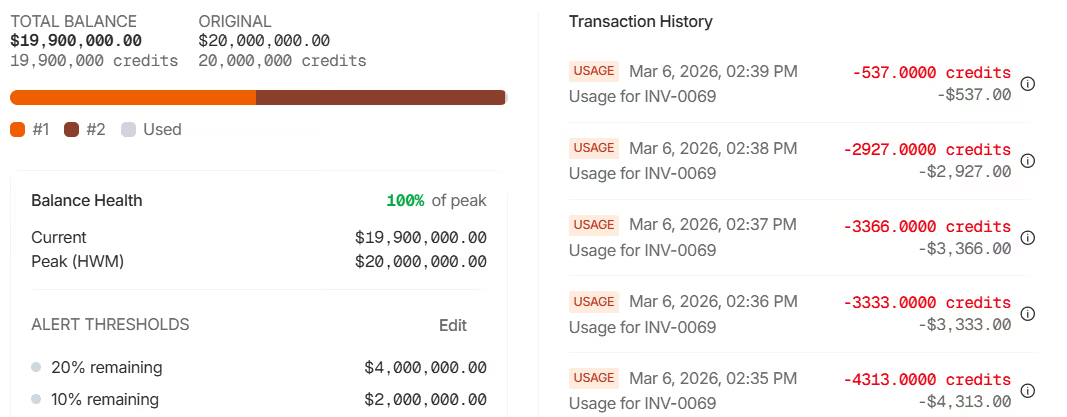
Prepaid Credits & Credit Wallet
Monk now supports prepaid credits with a full credit wallet system. Customers can purchase credits upfront, and Monk automatically applies them to invoices using FIFO (first-in, first-out) logic, prioritizing credits that expire soonest.
- Grant credits to customers as prepaid balances or promotional incentives
- Track credit blocks with individual expiration dates and automatic deduction
- Recognize breakage revenue when credits expire unused
- View full credit history with grant, deduction, and expiration events
Credits integrate seamlessly with existing billing. When an invoice is generated, Monk checks available credit balance and applies it automatically.
Pricing Estimate API
Give customers real-time cost estimates before they commit. The new endpoint allow you to show customers real-time cost previews before they take action.
- Preview costs for any combination of meter, quantity, and dimensions
- Support graduated pricing in estimates, with tier breakdowns
Integrations
Salesforce: Opportunity-to-Contract Sync
Close deals in Salesforce and let Monk handle the rest. When an opportunity closes, Monk extracts the contract details and creates a ready-to-activate contract automatically.
- Sync closed-won opportunities to Monk as draft contracts
- Link customers to their CRM records with the new contract provider field
- View sync status in the Opportunities table within Monk
Your sales team stays in Salesforce. Your finance team gets accurate contracts in Monk. No copy-paste errors, no delays.

Fixes
- Fixed invoice PDF generation for invoices with many line items
- Improved error messages when Stripe webhook verification fails
- Fixed currency display for non-USD invoices in the dashboard
- Fixed duplicate email notifications on payment retry
- Improved table sorting performance for large customer lists
Changelog: Feb 9 - Feb 15
Billing
Sub-Cent Pricing Support
Monk now supports pricing precision below one cent—essential for high-volume usage-based billing where per-unit costs are fractions of a penny. Line items store both cent-based and dollar-based amounts, ensuring accurate calculations at up to eight decimal places.
- Added meter archiving—soft delete meters no longer needed while preserving historical usage data
- Plans now support auto-pay configuration for Net 0 terms, automatically charging the customer's payment method on invoice creation
- New API endpoints for creating meters, plans, and pricing programmatically
- Contract creation API now supports pricing overrides for custom deal terms
- Contracts tab added to plan detail pages showing all contracts using that plan
- Auto-charge now runs immediately for first subscription invoice when auto-pay is enabled
Intelligent Collections
Consolidated Slack Notifications for Unreachable Contacts
When Monk can't reach contacts due to missing or bounced emails, you now receive a single consolidated Slack notification instead of one per invoice. The notification lists all affected invoices with customer names and invoice numbers. A 3-day cooldown prevents notification fatigue for ongoing issues.
- Payment portal now includes W9 and invoice PDF download options when enabled in settings
- Payment portal UI simplified with cleaner layout and better mobile support
Accounting
Expanded Audit Logging
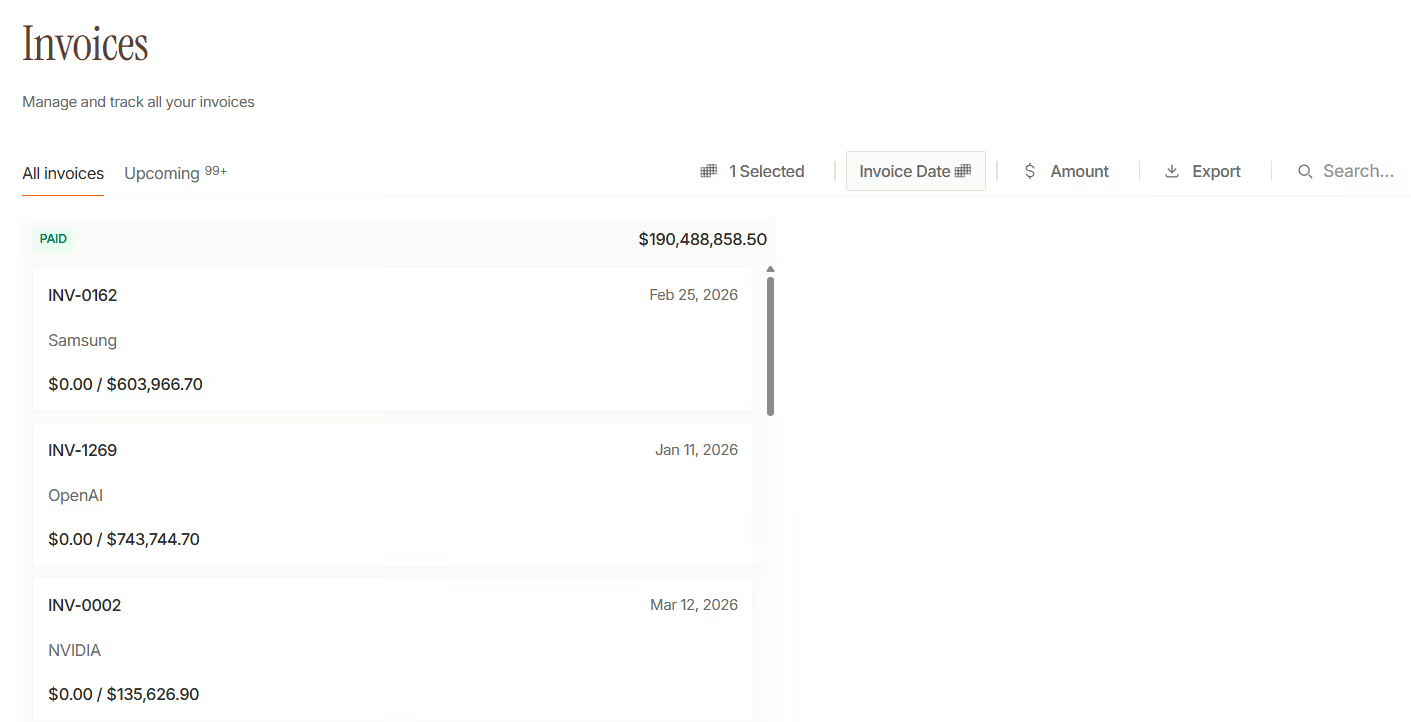
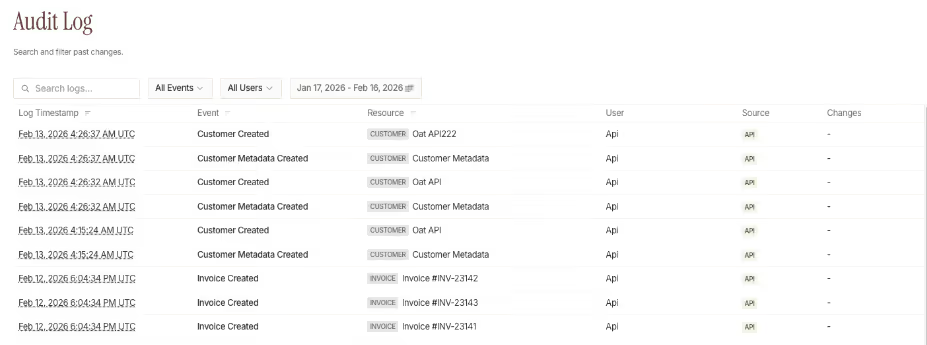
Audit logs now capture more events across invoices, payments, credit memos, and contracts. Every change records who made it, when, and what the data looked like before and after. Filter by event type, date range, customer, or user.
UX Improvements
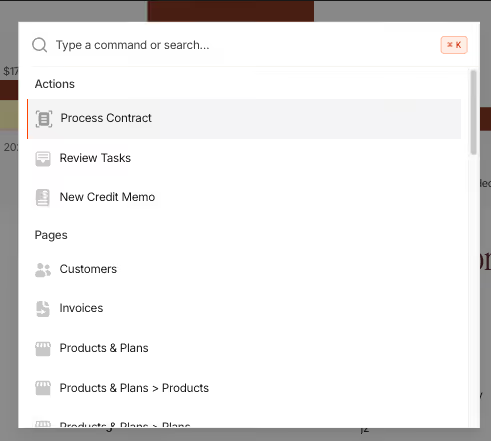
Command Palette (Cmd+K)
Press Cmd+K to instantly search across customers, invoices, conversations, and navigate anywhere in Monk. Recent items appear at the top so you can quickly return to what you were working on.
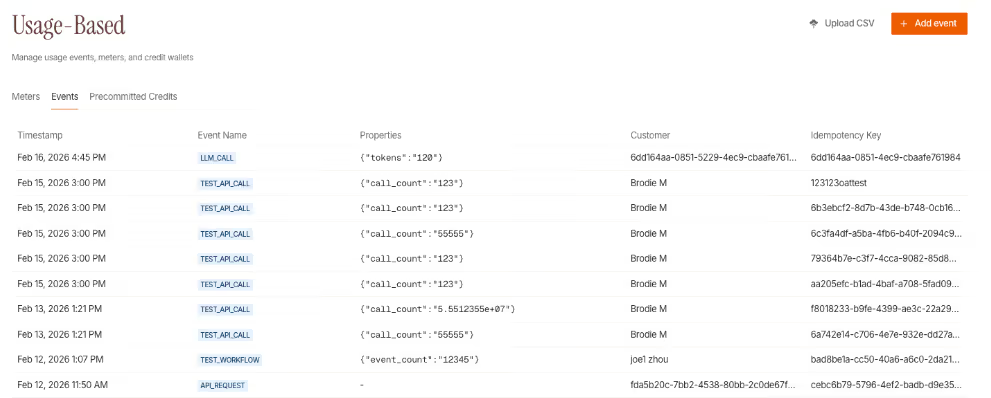
Events Management UI
A new Events tab in the Usage section lets you view, add, and manage billable events directly in Monk. Add individual events with custom properties, upload via CSV, and inspect event details. Useful for testing metering setup, backfilling historical usage, or manual adjustments.
- Product plans, pricing, and renewals tables now load faster for large datasets
- Invoice status filters now persist when navigating
- Improved date picker for easier date selection
- Transaction posted dates now display exact times in review tasks
- Audit log page now shows searchable, filterable history of all changes
Integrations
- Gmail now syncs immediately after sending emails
- Salesforce webhooks can now be enabled per-organization with API key authentication
- SSO authentication now available to select enterprise customers
Fixes
- Fixed date picker not selecting dates correctly in some browsers
- Fixed address line 2 not appearing in company profile edit mode
- Fixed invoice discount amount handling when undefined in PDF generation
- Fixed one-off Stripe invoices having placeholder contracts automatically disabled after due date
- Fixed document deletion on customer document tab
Changelog: Feb 2 - Feb 08
Intelligent Collections
Collections Report Drill-Down
Click any data point on your AR Trends or Monthly Collection charts to see the underlying details. A breakdown drawer shows which customers and invoices make up each bar or line segment—with search, filtering, and direct links to take action.
Navigate between periods without closing the drawer. See current vs overdue invoice breakdowns for AR data, or customer-level collection totals for monthly performance.

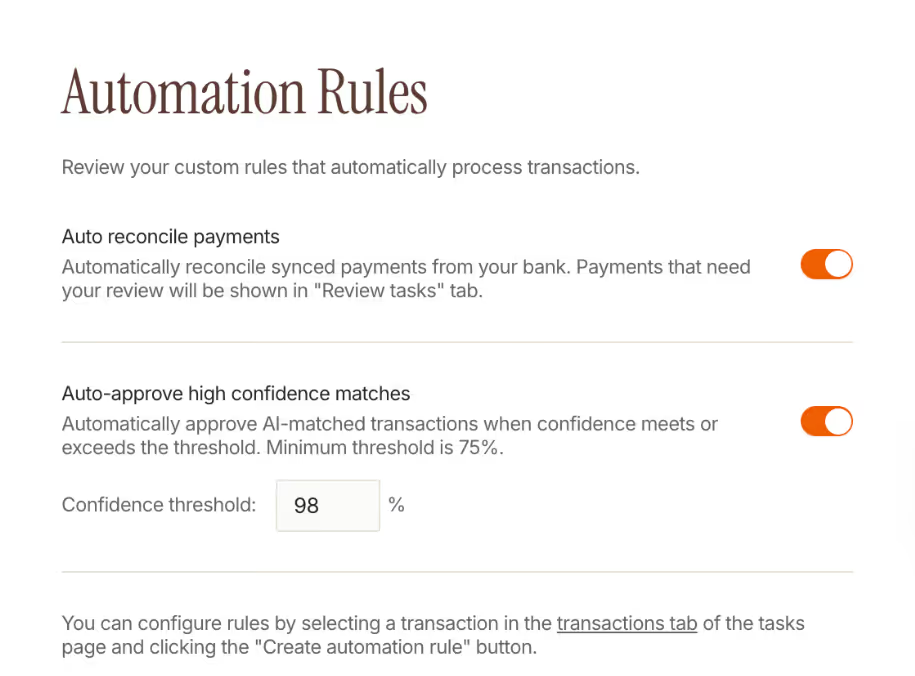
AI Confidence Threshold for Payment Matching
Control when AI-matched payments get auto-approved. Set a confidence threshold (75–100%) in your payment reconciliation settings, and Monk will automatically approve matches above your threshold while routing lower-confidence matches for review.
- Suggested matching rules now pre-fill when reviewing AI-matched transactions
- Collection "priority" status renamed to "needs review" for clarity
- Improved escalation detection with better playbook loop logic
- Activity logs now track when collections resume after being paused
Billing
- Added export by contract for recurring revenue reports—download CSV breakdowns at the contract level
- Product billing periods now sync automatically when you change contract dates, with visual highlights showing which products updated
- Service period dates can be excluded from invoice line items and QuickBooks sync via a new invoice settings toggle
- Improved billing period fallback logic for fixed-term contracts
Integrations
- Stripe tax lines and customer debit line items now sync to Monk as first-class data
- QuickBooks payment sync relaxed to save CPAs time on month-end
- QuickBooks API client retries improved on transient failures
UX Improvements
- Faster pagination across core tables with automatic page prefetching
- Customer table now shows total row count
- Refund workflow improved with a dedicated modal and clearer amount validation
- Tags are now searchable in filter dropdowns and included in CSV exports
- Pricing details drawer added to product plans page—click any pricing to see tiers, meters, and metadata
- Invoice attachments limit increased from 25 to 50 files
- Date pickers now support clearing the selected date
- Better error messages when invoices can't send due to missing billing contacts
Fixes
- Fixed division by zero error when syncing Stripe line items with zero quantity
- Fixed AR trends calculation for current week data
- Improved document viewer for blob-based file storage
- Fixed contract termination date handling when clearing the field
- Fixed email signature and recipient pre-fill in email composer
- Improved matching algorithm in payment reconciliation
Changelog: Jan 26 - Feb 1, 2026
Intelligent Collections
Redesigned Payment Reconciliation
Match bank transactions to invoices in a new dedicated review page. The redesigned interface shows your transaction list on the left, transaction details in the center, and invoice matching on the right—so you can review and approve matches without switching contexts with keyboard shortcuts.
AI-suggested matches now display confidence scores, and you can search across all invoices to find the right match. Bulk approve multiple transactions at once when you're confident in the matches.
Daily Transaction Review Reminders
Get a daily Slack notification summarizing transactions needing your attention.
Other Updates
- Keyboard shortcuts for navigating between collection conversations (use arrow keys) with a navigation list
- Improved invoice status display with priority-based ordering for batch invoices
- Smarter escalation detection—Monk no longer escalates when customers attach documents in the thread, more time back for you.
Accounting
Invoice Revenue Recognition Schedule
View the complete revenue recognition schedule for any invoice. The new schedule detail page shows a visual chart of recognized vs. deferred revenue over time, plus a month-by-month breakdown table. You can quickly switch between invoices using the search navigation.
Credit memos now appear in the revenue recognition view, showing how credits affect your revenue schedule.
Credit Memo Accounting Impact
When creating credit memos, you can now see and control the accounting impact. Choose between three allocation strategies—proportional, deferred-first, or recognized-first—to determine how credits affect your recognized and deferred revenue.
Other Updates
- Added void functionality for credit memo reversals
- General journal entries now include descriptions for better audit trails
Integrations
Webhooks (Beta)
Subscribe to invoice events and receive real-time notifications at your endpoint. Configure webhooks in Settings to get notified when invoices are created or updated. Webhook payloads include full invoice and customer data, with signatures for verification.
Payloads are encrypted at rest and delivered with automatic retries. Each webhook includes customer details like name, email, and billing address alongside the invoice data.
Salesforce Sync Improvements
Contracts from Salesforce now sync more reliably. We added additional variations to how Monk handles Salesforce file attachments.
Other Updates
- Stripe: Handle deleted draft invoices gracefully
- HubSpot: Improved deal sync performance efficiency
- GoCardless integration: Better counterparty name handling for payment matching
- Document viewer now supports .docx and .txt files alongside PDFs
UX & Customer Love
- QuickBooks invoice tables now include customer filters for faster review
- Improved drawer sizing with dynamic header text that truncates properly
- Empty charts in collection reports now show proper loading states
Fixes
- Fixed batch invoice status display showing incorrect resolved state
- Fixed collection report attribution for manual payment messages
- Fixed escalation detection incorrectly flagging W9 attachments depending on user language
- Improved performance for review tasks invoice queries
Billing
Line Item Display Override
When setting up pricing in contract review and when editing invoices, you can now override the default product name with custom text—useful when you need invoices to show specific terminology your customers expect.
Other Updates
- Invoices in contract extraction now group by month for easier review
- Added billing timing dropdown to product pricing configuration
- Usage-based line items now show a "Usage" indicator on invoices
Changelog: Jan 12 - Jan 18, 2026
Billing
Create and allocate credit memos to invoices
Credit memos now support full lifecycle management in Monk. You can create credit memos from a dedicated page, allocate them across multiple invoices, and download them as PDFs.
When creating a credit memo, select a customer and specify which invoices to apply the credit toward. The allocation UI shows outstanding balances and lets you distribute the credit across multiple invoices. Once issued, download the credit memo PDF from either the credit memo list or directly from the invoice drawer.
Duplicate invoices with one click
Quickly create new invoices from existing ones. From the invoice drawer, click "Duplicate" to create a copy with all line items, discounts, and payment terms preserved—then edit as needed.
This saves time when billing similar services to a customer or creating recurring invoices manually.
Other Updates
- Invoice edit and resend now works directly from collection conversations—edit an in-progress invoice and resend without leaving the collections view
- Auto-save now works on contract review—customer details and commercial terms save automatically as you edit
- Added "View in Stripe" links to customer pages and invoice headers for quick access to source records
Intelligent Collections
Visual playbook builder with nested conditions
Playbooks now support nested logic for more sophisticated collection workflows. The new visual flow builder shows your automation as a graph, making it easy to understand and edit complex rules.
Add conditions inside other conditions to create branching workflows—for example, send different follow-ups based on invoice age, then vary the message based on whether the customer has responded.
Collections table shows message context
The collections review table now shows who sent the last message and a preview of its content. Quickly identify which conversations need attention without opening each one. An indicator shows when a CSM has been looped in.
Other Updates
- Added "customer has responded" condition for playbooks—trigger different actions based on whether you've heard back
- Follow-up settings redesigned with clearer auto-send controls: choose "always," "until replied," or "never"
- Link from invoice drawer directly to the collections conversation for that invoice
Accounting
Revenue recognition drilldown
Click into any cell in the revenue recognition report to see the underlying invoice line items. The breakdown shows gross revenue, discounts, and credit memos separately so you can trace exactly how recognized revenue was calculated.
Filter the report by date range using the new month/year picker to focus on specific accounting periods.
Other Updates
- Credit memos now appear separately from discounts in revenue recognition reports
- Added credit_memo_allocation_id to journal entries for cleaner audit trails
- AR aging export now includes QuickBooks customer IDs for easier reconciliation
Integrations
Slack notification preferences
Control which Monk notifications you receive in Slack. From the Slack integration page, toggle notifications for draft reviews, escalations, and other events. Each team member can set their own preferences.
Other Updates
- QuickBooks invoice sync tables now show legal name for better matching
- QuickBooks import now pulls customer addresses automatically
- DocuSign integration upgraded for improved reliability
- Archived Slack channels now display in the channel list
- Slack channel export includes email domains for contact discovery
UX & Customer Love
- Improved date range picker with better preset options and keyboard navigation
- Server-side pagination added to customers and transactions tables for faster loading
- Document viewer redesigned with download button and cleaner modal experience
- Billing period overlap detection—invoices with overlapping service periods are now flagged during contract review
- Org-level CC contacts—add email addresses that receive copies of all Monk-generated invoices
- Animated loading states across integration and customer pages
Fixes
- Fixed memory leak in document attachment handling
- Fixed onboarding disabled state not displaying correctly
- Fixed sorting issues in customer table after multiple column clicks
- Fixed email rendering for Outlook dividers
- Fixed invoice metadata being cleared on update
- Fixed activity log display for phantom invoices
- Fixed scheduled email UX when selecting past dates
- Fixed playbook execution loop in email actions
- Improved error handling for PDF and attachment retrieval
Changelog: Jan 19 - Jan 25, 2026
Intelligent Collections
Target Playbooks by Customer Segment
Playbooks now support granular customer targeting. Instead of applying the same collection workflow to everyone, you can now target specific customer segments using tags or individual customer IDs.
Create different collection approaches for enterprise customers versus SMBs, or route high-value accounts through specialized workflows. The targeting system uses a priority model: explicit customer IDs take precedence, then tag-based matching, with a catch-all fallback for everyone else.
Activity Timeline for Collections
Every collection conversation now has a complete activity log. See exactly when drafts were created, emails sent, replies received, and escalations triggered—all in one timeline view. Each event shows whether it came from a Playbook, the Monk Agent, or your team.
This visibility helps you understand what happened with any collection and why, without digging through email threads or checking multiple systems.
Other Updates
- Added option to hide invoice numbers from collection email subjects for cleaner customer communication
- Playbooks now support custom follow-up cadence per action, overriding the global setting
- Collections now skip invoices that are already escalated or paid
Billing
Credit Memo Management
Credit memos now support the full lifecycle you need for proper AR management. You can void credit memos that were created in error—the system automatically reverses invoice allocations and regenerates PDFs with a voided watermark.
When creating credit memos, you can now allocate credits across multiple invoices at once and add reasoning notes for audit purposes. Notifications are sent automatically when credits are applied, showing customers their updated balance.
Public API
Monk now offers a public REST API for server-to-server integrations. Generate API keys from Settings, then use them to query customers and invoices programmatically.
The API supports pagination and filtering—fetch customers by ID, list invoices by status or date range, and integrate Monk data into your internal tools or workflows. Full documentation is available in the developer portal.
Other Updates
- Customer pages now display available credit balance from credit memos
- Improved sales tax recalculation when applying credit memos to draft invoices
- Invoice PDFs now show credit memo adjustments in the line item breakdown
Integrations
Salesforce Integration
Connect Salesforce to automatically sync your CRM data into Monk. The initial sync pulls Accounts, Contacts, and Closed Won Opportunities, then extracts contract data from attached documents.
Once connected, Monk maintains a cache of your Salesforce data and can pull contract terms directly from DocuSign envelopes linked to opportunities. This eliminates manual data entry when setting up billing for new deals.
GoCardless Payment Sync
GoCardless payments now sync automatically with Monk. Transactions flow into your payment reconciliation queue, where they're matched to invoices using the same intelligent matching logic as other payment sources.
The integration follows the standard payment-to-mandate-to-customer chain, ensuring payments are attributed to the correct customers even when mandate details change.
Other Updates
- QuickBooks sync now imports credit memos and maps them to invoices correctly
- Credit memo exports to QuickBooks support multi-invoice allocations
- Slack notifications for unreachable contacts alert you when collection emails bounce
Accounting
DSO Calculation Improvement
Days Sales Outstanding now calculates from when invoices were actually sent, not the invoice date. This change gives you more accurate DSO metrics that reflect your actual collection timeline.
If an invoice is dated January 1st but sent on January 10th, DSO now counts from the 10th. For invoices without a sent date, the calculation falls back to the invoice date.
Other Updates
- Average Days report now supports server-side pagination and filtering for faster performance
- Collection reports show breakdown by customer segment and time period
- Revenue recognition excludes voided credit memos automatically
UX & Customer Love
- Bulk invoice upload from the sidebar lets you import invoices via CSV or PDF extraction
- Review tasks tab order now shows Collections first for faster access
- QuickBooks export tables show invoice balance alongside status
- Credit memo list supports customer filtering and bulk PDF downloads
Fixes
- Fixed email reconciliation for outgoing messages to properly track sent emails
- Fixed usage-based billing aggregation error when calculating line item quantities
- Resolved legal name being removed when saving customer records
- Fixed auto-save triggering unnecessary Slack updates on review tasks
- Corrected invoice reference tracking for batched collection emails


.avif)