The Hidden Cash Problem
1.2 The Contract-to-Invoice Gap
Creating an invoice is far from straightforward. You need the right commercial terms from a contract that might be thirty pages long and usage data that probably lives in two or three different systems. You need to know which entity to bill, which contact to send it to, and which PO number to reference. And you need all of that to come together accurately, on time, every billing cycle, often across dozens or hundreds of customers.
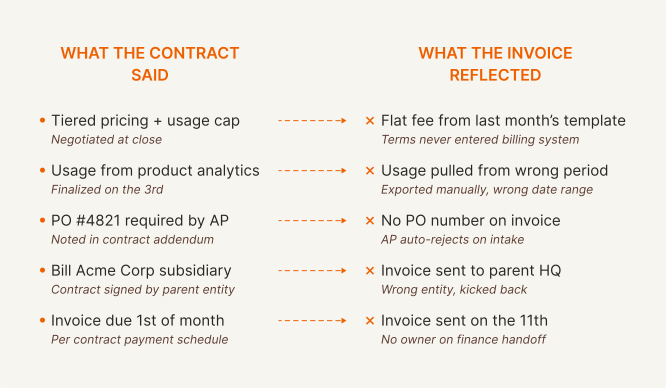
There are a lot of places for this process to break down. The errors that result are usually small individually — a wrong billing date, a missing line item, a usage figure pulled from the wrong period — but they compound quickly and they almost always surface after the invoice has already been sent and the customer has already flagged it.
Where the gap comes from
The failure points are predictable and tend to cluster around the same places:
Why most tools don't solve it
Most AR software assumes the invoice already exists and focuses on what happens after it's sent. The creation step gets handled in a separate tool, in the ERP, or manually. The connection between the contract and the invoice is a copy-paste job that someone does under time pressure at the end of the month.
The tools that do attempt invoice automation tend to handle straightforward cases reasonably well. Flat monthly fees, standard net-30 terms, single entity. Where they fail is anything more complicated than that — usage components, addendums, custom payment schedules, contracts that were amended mid-year. Those cases require something that can actually read and parse a contract, understand what it obligates, and generate an invoice that reflects it accurately. That is a meaningfully harder problem than scheduling a recurring charge.
Up next: Post 3 gets into the hardest version of this problem specifically — usage-based billing, where the invoice depends on data that is messy, delayed, and often coming from systems that were never designed to talk to each other.
Following this series — 10 posts on what's broken in B2B AR and what the fix looks like.
1.4 Many Overdue Invoices Aren't a Payment Problem
When an invoice goes sixty days past due, the default response is to treat it as a collections problem. Send another reminder, escalate, issue warnings. For a material share of what shows up on the aging report, it is exactly the wrong response — and applying it wastes time, damages customer relationships, and does nothing to move the invoice toward payment.
The root cause distinction that most AR tools miss is straightforward: some invoices are late because the customer is slow to pay, and some are late because the invoice never reached someone capable of acting on it. Collections automation should treat the two differently.
The two types of late invoice
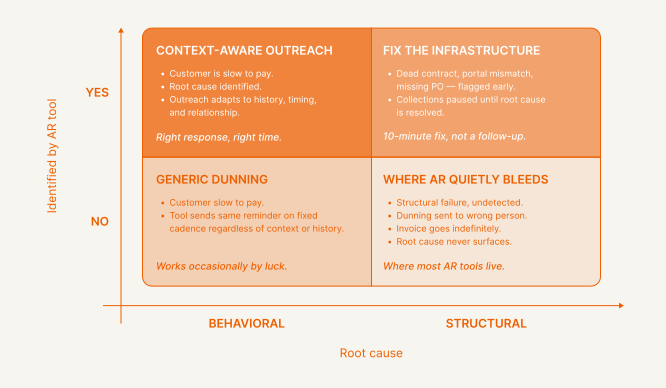
The top half of the matrix is where good AR infrastructure operates. The bottom half is where most tools live — either sending generic reminders to customers who needed something more targeted, like a portal setup or PO number, or sending follow-ups into a void because nobody detected that the delivery failed in the first place.
The practical implication is that before any collections activity happens, the right question is not how to follow up but why the invoice is late. A dead contact needs a lookup, not a reminder. A portal mismatch needs a resubmission, not an escalation call. A genuinely slow customer needs outreach calibrated to their history and relationship, not a templated nudge on a fixed schedule.
Up next: Post 5 covers the category of late invoices that the standard collections playbook has no answer for — W9s, missing POs, out-of-office approvers, and the other exceptions that keep showing up quarter after quarter.
Following this series — 10 posts on what's broken in B2B AR and what the fix looks like.
1.5 The Edge Cases Nobody Planned For
Every AR workflow has a version of the same story. A contract gets signed, an invoice goes out on time, everything looks clean — and then it stops moving. Not because the customer won't pay, but because something in their AP process requires something additional. A W9. A PO number that wasn't captured at close. A supplier registration that takes three weeks.
These get treated as one-off problems and are handled manually by the finance team. The issue is that the same exceptions show up predictably, quarter after quarter - in fact, they account for 39% of the slowdown in cash flow. Treating them as surprises is why they keep costing the same amount of time every cycle.
What happens when an exception fires
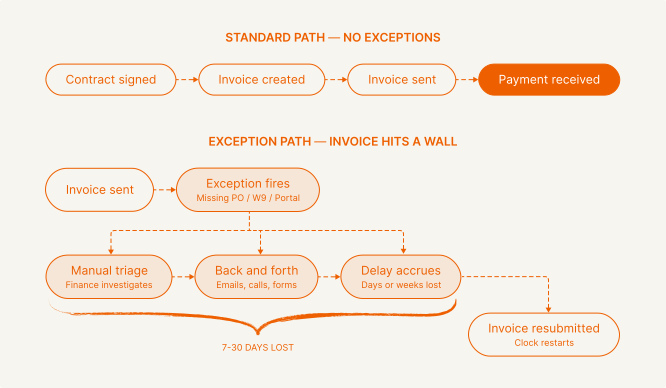
The standard collections playbook has no answer for this. A dunning email to a customer whose AP team is waiting on a W9 accomplishes nothing. An escalation call to an account manager does not resolve a missing PO. Standard exceptions such as these should be handled by any accounts receivable tool in an automated fashion, while exceptions that require human handling should be flagged accordingly.
The predictable exception types
Why this keeps happening
The exceptions above are not exotic. The problem is that most AR infrastructure treats them as outside the workflow entirely, so they default to someone's inbox every time. By responding appropriately to edge cases like these, AR tools can handle 80% of follow-ups autonomously.
Up next: Post 6 covers one of the most consistent structural failures we see across customer bases - the unreachable contact.
Following this series — 10 posts on what's broken in B2B AR and what the fix looks like.
1.6 The Unreachable Contact Problem
Most overdue invoices get treated as a collections problem. The assumption is that the customer received the invoice, is aware it's outstanding, and needs to be prompted to pay. That assumption is wrong more often than most finance teams realize.
One of the most common root causes has nothing to do with payment intent. The billing contact left the company. The invoice went to a deactivated inbox. The sending system recorded it as delivered, nothing bounced visibly, and reminders kept going to the same dead address for weeks.
Why this stays hidden
Even when delivery signals exist, they rarely make it into the AR workflow. A bounce might get logged somewhere in the sending system — but the aging report has no awareness of it. Every outstanding invoice looks identical regardless of whether it was genuinely received or structurally undeliverable, which means finance teams respond the same way to both.
Finance teams respond accordingly — reminders, escalations, warnings — none of which addresses the actual issue. The invoice is not late because the customer won't pay. It is late because nobody has seen it.
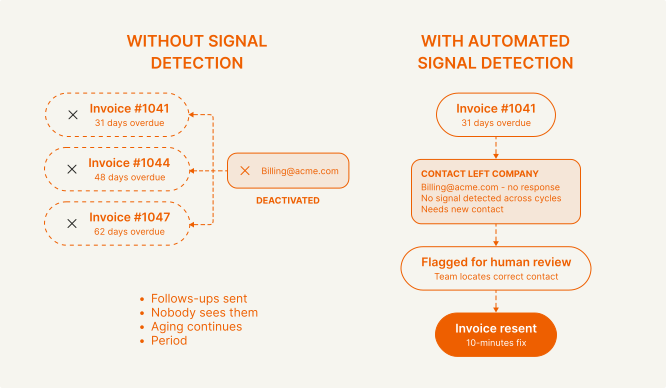
The fix is almost always a quick lookup
Find the current AP contact, resend the invoice, and payment follows. The cost is not the lookup — it is the thirty or sixty days of unnecessary aging that accumulated while emails were sent to a dead inbox. Across a large enough customer base, contact-related failures account for a material share of invoices that go sixty or more days past due, and the pattern is consistent enough that it should be tracked systematically rather than discovered by accident. A bounced email, deactivated domain, and radio silence are all signals. None of these require human review to detect — they require a system that is watching for them rather than continuing to send into the void.
Up next: Post 7 covers what intelligent collections actually looks like in practice — and why most of what gets sold as automated collections is closer to a scheduled email than a real system.
Following this series — 10 posts on what's broken in B2B AR and what the fix looks like.
1.7 The Difference Between Automated Collections and Intelligent Collections
Most tools marketed as intelligent collections software are doing something far simpler than that. They send a reminder email on day 30, another on day 45, another on day 60. The emails themselves are nothing special - robotic reminders requesting payment.
The result is that customers learn to ignore it. A generic reminder from a noreply address on a predictable schedule reads like system noise, not like a real person asking about a real invoice. And that is exactly how it gets treated.
People respond to people
The single biggest driver of collections response rates is not timing or frequency — it is whether the outreach feels like it came from a human being who is aware of the relationship. A message that references the specific invoice, uses the customer's name, matches the tone of how that company communicates, and reads like it was written by someone on the finance team gets responded to. A templated dunning email does not.
Across our customers, outreach that sounds like a real person generates 24% higher response rates compared to standard dunning sequences, reducing the number of unnecessary follow-ups. The content is not dramatically different. The framing is.
What flexibility actually looks like in practice
Graphic A — before/after comparison
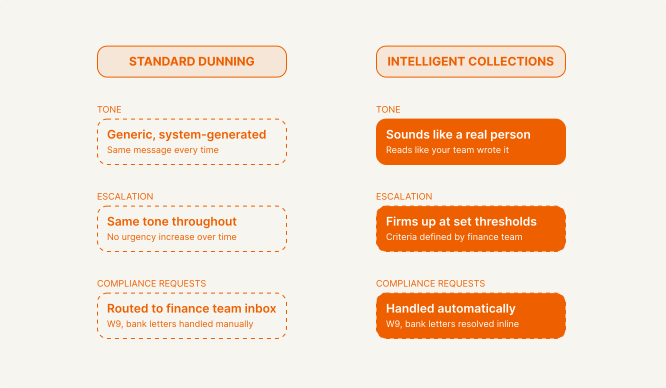
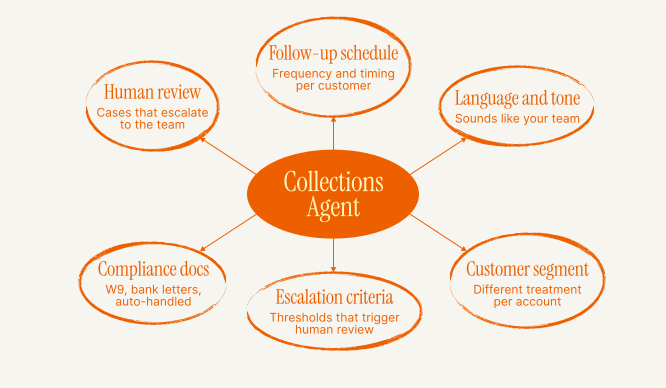
Different customers and situations warrant different approaches, and good collections infrastructure gives finance teams the flexibility to reflect that. A customer who has paid reliably for two years might warrant a different follow-up schedule than one with a consistent pattern of delay. An account that crosses an aging threshold should move into a firmer escalation rather than receiving another identical reminder. This system should apply bespoke rules that a finance team can set - and has proven to save more than 26/hours per month in valuable time.
Graphic B — configurable agent spokes
Up next: Post 8 covers the final stage of the contract-to-cash lifecycle — cash application. Payment arrives, and if the matching process is manual, the invoice stays outstanding for days while someone reconciles it by hand.
Following this series — 10 posts on what's broken in B2B AR and what the fix looks like.
1.8 Cash Application = Closing the Loop
The last mile of the contract-to-cash lifecycle is the one most finance teams think about least — until month-end, when someone spends two days matching payments to invoices by hand.
Cash application is the process of taking an incoming payment and linking it to an invoice. In a manual workflow, this means someone looking at a bank statement, finding a wire transfer with a partial memo or no memo at all, cross-referencing it against open invoices, and updating the ledger. For companies with high invoice volume, this becomes a significant operational burden that happens on a deadline every month.
Why manual matching fails predictably
Most AR tools handle the easy case — one payment, one invoice, exact match — and stop there. When the payment is partial, or covers multiple invoices, or arrives under a different entity name, the tool has no workflow for it. The payment sits unmatched, the invoice stays open, and the exception lands in someone's inbox waiting to be resolved manually. For companies with any volume of enterprise customers, these are not edge cases — they account for a significant share of every month's incoming payments that payment reconciliation software is not equipped to handle.
Because these exceptions accumulate, invoices that were actually paid days ago are still showing as outstanding on the aging report, collections may have continued unnecessarily, and the reported cash position is materially wrong. By automating the process, finance teams can meaningfully reduce the average days to close an invoice.
What automated cash application looks like

When cash application is automated, the loop closes the same day payment arrives. The invoice status updates immediately. The aging report reflects reality. Collections stop on invoices that have been paid. And the finance team's view of the cash position is accurate without anyone having to do anything.
The manual reconciliation event at month-end disappears. What replaces it is a small queue of genuinely ambiguous cases — payments that could not be matched automatically because the information simply was not there — which a human reviews in minutes rather than hours.
Up next: Post 9 closes out this series with a one-pager on the accounts receivables lifecycle.
Following this series — 10 posts on what's broken in B2B AR and what the fix looks like.
1.10: To Build or to Buy?
Maybe you've read this far and you're convinced the problem is real. The final question is whether to solve it yourself. The answer depends on where you are, what you're optimizing for, and how honest you are about your engineering team's bandwidth.
The build temptation
Building is attractive because it promises a perfect fit. Your contracts are complex. Your billing logic is unique. Your ERP has custom fields. Off-the-shelf tools are too generic. So the finance team requests a custom integration, the engineering team scopes it, and six months later you have a semi-functional internal tool that one engineer understands and nobody has time to maintain.
The hidden costs of building:
The hidden costs are not the build — they are everything that comes after it. Two to four engineers, three to six months, and a basic AR workflow: that's the entry price, plus the opportunity cost of pulling those engineers off your core product. Then the real compounding begins. Integrations break when APIs change. Data schemas drift. The tool that solved last year's problem doesn't survive contact with this year's edge cases. And none of it comes with the AI capabilities or cross-customer pattern recognition that a purpose-built platform develops over thousands of billing cycles.

When building makes sense
Build if: your billing model is so bespoke that no vendor can support it, you have dedicated fintech infrastructure engineers, and AR automation is a core competitive advantage (rare). Even then, the right answer is usually to build on top of an existing platform rather than from scratch.
When buying makes sense
Buy if: you want DSO reduction in weeks not quarters, your finance team is spending >10 hours/week on manual AR tasks, you're scaling past 200+ customers, you use standard systems (Stripe, NetSuite, QuickBooks, HubSpot), and you want AI-native capabilities without building out an ML team.
We believe the better question isn't build vs buy — it's whether you've found a vendor who can actually handle your billing complexity, integrate with how you operate, and grow with you as your customer base does. That's a harder evaluation than it sounds, and it's the one worth spending time on.


.avif)