AR Automation for Microsoft Dynamics 365

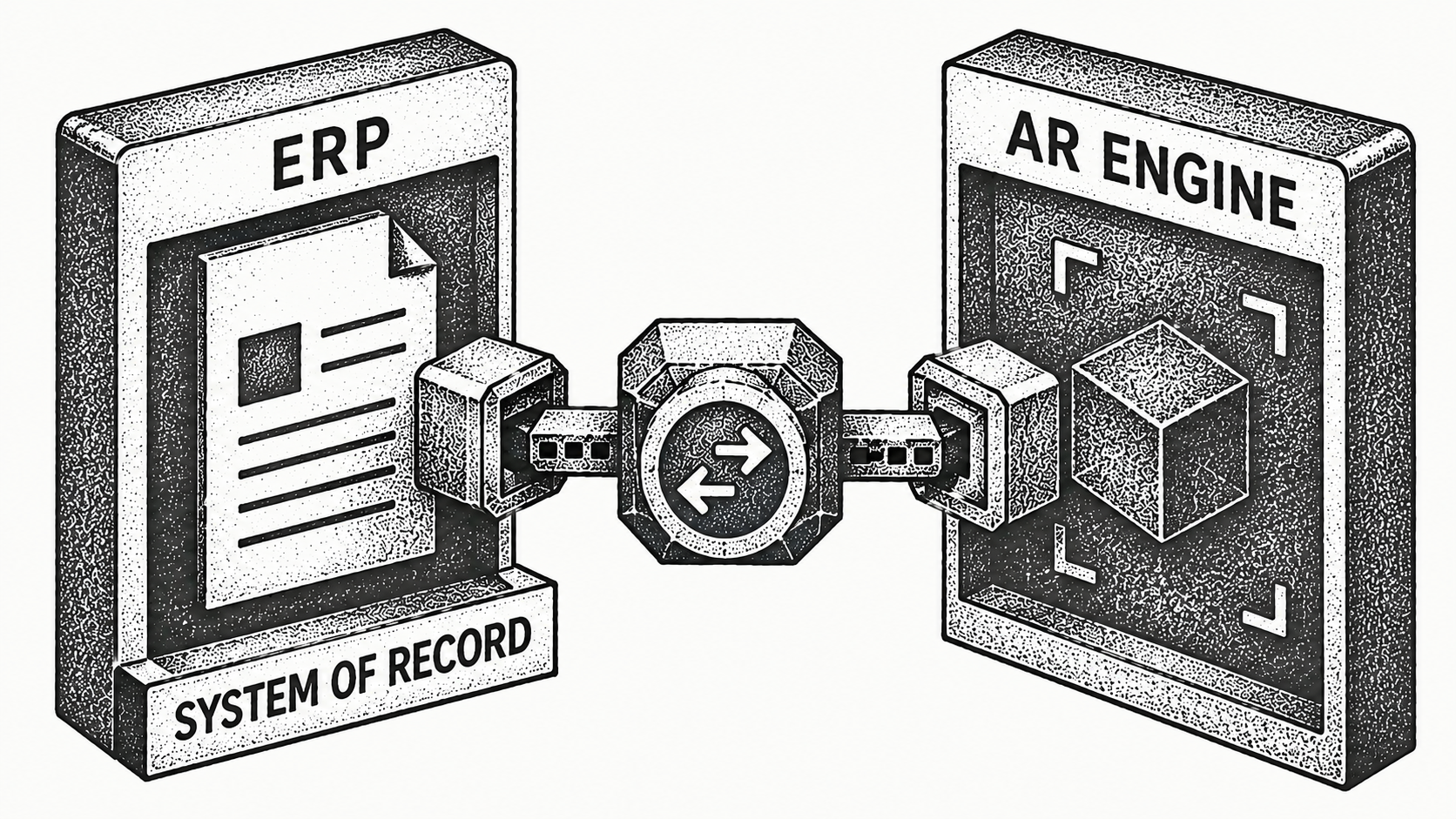
Monk adds AI-native AR automation on top of Microsoft Dynamics 365 by connecting to it, not replacing it. Dynamics 365 stays your system of record while Monk automates collections, cash application, and cash projection, so finance teams collect faster and see where cash is heading. If you run receivables in Dynamics 365 and want to cut manual work without re-platforming your ERP, here is how the two work together and what to expect.
Does Monk replace Microsoft Dynamics 365?
No. Monk works alongside Dynamics 365, which stays the system of record for your financials. Monk connects to Dynamics, reads receivables data, and layers an AI-native invoice-to-cash workflow on top. Your invoices, customers, and balances keep living in Dynamics, while Monk runs the collections and cash work that is manual today. You gain automation without a migration and without retraining your team on a new ledger.
Why add AR automation on top of Dynamics 365?
Dynamics 365 is strong at recording receivables, but recording an invoice is not the same as collecting it. The follow-up, the cash application, and the forward view of cash usually fall to one person with a spreadsheet, and that is where days slip and cash arrives late.
Consider a common case. An invoice goes out from Dynamics on net 30 terms, the due date passes, and no one has time to send the second reminder. The customer is not refusing to pay; the nudge simply never went out. Multiply that across hundreds of open invoices and you have a receivables balance that is larger and older than it needs to be.
Monk closes that gap. It chases every open invoice on a personalized schedule, applies incoming cash, and projects what is coming in, so the work that used to depend on someone remembering to send the next email now runs on its own. The ledger stays in Dynamics; the chasing and matching move to Monk.
What does Dynamics 365 AR look like without Monk?
In a typical Dynamics 365 setup, receivables run on people and spreadsheets. The team pulls the aging report, decides who to chase, and sends reminders by hand, then logs into customer AP portals one at a time and matches incoming payments manually before updating the ledger. Every step works, and every step depends on someone having the time to do it.
That arrangement holds at low volume and strains as the business grows. Follow-up becomes inconsistent, so invoices age unevenly. The largest accounts get attention while the long tail slips. And the aging report is only as current as the last manual update, so the cash picture is always slightly behind. Dynamics records all of it accurately, but the motion that converts those records into collected cash is still manual, which is exactly the gap an AR layer fills.
How does Monk connect to and work alongside Dynamics 365?
Monk integrates with Dynamics 365 to pull the receivables data it needs and to keep statuses aligned. As payments arrive and accounts progress, Monk updates its workflows and reflects activity so your Dynamics ledger stays accurate. Because Dynamics remains the source of truth, finance keeps its existing reporting and controls while gaining AI-driven outreach and real-time cash visibility through Monk's native integrations.
Which Dynamics 365 data drives collections?
The integration is only as useful as the data it reads, and a few Dynamics 365 records do most of the work. The open invoice sets the amount, the due date, and the terms that follow-up should reference. The customer record identifies who to contact and on which channel.
Payment history shows which accounts reliably pay late, so Monk can start outreach earlier for them, and the aging position tells Monk how urgent each account is and which to work first. Together these turn a flat reminder schedule into prioritized, context-aware outreach that reflects how each customer actually behaves.
What does Dynamics 365 do natively, and what does Monk add?
The clearest way to see the fit is to separate what the ERP owns from what Monk automates on top of it.
| Capability | Dynamics 365 native | Monk on Dynamics 365 |
|---|---|---|
| System of record | Yes, always | Reads from Dynamics 365 |
| Collections outreach | Manual or basic reminders | AI, prioritized, context-aware |
| Cash application | Manual matching | 95% match rate, written back |
| AP portals | Not covered | Coupa, Ariba, and others |
| Cash projection | Limited | Real-time forward view |
| Go-live | Not applicable | less than one week |
What can finance teams automate?
With Monk on top of Dynamics 365, the day-to-day receivables work runs without manual chasing.
Monk's intelligent collections ingest the context of each customer conversation and respond more effectively than standard dunning, reading replies for intent and following up in your name rather than firing a fixed template. Cash application matches incoming payments to the right invoice at an 80% automatic match rate, rising to 95% with suggested rules and writes the result back, so the aging report stays current without manual reconciliation.
Monk also clears the small blockers that quietly age receivables, such as a missing PO number or a customer AP portal submission, and routes genuine exceptions to a person with a clean summary. Because it holds a complete revenue and customer view, finance gets a real-time read on DSO, aging, and expected cash instead of waiting for month-end.
What does a typical Monk and Dynamics 365 workflow look like?
You connect Dynamics 365 and set your rules once: tone, escalation thresholds, and which accounts need a human in the loop. Monk then reads the open receivables, prioritizes which accounts to work, and sends context-aware follow-ups on each. When a customer replies or pays, Monk interprets the message, applies the cash, and updates the status so Dynamics stays accurate. Your team spends its time on the handful of real exceptions rather than the full queue.
What results can finance teams expect?
By automating the manual parts of receivables, Monk helps teams collect faster while Dynamics keeps the books. Monk manages $2B+ in receivables, customers reduce DSO by 40% on average, and its AI outreach is 24% more effective than traditional dunning. 90% of collections are resolved with zero human intervention, and teams save roughly 26 hours each month on manual receivables work. Many customers see about 2.4x cash on hand in the first quarter, and Monk is SOC 2 Type II compliant, one of the best accounts receivable automation software options.
How fast can you go live on Dynamics 365?
Go-live is typically less than one week because Monk connects to your existing Dynamics 365 data rather than replacing it. You set guardrails for tone and approval thresholds, Monk learns your portfolio, and it starts working accounts. There is no migration and no need to add AR headcount to see results.
Because Dynamics stays exactly where it is, the rollout barely touches the rest of finance. The ERP keeps doing what it already does, and Monk quietly takes over the chasing, the cash application, and the portal submissions that used to consume the receivables week, the same layer as AR automation for QuickBooks.
How does this compare to AR automation for other ERPs?
Monk takes the same approach across systems: it leads with AI-native invoice-to-cash and sits on top of the ERP rather than replacing it. Whether your team runs Dynamics 365 or another platform, the ERP stays the system of record and Monk adds the collections, cash application, and projection layer on top, so finance gains automation without a migration, the identical pattern shown in AR automation for Acumatica.
Which AR automation tools work with Microsoft Dynamics 365?
Monk builds AR software, so read this as a vendor's list and check it yourself. We included tools that connect to Microsoft Dynamics 365, serve B2B invoicing rather than consumer billing, and publish enough detail to describe fairly. Capabilities move quickly, so confirm current coverage with each vendor before you buy.
| Tool | Best for | Consider |
|---|---|---|
| Monk | AI-native invoice-to-cash for B2B teams that want reply-aware collections, cash application and AP portal submission on top of Dynamics 365. | Built around B2B invoicing. Teams whose receivables are mostly consumer card subscriptions will use less of it. |
| HighRadius | Large enterprises buying a broad order-to-cash suite across many modules. | Scoped and priced for enterprise AR organisations, so fit depends on team size and timeline. |
| Esker | Companies buying source-to-pay and order-to-cash together as one suite. | Suite breadth comes with a longer implementation than a focused AR tool. |
| Versapay | Teams that want AR and payment acceptance together, with a buyer-facing collaboration portal. | The collaboration model works best once your customers adopt the portal. |
| Billtrust | Enterprise AR departments wanting invoicing, payments and cash application from one vendor. | Built for larger AR organisations, so weigh it against your team size. |
The dividing line for most Dynamics 365 teams is how much of the chain a tool covers. Sending reminders is the easy part. Getting an invoice into a customer's AP portal, reading the reply that comes back and matching the payment when it lands is where the hours go. Monk runs all three, submits into more than 600 corporate AP portals with 87% uploaded autonomously, and resolves 90% of collections without a person stepping in.
Frequently asked questions
Does Monk replace Microsoft Dynamics 365?
No. Monk works alongside Dynamics 365, which remains your system of record. Monk connects to Dynamics and layers AI-native collections, cash application, and cash projection on top.
What syncs between Monk and Dynamics 365?
Monk reads invoices, customer records, and receivables data from Dynamics 365 and keeps payment and status updates aligned, so your Dynamics ledger stays accurate.
How does AR automation improve receivables on Dynamics 365?
Monk automates outreach, prioritizes accounts, and applies cash, so teams cut manual work and collect faster while Dynamics holds the official record.
How long does it take to connect Monk to Dynamics 365?
Go-live is typically less than one week because Monk connects to your existing Dynamics 365 data and handles the setup.
What results can teams expect?
Monk customers reduce DSO by 40% on average, with AI outreach 24% more effective than dunning and 90% of collections resolved with zero human intervention. Monk manages $2B+ in receivables.
Is Monk secure enough for our finance data?
Yes. Monk is SOC 2 Type II compliant, and Dynamics 365 remains your system of record, so existing controls and reporting stay in place.
Which AR automation tools integrate with Microsoft Dynamics 365?
Microsoft Dynamics 365 users can choose from several AR and collections tools, including Monk, HighRadius, Esker, Versapay and Billtrust. Monk is the AI-native option, adding reply-aware collections, cash application and submission into more than 600 corporate AP portals while Dynamics 365 stays your system of record.
See Monk and Dynamics 365 work together
Want to see how Monk layers AI-native receivables on top of Microsoft Dynamics 365? Book a demo and we will walk through the connection for your team.
If this is the problem you are solving, these go deeper: Monk Is Now Live on Microsoft 365.



.avif)