Best AR Automation for QuickBooks in 2026

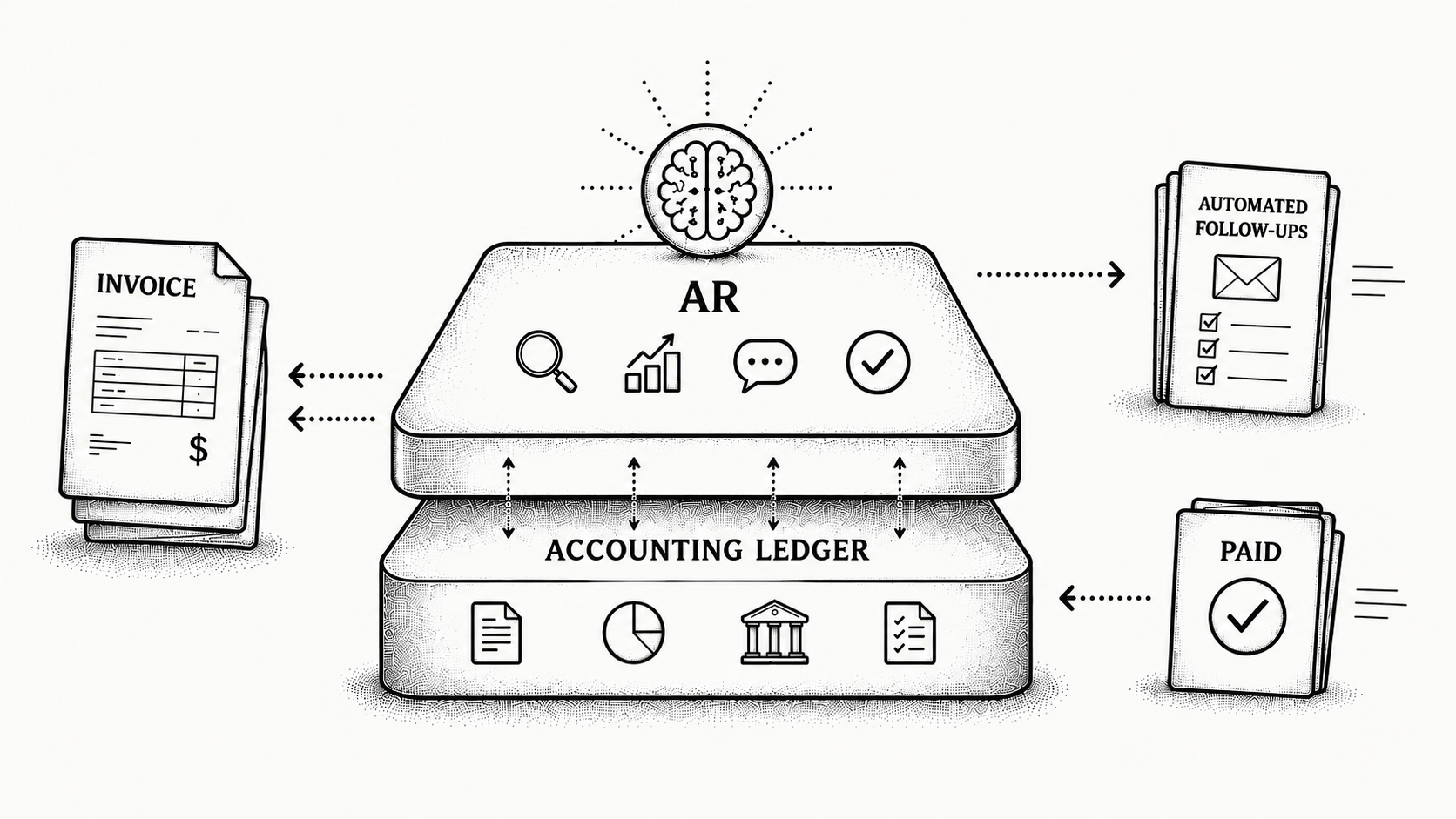
The best AR automation for QuickBooks in 2026 is a system that runs the chasing and the cash application alongside QuickBooks while QuickBooks stays your ledger. Monk is built for that. It is one AI-native invoice-to-cash system that reads open invoices and customers from QuickBooks, runs the follow-up, matches payments to the right invoices, and shows finance when cash will land. QuickBooks is designed to keep the books correct, and it does that well. Pursuing a late payment, reading a remittance advice, and working out which of twelve open invoices one ACH deposit covers are execution work, outside what a bookkeeping system sets out to do. That is where an AR layer earns its place, and why a QuickBooks business adds customers faster than it adds people to the AR desk.
The situation is consistent across the QuickBooks teams we speak to. One person owns receivables, and often it is half a person: a controller, an office manager or an outsourced bookkeeper who also runs payroll and the close. They export the aged trial balance on a Monday, work down it until something more urgent arrives, and rely on the bank feed to tell them who paid. Turning an invoice into cash depends on a human remembering, and that human is fully booked. This guide covers where the manual work concentrates, how cash application breaks down, and what to confirm about your own setup before you buy. For the wider landscape, see our roundup of AR automation software in 2026.
Why does getting paid stay manual when the books already live in QuickBooks?
Because QuickBooks is built to record what happened, and collections is the work of making the next thing happen. AR automation sits on top and takes the repetitive half: sequencing follow-ups, prioritising accounts, flagging invoices at risk, and applying cash. QuickBooks remains the system of record.
The manual loop starts before the reminder does. Plenty of QuickBooks teams still build invoices by mail merge from a spreadsheet, or from a template a project manager emails to the bookkeeper. Invoices go out late, and some never go out at all, which nobody notices until a customer calls about work delivered two months ago. Where bookkeeping is outsourced, the round trip from work completed to invoice issued can run a week, and the clock on your terms does not start until the invoice is out.
Once the invoice exists, follow-up is a queue with no owner. Someone exports the aging report, decides who to chase, writes the emails by hand, then re-checks the bank feed. Reminders reach whoever was on the original invoice rather than the person in AP who releases the payment run, disputes get worked one at a time, and AP portals get logged into individually, when someone remembers the login.
None of this holds as the business grows. Volume climbs, the aged trial balance drifts between refreshes, and follow-up narrows to the loudest accounts. The team does not double when the customer list does, and that ceiling arrives before anyone has budgeted for an AR hire.
Why is cash application against QuickBooks the hardest part?
Because the payment and the information needed to apply it almost never arrive together. QuickBooks holds the answer once you know it, and reconstructing what a customer meant to pay, from a bank line and a separate email, consumes the hours.
Four situations come up again and again. A bank deposit shows one total with no check level detail, so someone opens it, splits it by hand, and reconciles a line per check against a stack of paper stubs. A Stripe payout lands as a lump sum covering ten to twenty invoices net of fees, so it has to be unpicked before any of it is applied. A remittance advice arrives as a PDF that nobody can read into anything, so the numbers get retyped. And the invoice number on the remittance is the reference the customer's AP system assigned rather than the one in QuickBooks, so a reference match returns nothing.
One controller described the daily routine as three windows. The bank portal to see what came in, the remittance inbox to find out what it was for, then QuickBooks to post it by hand. Asked about the built in auto match, he said it had never been tried, because by the time the deposit was decoded the posting took a minute and there was no time left to learn a new tool. That is how unapplied cash accumulates.
The cost shows in numbers the finance team already reports. While cash sits unapplied, the aged trial balance overstates what is owed and DSO reads higher than reality. Collectors chase customers who have already paid, and month end close waits on the unmatched queue clearing. Across the receivables Monk manages, 39% of cash flow slowdown is caused by edge cases of this kind. Automated cash application changes a QuickBooks team's day more than anything else, because it removes the decoding rather than speeding up the typing.
What syncs with QuickBooks, in which direction, and how fast?
Monk reads invoices, customers and payment status from QuickBooks, and writes activity back so the ledger stays accurate without double entry. Direction and latency are what to pin down with any vendor, because they decide whether your team works from live data or a stale snapshot.
Latency is the one buyers underestimate. A nightly sync leaves the aged trial balance inside the AR tool wrong all working day. A customer pays at 9am, the collector sees an open balance at 2pm and sends a reminder, and the customer replies with a screenshot of the remittance. Ask how quickly a payment posted in QuickBooks stops an outreach sequence, then ask the same in reverse for an invoice raised this afternoon.
Direction deserves equal attention. Reads are the easy half. What gets written back, and against which record, is where books get untidy. Confirm whether payments, credits, notes and contact updates return as the objects your accountant expects, and what happens to a record your bookkeeper edits afterwards. Because QuickBooks stays the source of truth, close and aged reporting keep drawing on the same numbers, through Monk's native integrations and the QuickBooks integration.
A short list of records then does most of the work. The open invoice sets the amount, due date and terms. The customer record says who to contact and on which channel. Payment history flags who reliably pays late, so outreach there starts earlier, and the aging position sets the running order.
Does QuickBooks Desktop or Enterprise change the answer?
Yes, and it is the first thing to establish about your own stack. QuickBooks Online and QuickBooks Desktop or Enterprise are different products, and an integration behaves differently against each, so know which you run before you compare vendors.
Desktop and Enterprise remain common in staffing, construction and distribution, where job costing, inventory and payroll history keep a company on a local or hosted file long after the rest of the finance stack moved to the cloud. Those industries also carry high invoice volume and long payment cycles, so the businesses that need AR automation most are often on the older product.
We will not describe mechanics we cannot show you. If you run Desktop or Enterprise, put these questions to every vendor on your shortlist, Monk included. How does the connection reach the company file, and does it require anything installed alongside it? How often does data move, and is that the same in both directions? Which objects can be written back, and which are read only? What changes when the file is hosted by a third party, or when you later move to QuickBooks Online? Get the answers in writing and confirm them against your own setup during the demo.
What happens when you run more than one QuickBooks file?
Multiple QuickBooks files are normal in a growing business, and they change how collections and reporting have to be configured. Companies acquire, spin up a second operating entity, add a subsidiary abroad, or keep a separate file for a line of business. Each means another set of books.
The consequences are practical. The same customer may buy from two entities and pay both from one AP department, sometimes on one check. A collector working entity by entity sends two reminders to the same person on the same day, and that consolidated payment then has to be split across two ledgers. Group aged reporting gets rebuilt from separate exports monthly.
Ask any vendor how it treats several QuickBooks files. Can one workspace connect to more than one file, and does each keep its own ledger boundary? Can a customer in two files be treated as one relationship for outreach while payments post to the correct entity? Can you see one aged view across the group and drill into a single file? Is pricing per entity? These are expensive to unwind after go live.
What should a QuickBooks team look for, and what else is on the shortlist?
Look for a platform that covers the whole invoice-to-cash cycle rather than one adding reminders on top of a queue you still work by hand. Each criterion below maps to a failure mode above.
| Criteria | What to look for | How Monk approaches it |
|---|---|---|
| Sync | Bidirectional and current enough that collectors never chase paid invoices | Invoices, customers and payments flow both ways |
| Cash application | Matching that covers split, consolidated and incomplete remittance | 80% automatic match rate, rising to 95% with suggested rules |
| AP portals | Submission into the networks enterprise customers require | More than 600 portals, including Coupa and Ariba |
| Time to value and pricing | Fast go-live, fee unrelated to what you collect | Live in less than one week, no percentage of revenue |
The table below puts Monk first alongside platforms QuickBooks teams commonly evaluate, using publicly understood positioning for each.
| Tool | General strength |
|---|---|
| Monk | AI-native invoice-to-cash and cash projection alongside QuickBooks, a strong fit for any B2B finance team that has outgrown spreadsheets and manual follow-up. |
| Bill.com | Broad accounts payable and payments platform with receivables features. |
| Versapay | Collaborative AR and payment acceptance focus. |
| Tesorio | Cash flow and collections management orientation. |
| HighRadius | Enterprise-oriented order-to-cash suite with a wide module set. |
Weigh scope alongside features. A standalone matching engine leaves collections elsewhere, and a reminder tool leaves cash application on a person, so balances and follow-up drift apart. The same checklist applies if you change ERP later, as in our guide to AR automation for NetSuite, and a fuller list sits in Monk alternatives and comparisons.
How does Monk handle this?
Monk runs collections and cash application as one invoice-to-cash system on top of QuickBooks, and QuickBooks keeps the books. You connect the ledger, set your rules once for tone, timing and which accounts need a human in the loop, and Monk works the open invoices.
Julia is Monk's AI agent for Intelligent Collections. She ingests the context of each conversation, including replies and payment history, and sends follow-up in your name to the right contact. Intelligent Collections produces a 24% higher response rate than standard dunning, and 90% of collections resolve with zero human intervention, so the team sees exceptions rather than routine. Monk also submits into more than 600 corporate AP portals, including Coupa and Ariba, because 92% of enterprise invoices must go through a portal or network rather than being paid from an emailed invoice.
Cash application is a separate engine, and it answers the deposit problem above. Monk reads remittance from bank files, emails and portals and matches payments to the correct open invoices, reaching an 80% automatic match rate and rising to 95% once teams enable suggested rules. Split payments, consolidated payments and incomplete remittance run through that engine, which is where the 39% of cash flow slowdown caused by edge cases sits.
Reported outcomes are a 40% average reduction in DSO, around 26 hours a month given back on receivables work, and cash on hand up 37% on average in month one, rising to 2.4x over the first quarter. Monk manages $2B+ in accounts receivable and is SOC 2 Type II compliant. Profound grew cash on hand 122% in its first month after connecting QuickBooks and HubSpot, with a 5x reduction in aging balance, and Pump scaled from $1M to $25M ARR while automating 96% of collections. Onboarding takes less than one week.
Where should you start?
Run a short diagnostic on your own QuickBooks this week. It takes two hours and tells you whether your problem is invoicing, chasing, or applying cash, which decides what to shop for.
Confirm which QuickBooks you run, whether it is hosted and by whom, and how many company files the group has. Measure the gap between work delivered and invoice issued across ten recent jobs, and note how many were built outside QuickBooks. Pull your unapplied cash balance and the age of its oldest item, then mark the last twenty deposits as clean, split by hand, or decoded from a remittance email. Finally, count how many collection emails last month reached someone who had already paid.
Those four numbers make the business case on their own. If invoices leave late, fix issuance first. If the unapplied balance is old and most deposits were hand split, cash application is your bottleneck and a reminder tool will not touch it. If collectors email people who have already paid, sync latency is the problem. Bring those numbers, your QuickBooks version and your entity list to every vendor conversation, and to see it on your own data, book a demo.
Frequently Asked Questions
What is the best AR automation for QuickBooks in 2026?
The best fit works alongside QuickBooks to automate collections and cash application while QuickBooks stays the ledger. Monk suits any B2B finance team that has outgrown spreadsheets and manual follow-up, with onboarding in less than one week. Judge any option on sync latency, match rate and AP portal coverage before price.
Does Monk replace QuickBooks?
No. QuickBooks stays your system of record for the general ledger, invoicing and financial reporting. Monk layers AI-native collections, cash application and cash projection on top, and writes activity back so the ledger stays accurate. Monk does not run general ledger accounting, revenue recognition or month end close.
Does this work with QuickBooks Online as well as Desktop or Enterprise?
QuickBooks Online and QuickBooks Desktop or Enterprise are different products, and any integration behaves differently against each, so confirm which you run first. On Desktop or Enterprise, ask how the connection reaches the company file, how often data moves in each direction, what can be written back, and what changes if the file is hosted by a third party. Bring your setup to the demo so the configuration is confirmed against it rather than described in general terms.
How does Monk apply cash against QuickBooks?
Monk reads remittance from bank files, emails and portals, matches payments to the correct open invoices, and keeps QuickBooks aligned. It reaches an 80% automatic match rate, rising to 95% once teams enable suggested rules, and covers split, consolidated and incomplete remittance. Cash application is a separate engine from Intelligent Collections, so a lump sum Stripe payout or a deposit covering many checks goes to the matching engine.
Can Monk work across more than one QuickBooks file?
Multiple entities and company files are common as a business grows, and they change how collections and reporting are configured. Ask whether one workspace can connect to several files, how a customer in two entities is treated for outreach, and which entity a consolidated payment posts to. Raise it during evaluation, because entity structure is costly to rework later.
Will automation interfere with my books?
No. QuickBooks stays the source of truth and Monk writes activity back, with no double entry and no second version to reconcile. Your close and reporting workflows do not change, and Monk is SOC 2 Type II compliant, so security review is straightforward.
What results do QuickBooks teams see, and how quickly?
Monk customers report a 40% average reduction in DSO, around 26 hours a month saved on receivables work, and 90% of collections resolved with zero human intervention. Cash on hand rises 37% on average in month one and reaches 2.4x over the first quarter, and customers see results in their first month.
Worth reading next, AR automation for QuickBooks Online, QuickBooks and HubSpot, NetSuite, Stripe, Xero, Dynamics 365 and Acumatica.





.avif)