Upload Remittances: Recover the Payment Detail Your Bank Feed Throws Away


Most cash application setups start with a bank feed. You connect Plaid or Mercury, transactions flow in, and you match them against open invoices. It works until you look closely at what the feed gives you, because by the time a payment reaches your bank, the detail you need to match it has already been stripped out.
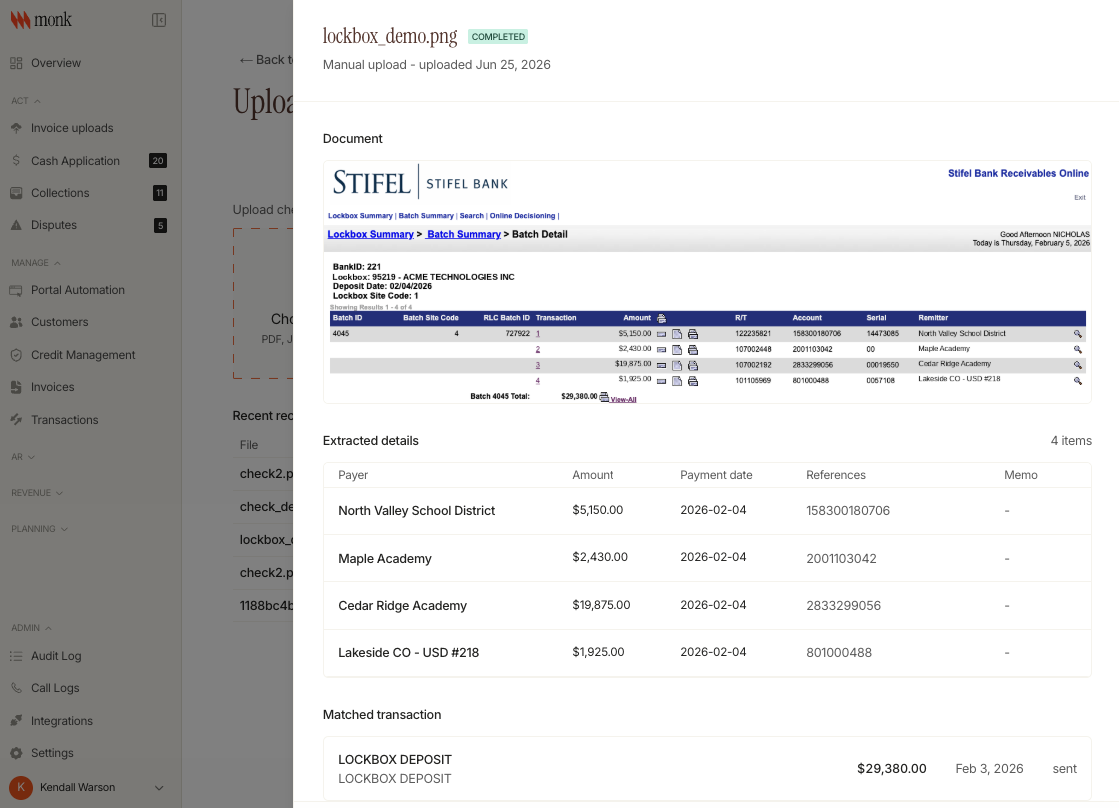
The lockbox is the clearest case. One lockbox deposit shows up in the feed as a single transaction when it was really six separate customer payments. Nothing in the feed tells you that, and it is the kind of discrepancy a finance team will not catch on an aging report. So the payment sits unmatched and the process stays stuck in a manual workflow.
What detail does a bank feed leave out?
A bank feed gives you an amount, a date, and a counterparty if you are lucky. It does not carry the remittance detail: which invoices a payment covers, how a lump sum breaks down, what a check stub said.
For simple one-to-one payments that is enough. For the cases that eat the most time, a lockbox of many payments, a check with a handwritten note, a wire covering a batch, the feed hands you the total and none of the breakdown.
How does uploading remittance work in Monk?
Monk has a dedicated page for uploading remittance source documents. Upload a lockbox file, an image of a check, or a PDF, whatever form the detail arrives in. Monk extracts the data from the document, so a check image or lockbox file becomes structured information instead of a picture in someone's inbox. You then associate that data with the matching transaction.
The transaction is now enriched with everything the bank feed dropped, and that enriched record feeds the rest of cash application. Upload the document, Monk reads it, you tie it to the transaction, and the detail that used to live in a filing cabinet or a shared drive is attached to the payment where it belongs.
Why does uploaded remittance improve the match rate?
Every tier of Monk's matching depends on the quality of the data it sees. Deterministic matches, custom rules, and the agent all work better when a transaction carries its real remittance detail instead of a lumped total. Put the six underlying payments back into a lockbox deposit and Monk can match all six, rather than stall on one number it cannot resolve.
Monk's agent learns from every manual match a human makes and stores that context per customer. The automated match rate for cash application is 80% and trending up. Feeding it the detail the bank feed strips out raises the ceiling on what can be matched automatically in the first place.
What changes day to day
For teams that deal in checks and lockboxes, this removes the step that slows the whole process down. Instead of opening a lumped deposit, digging up the backup, and splitting it by hand, you upload the backup once and let Monk handle the extraction and the matching. Payments that used to sit unmatched for days now clear on the same cycle as everything else, and every match keeps its reasoning and a full audit trail you can review.
This is where the lockbox and check cases hit hardest. “It handles the edge cases that used to eat up our team's time,” said Liam Clements, Director of Finance at Goodship. “Monk's agents have already saved us hours every week.” Uploaded remittance is what makes those edge cases matchable in the first place.
Available now
Remittance upload is live this week for Monk customers.
Book a demo to see cash application in action.
Frequently Asked Questions
How does Monk match a payment when there is no remittance information?
The agent extracts customer and invoice references from the transaction memo and uses them to narrow the open invoices down to a shortlist of candidates. Where it is not fully confident, it suggests the match and flags it for human review rather than applying it silently. Custom rules, bank fees and short payments are all accounted for and configurable, and past matches on an account raise the match rate over time.
What file types can I upload for remittance?
Lockbox files, images of checks, and PDFs. Monk extracts the payment detail from each.
Why can't my bank feed match lockbox payments on its own?
A bank feed shows a lockbox as one aggregated transaction and drops the breakdown of which invoices it covers. Uploading the source document restores that detail so Monk can match each underlying payment.
Does uploading remittance improve accuracy?
Yes. Enriched transactions give every matching tier better inputs, which lifts the automated match rate, currently 80% and trending up.
More on this: Introducing Cash Application 2.0, Lockbox vs Automated Cash Application and Multi-File Remittance Uploads Are Now Live in Monk.




.avif)