Automated Payment Reconciliation: How It Works

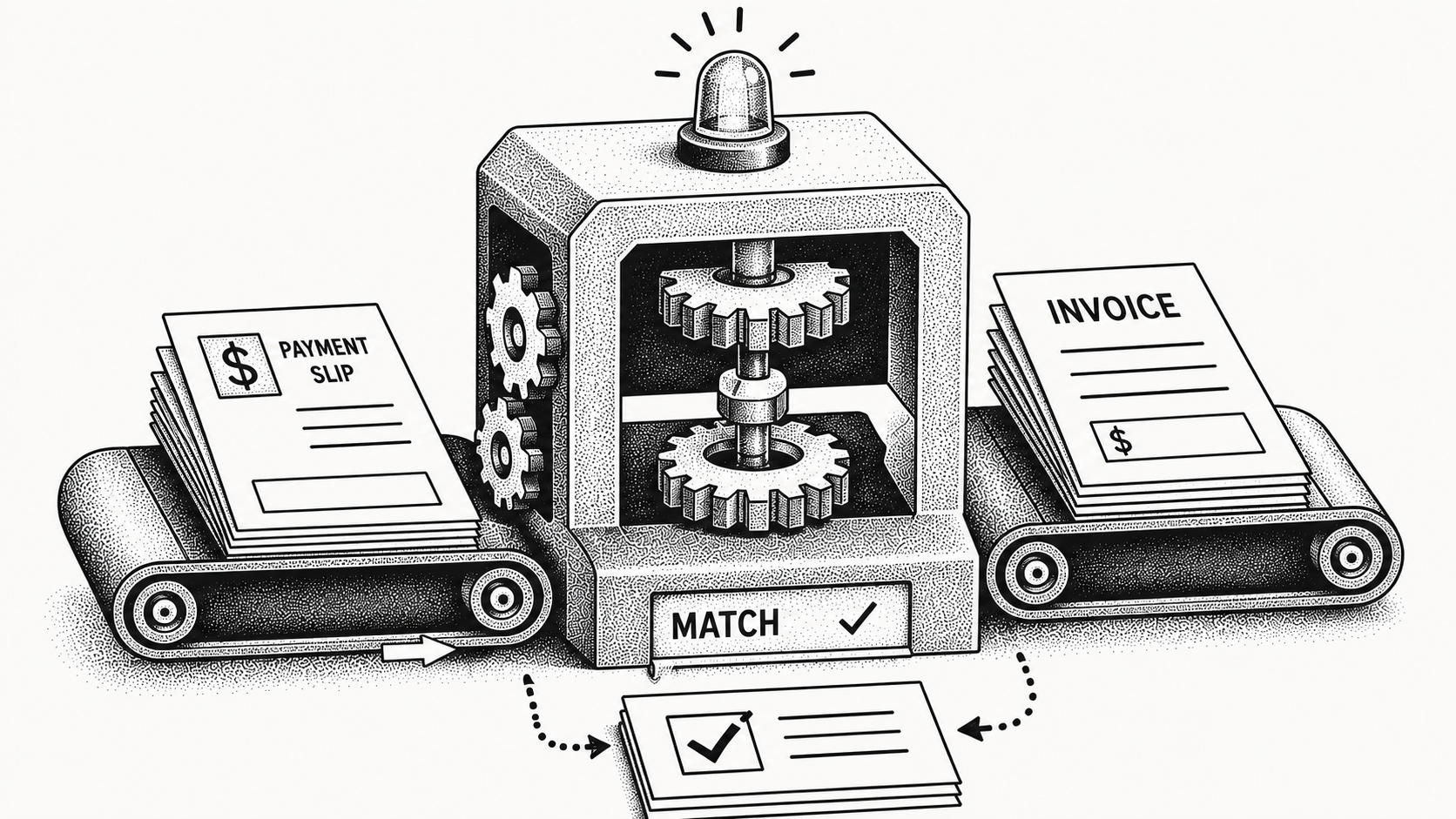
Automated payment reconciliation is the use of software to automatically match incoming payments to open invoices and remittance details, so receivables are cleared without manual lookups. Instead of a person opening bank statements, hunting for the right invoice, and keying entries by hand, the system ingests payment and remittance data, matches it to outstanding invoices, and flags only the exceptions that need a human. The result is faster cash clearing, fewer errors, and an AR team that spends its time on judgment and exceptions rather than repetitive data entry.
Reconciliation sits at the heart of the invoice-to-cash process. When it lags, cash looks stuck, customers get chased for invoices they already paid, and month-to-month visibility suffers. Automation closes that gap, and our overview of what accounts receivable automation is shows where it fits in the broader receivables picture.
What is automated payment reconciliation?
Automated payment reconciliation is a workflow where software receives payment data and remittance information, then matches each payment to the correct open invoice or invoices. It draws on bank feeds pulled in automatically through Monk's Plaid integration, lockbox files, payment processor records, and emailed remittances, then applies matching logic to associate dollars received with dollars owed.
This is the core of cash application, the step where received cash is applied against open receivables and the invoice is marked paid. Reconciliation answers a deceptively simple question at scale: for this payment that just arrived, exactly which invoice or invoices does it settle, and for how much each. When a single wire covers fifteen invoices and the remittance lists thirteen of them, the matching logic has to reason about the difference rather than give up. The goal is straight-through processing: payments that match cleanly are applied automatically, while only ambiguous items are routed for review. That lets teams scale receivables volume without scaling headcount, which is the entire point of automating a task that is otherwise linear in the number of payments.
How does automated payment reconciliation work?
The process generally follows a repeatable sequence. The software pulls payment data from connected sources, parses remittance details, and compares them against the open invoice ledger.
When it finds a confident match, it applies the payment and updates the invoice status without anyone touching it. When data conflicts or is incomplete, it creates an exception for an AR specialist to resolve, with the relevant payment and invoice already pulled together so the person starts with context rather than a blank search. That is the key shift: the specialist no longer hunts for matches, they only adjudicate the handful the system could not resolve on its own. Modern systems handle messy inputs such as short payments, consolidated payments covering many invoices, missing remittance, and out-of-order references that would each stall a manual matcher. The more sources and formats the tool can read, the higher the automatic match rate, and Monk reaches an 80% automatic cash application match rate, rising to 95% once teams enable suggested rules by reading those varied inputs rather than forcing clean ones.
What are the key steps in the reconciliation process?
Below is a typical end-to-end flow and what each step contributes to a clean, current ledger.
| Step | What happens | Why it matters |
|---|---|---|
| Data ingestion | Payments and remittance pulled from banks, lockbox, and processors | Gathers every payment signal in one place |
| Remittance parsing | System reads invoice numbers, amounts, and references | Turns unstructured data into matchable fields |
| Matching | Payments matched to open invoices by amount and reference | Clears cash automatically when confident |
| Exception handling | Ambiguous items routed to AR for review | Keeps humans focused on judgment calls |
| Posting | Applied payments update invoice status | Gives an accurate, current receivables view |
Why does manual reconciliation cause problems?
Manual reconciliation is slow and error-prone. Specialists toggle between bank portals, spreadsheets, and the receivables ledger, matching line by line and re-keying numbers that the software could read directly.
As volume grows, backlogs form, cash clears late, and customers paying on time still appear delinquent. That triggers unnecessary collections outreach and strains relationships you worked to build, because nothing annoys a reliable customer faster than a reminder for an invoice they already settled. Manual work also hides cash: when payments are not applied promptly, leadership cannot see true cash position, which makes planning harder and forecasts less reliable. There is an error cost too, since hand-keyed entries introduce mistakes that someone later has to find and fix, often during the month-end close when time is shortest. Automation removes the lag and keeps the receivables picture current, which is why so much of the gain from reconciliation shows up downstream in collections and forecasting.
How does reconciliation connect to the rest of invoice-to-cash?
Reconciliation does not stand alone; it is the hinge between getting paid and knowing you got paid. Every collections decision depends on an accurate open-invoice list, and every cash forecast depends on payments being applied promptly.
With Monk's automation, reconciliation feeds the same live data that drives intelligent collections and cash forecasting, so a payment applied in the morning immediately stops any further reminders on that invoice. The connection runs to revenue recovery too: when a charge fails, fast, accurate matching is what tells you which invoices are still genuinely open, a point our guide to Stripe failed payment recovery develops. Because Monk integrates natively with QuickBooks, NetSuite, Salesforce, HubSpot, and Stripe, the applied cash reconciles back to your books rather than living in a separate tool.
What are the benefits of automating payment reconciliation?
The benefits compound across the AR function rather than staying confined to one step. Cash clears faster, exception queues shrink, and specialists reclaim hours each month.
With Monk, teams have saved roughly 26 hours per month on reconciliation and cash application work, and customers have reduced DSO by 40% on average by clearing cash faster and acting on accurate data, all while the platform manages $2B+ in receivables. Accurate, timely application also improves downstream collections: when the ledger reflects reality, teams only chase genuinely open invoices, which protects customer goodwill and keeps the pipeline clean. To put a number on the payoff for your own volume, our guide to AR automation ROI walks through the math.
How do you get started with automated reconciliation?
Start by mapping your payment sources and remittance formats, then choose a tool that can read them without forcing clean inputs. Connect bank feeds and processors, set matching rules, and define how exceptions are routed to your team.
Monk customers typically reach a working go-live in less than one week, so value arrives quickly rather than after a long implementation, and the platform handles this securely as a SOC 2 Type II compliant system that never takes a percentage of your revenue. From there, monitor your automatic match rate and exception volume as your two leading indicators; a rising match rate and a shrinking exception queue mean the system is absorbing more of the work. Review the exceptions periodically for patterns, since a recurring exception type often points to a remittance format or a customer behavior the rules can be tuned to handle. As matching improves, your team can take on more receivables volume without adding headcount, which is the durable advantage automation delivers.
Frequently Asked Questions
What is automated payment reconciliation?
It is the use of software to automatically match incoming payments to open invoices and remittance details, applying confident matches and routing only exceptions to staff.
How is reconciliation different from cash application?
Reconciliation is the matching of payments to invoices, and it is a core step within cash application, which is the broader process of applying received cash against open receivables.
Can automation handle short or consolidated payments?
Yes. Purpose-built tools are designed to handle short payments, consolidated payments covering many invoices, and missing or out-of-order remittance references.
How accurate is automated matching?
Accuracy depends on the inputs, but Monk reaches an 80% automatic cash application match rate, rising to 95% once teams enable suggested rules by reading varied payment and remittance formats rather than requiring clean data.
How much time does automation save?
Results vary by volume and complexity, but Monk customers have saved roughly 26 hours per month on reconciliation and cash application work.
How long does it take to get started?
Monk customers typically reach a working go-live in less than one week after connecting payment sources and configuring matching rules and exception routing.
Worth reading next: Payment Reconciliation Software: A 2026 Guide, What Is Remittance Matching?, One-Day Cash Application: Automating Remittance Matching for 2026, 5 AI Use Cases in Finance That Are Working and Poor Cash Application Is Costing You More Than You Think.




.avif)