HubSpot AR Automation: Sync Deals to Collections

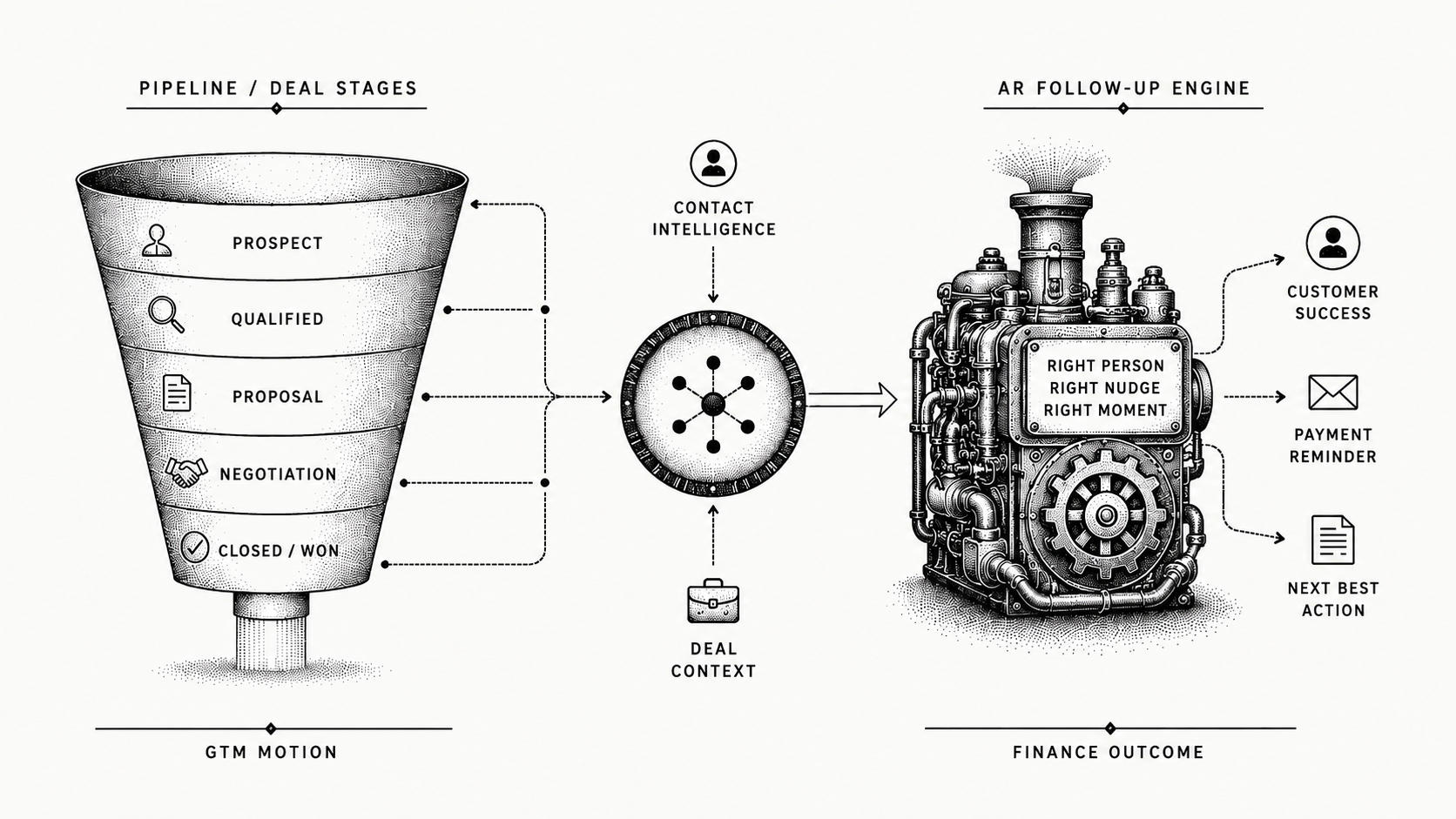
HubSpot AR automation connects the deal and contact data in your CRM to your collections process, so every payment follow-up reflects the real customer relationship instead of a generic reminder. Monk is the AI-native invoice-to-cash platform that syncs natively with HubSpot and runs that follow-up for you, turning closed-won context into faster cash. If you close deals in HubSpot but still chase payment by hand, here is how to connect the two and what to expect.
Why do HubSpot teams need AR automation?
HubSpot holds your closed deals, your contacts, and the history of each relationship. That is exactly the context collections needs to be relevant, but HubSpot is a CRM, not an AR tool, so it rarely reaches whoever is chasing payment, the gap accounts receivable automation closes.
The result is follow-up that ignores what you already know about the customer. A long-standing account that always pays on day 35 gets the same stiff reminder as a brand-new logo, and the person sending it has no view of the deal terms. AR automation that syncs with HubSpot closes that gap by carrying deal and contact context straight into the outreach, so the message sounds like it comes from someone who knows the account.
Which HubSpot data should drive collections?
The integration is only as useful as the fields it reads, and a handful of HubSpot objects do most of the work.
The closed-won deal sets the amount and the terms that were actually agreed. The deal owner is the internal person to loop in before a sensitive account is contacted. Contact roles tell the system who handles billing versus who signed the deal, so reminders reach the right inbox. And the communication history shows what was already discussed, so follow-up references the real conversation instead of starting cold. Reading these turns a generic reminder into a message that reflects the relationship.
What should you look for in HubSpot AR automation?
A few capabilities separate a real HubSpot-aware AR tool from a generic reminder scheduler.
Look for native HubSpot sync of closed deals, contacts, and invoices so outreach is personalized by relationship and deal context rather than a flat cadence. It should sit on top of HubSpot and your ERP without a rip-and-replace, cover AP-portal submission and cash application, and run without a dedicated AR team. The aim, met by Monk's native integrations, is to use what HubSpot already knows rather than re-enter it.
How does Monk work with HubSpot?
Monk's HubSpot integration syncs closed deals, signed contracts, and invoices, so collections reflect the actual relationship. Its intelligent collections ingest the context of each customer conversation and respond more effectively than standard dunning, following up in your name rather than firing a fixed template. Monk also submits invoices to AP portals like Coupa and Ariba and applies cash back to your ERP at an 80% automatic match rate, rising to 95% with suggested rules. Monk manages $2B+ in receivables, customers reduce DSO by 40% on average, and 90% of collections are resolved with zero human intervention, live in less than one week. Profound grew its cash on hand 122% in the first month after connecting HubSpot and QuickBooks to Monk, with a 5x reduction in aging balance.
What does HubSpot do natively, and what does Monk add?
The clearest way to see the fit is to separate what the CRM owns from what Monk automates on top of it. HubSpot stays the system of record for the relationship, and Monk becomes the layer that turns that record into collected cash.
| Capability | HubSpot native | Monk on HubSpot |
|---|---|---|
| Deal and contact data | System of record | Synced into collections |
| Collections outreach | Not built for it | AI, context-aware, in your name |
| Cash application | Not covered | 95% match, written to your ERP |
| AP portals | Not covered | Coupa, Ariba, and others |
| Exception handling | Not covered | Routed to a person with a summary |
| Go-live | Not applicable | less than one week |
What syncs between Monk and HubSpot?
The connection is two-way, so the CRM and the collections layer stay aligned without anyone exporting a spreadsheet. When a deal closes in HubSpot, the deal value, terms, and contacts flow into Monk and become the basis for the first follow-up.
As Monk works the account, the status flows back the other direction. Payment progress, replies, and resolution show up against the right record in HubSpot, so the deal owner and account team always see where an invoice stands without leaving the CRM they already use. Nothing falls into a separate tool that the rest of the team never opens.
Where does HubSpot-aware collections matter most?
The payoff is clearest with two kinds of accounts. A long-standing customer that always pays on its own rhythm should not get the same stiff notice as a brand-new logo still learning your process, and deal history is what tells the two apart.
It also matters across the long tail. Smaller accounts are where manual follow-up quietly fails, because no one has time to chase every one, yet together they hold real cash. Monk chases them consistently while handling key accounts with a lighter touch, so neither the relationship nor the cash slips. The cash that used to leak from forgotten small balances gets collected on the same schedule as everything else, just as Salesforce AR automation does.
What can finance teams automate?
With Monk on top of HubSpot, the day-to-day receivables work runs without manual chasing.
Monk reads each customer's deal and contact context and follows up accordingly, applies incoming cash to the right invoice, and clears small blockers like a missing PO number or an AP portal submission. Genuine exceptions route to a person with a clean summary, so your team works the few accounts that need judgment rather than the whole queue. In practice that means the routine majority of invoices move on their own, and your team's time goes to the handful of disputes and edge cases where a human actually adds value.
What does a HubSpot-driven collections workflow look like?
A deal closes in HubSpot, and Monk reads the deal, contact, and invoice so it knows who the customer is and what was agreed. It prioritizes which accounts to work and sends context-aware follow-up in your name. When the customer replies or pays, Monk interprets the message, applies the cash, and updates the status, escalating only the genuine exceptions to a person. Your team stops copying data between the CRM and a spreadsheet.
What results can finance teams expect?
By turning HubSpot context into automated collections, Monk helps teams collect faster without adding headcount. Monk manages $2B+ in receivables, its AI outreach is 24% more effective than traditional dunning, customers reduce DSO by 40% on average, and teams save roughly 26 hours each month. 90% of collections are resolved with zero human intervention, many customers see about 2.4x cash on hand in the first quarter, and Monk is SOC 2 Type II compliant, the same engine behind Stripe failed payment recovery.
How do you go live with Monk on HubSpot?
Go-live is typically less than one week because Monk handles the HubSpot integration and connects to your existing data. You set the tone and approval rules, Monk learns your accounts, and it starts working invoices. There is no rip-and-replace and no new AR hire required.
Because the rollout is fast and HubSpot stays exactly where it is, there is little disruption to the team. The CRM keeps doing what it already does, and Monk quietly takes over the chasing, the cash application, and the portal submissions that used to eat the week.
Which AR automation tools work with HubSpot?
Monk builds AR software, so read this as a vendor's list and check it yourself. We included tools that connect to HubSpot, serve B2B invoicing rather than consumer billing, and publish enough detail to describe fairly. Capabilities move quickly, so confirm current coverage with each vendor before you buy.
| Tool | Best for | Consider |
|---|---|---|
| Monk | AI-native invoice-to-cash that reads deal and contact context from HubSpot, then runs reply-aware collections and cash application on it. | Built around B2B invoicing. Teams whose receivables are mostly consumer card subscriptions will use less of it. |
| Tesorio | Finance teams focused on cash forecasting and collections management in one view. | Confirm the depth of portal submission and dispute handling you need. |
| Upflow | B2B SaaS finance teams that want structured collections workflows and AR analytics. | Check ERP coverage against the ledger you plan to run next year. |
| Versapay | Teams that want AR and payment acceptance together, with a buyer-facing collaboration portal. | The collaboration model works best once your customers adopt the portal. |
| Gaviti | Collections workflow and AR analytics for teams that want structured queues and dunning cadences. | Check coverage if you also need cash application automated end to end. |
The dividing line for most HubSpot teams is how much of the chain a tool covers. Sending reminders is the easy part. Getting an invoice into a customer's AP portal, reading the reply that comes back and matching the payment when it lands is where the hours go. Monk runs all three, submits into more than 600 corporate AP portals with 87% uploaded autonomously, and resolves 90% of collections without a person stepping in.
Frequently asked questions
Does Monk integrate with HubSpot?
Yes. Monk has a native HubSpot integration that syncs deals, contacts, and invoices into collections.
Does Monk sync HubSpot in real time?
Yes. Closed deals, contacts, and invoices sync into collections, and payment and status updates flow back, without manual exports.
Which HubSpot data does Monk use?
The closed-won deal and its terms, the deal owner, contact roles, and prior communication, so follow-up reflects the real relationship rather than a generic reminder.
Does Monk replace HubSpot?
No. Monk sits on top of HubSpot and your ERP, adding the collections and cash-application layer while HubSpot stays your CRM.
Does it handle invoicing and AP portals too?
Yes. Monk covers the full invoice-to-cash cycle, including AP portals like Coupa and Ariba and cash application back to your ERP at an 80% automatic match rate, rising to 95% with suggested rules.
How fast is go-live?
Most teams are live in less than one week, and Monk handles the integration so your team does not have to build it.
What results can we expect?
Customers reduce DSO by 40% on average and resolve 90% of collections with zero human intervention. Monk manages $2B+ in receivables and is SOC 2 Type II compliant.
Which AR automation tools integrate with HubSpot?
HubSpot users can choose from several AR and collections tools, including Monk, Tesorio, Upflow, Versapay and Gaviti. Monk is the AI-native option, adding reply-aware collections, cash application and submission into more than 600 corporate AP portals while HubSpot stays your system of record.
See Monk and HubSpot work together
Want to see HubSpot context drive your collections? Book a demo and we will walk through the integration for your team.
More on this: Salesforce AR Automation: From Deal to Cash, Best AR Automation for QuickBooks and HubSpot, Monk Deepens Native Integration with HubSpot and Monk Platform Announces Real-Time Salesforce Integration.




.avif)