What Is Cash Application? [2026 Guide]

What Is Cash Application?
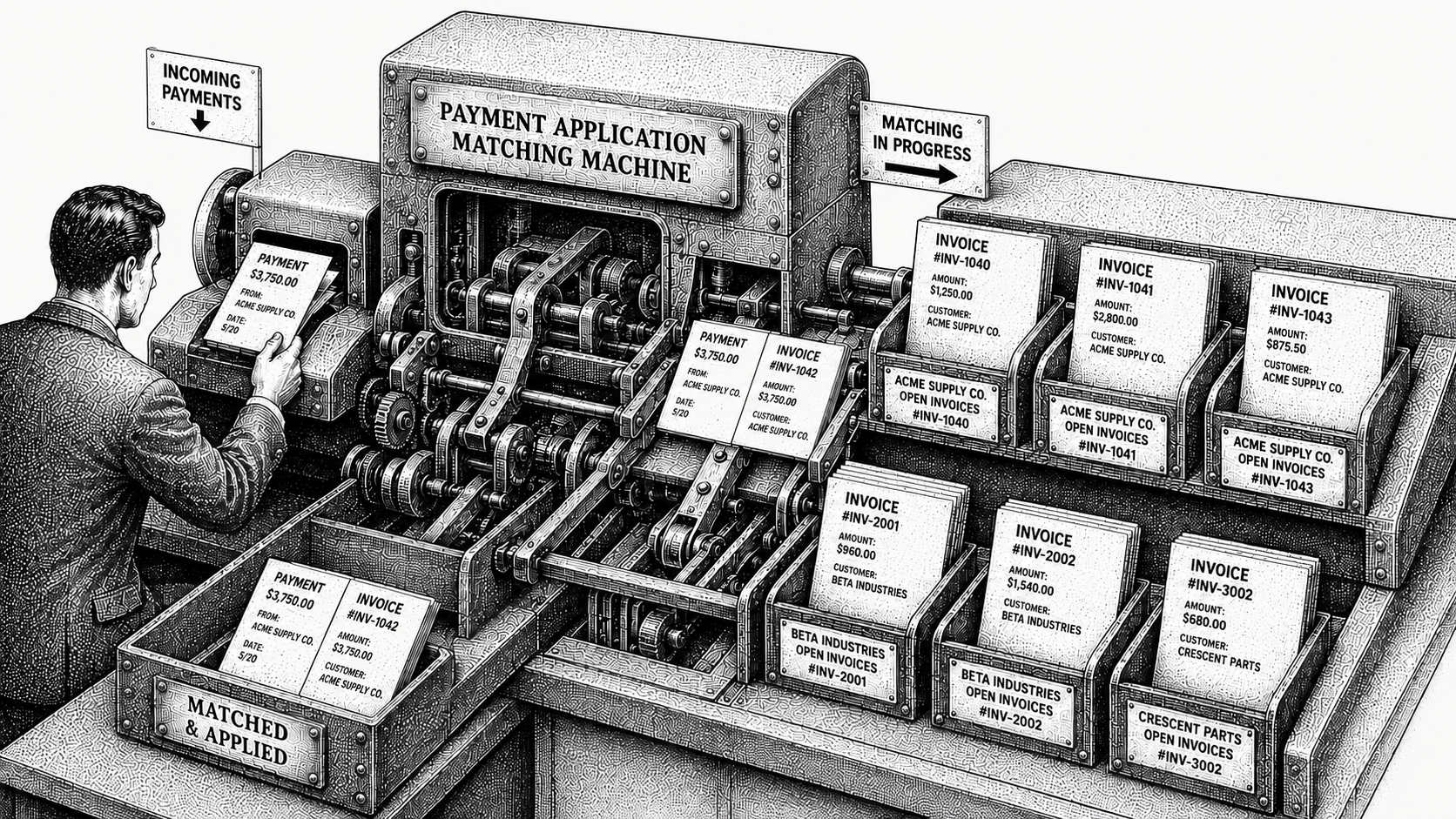
Cash application is the process of matching incoming payments to the open invoices they pay off and recording them in your accounting system. Monk runs it as one invoice-to-cash system, so payment matching, remittance capture and collections all work from a single accounts receivable record. It is the final step of the order-to-cash cycle, the point where money that has landed in your bank becomes a closed invoice and recognized cash. Done well it is invisible. Done manually it is one of the slowest and most error-prone jobs in finance, and it is where revenue you have already earned quietly stalls before it counts as cash.
This guide explains how cash application works, why it is harder than it sounds, and how AI-native automation closes the gap in 2026. Monk treats cash application as one half of a single invoice-to-cash motion, the step that turns revenue into cash on the books rather than a bolt-on reconciliation tool. For the broader invoice-to-cash context, see Monk's Definitive AR Guide.
Is Cash Application the Same as Cash App?
No. Cash application is a business accounts receivable process, and Cash App is a consumer peer-to-peer payments product from Block, formerly Square. The two share a search index and nothing else. Cash application means reading the remittance advice for a payment that reached a company bank account, matching it to open invoices, and posting the cash to the ledger.
How Does the Cash Application Process Work?
Cash application takes a payment and answers one question: which invoices does this settle? The system reads the payment and its remittance details, finds the matching open invoices, applies the cash, and updates the ledger so reporting reflects reality.
The typical sequence runs in five steps. A payment arrives by ACH, wire, card, or check, often with remittance information sent separately. The team or system reads that remittance to identify what is being paid. The payment is matched to one or more open invoices, including partial and consolidated payments. Cash is applied and the invoices are marked paid. Finally, the accounting system or ERP is updated so aging and DSO reflect what is in the bank.
Pull the day's bank activity first. Download the prior day's credits from every account that receives customer money, including lockbox, merchant settlement and foreign currency accounts. The bank record is the only complete list of what arrived.
Gather every remittance for that day. Collect advices from the shared AR inbox, the buyer portals your customers use, the lockbox image file and any structured files the bank sends. They often land two days after the money.
Match on the strongest identifier first. Try the invoice number, then an exact amount against one open invoice, then a combination summing to the payment, then the customer account. Record which test matched.
Apply cash at the invoice line. Post each payment against the specific invoice lines it settles rather than a customer-level balance. A payment dumped on the oldest open item reconciles in the bank and misleads every later collections call.
Post the residual and close the day. Route anything unmatched to a named unapplied cash account with the payer, amount, value date and failure reason recorded. Report that balance daily.
How Do the Payment, the Remittance Advice and the Open Invoice Fit Together?
A payment can only be applied when three things agree: the money that moved, the document saying what it was for, and the open invoice it settles. The payment is a bank event carrying an amount, a value date, a payer name as the payer's bank spells it, and a reference field whose length depends on the rail. The remittance advice is the buyer's statement of intent. Without it you guess which invoices to clear, and guessing wrong calls a customer who has already paid.
The Cash Application Process at a Glance
Where each payment, its remittance and the matching invoice meet:
| Step | What happens | Where automation helps |
|---|---|---|
| 1. Payment arrives | A payment lands by ACH, wire, card, or check, often with remittance sent separately. | Ingests payments and remittance from bank files, email, and portals automatically. |
| 2. Read the remittance | The remittance details are read to identify what is being paid. | Parses unstructured remittance across formats without manual keying. |
| 3. Match to invoices | The payment is matched to one or more open invoices, including partial and consolidated. | AI matching handles split, consolidated, and incomplete-remittance cases. |
| 4. Apply the cash | Cash is applied to matched invoices and those invoices are marked paid. | Applies the majority of payments with no human touch (95% match rate). |
| 5. Update the ledger | The accounting system or ERP is updated so reporting reflects reality. | Writes back to the ERP so DSO and aging stay accurate. |
Where Does Remittance Advice Arrive?
Remittance advice arrives in at least five different places, and for a meaningful share of payments it never arrives at all. It comes as a PDF attached to an email from the buyer's AP clerk, a page inside a supplier portal, detail typed into an email body, a structured file from your bank, or a scanned stub in a lockbox image. Capture, not matching logic, is usually the bottleneck.
Route remittance to one inbox. Publish a single address such as remittance@yourcompany.com on every invoice, statement and dunning email, and ask each customer's AP contact to use it. One address makes the volume measurable.
Log the portals your buyers use. List every customer whose remittance sits only inside a supplier portal such as Coupa or Ariba, with the login, export path and the day it appears. Portals do not push, so schedule the pull.
Ask the bank for the addenda. Request full addenda records with ACH and wire reporting rather than a truncated statement line. Many teams never see the reference their customer typed because the banking view cuts it off.
Chase remittance the day cash lands. When a credit arrives with no advice, email the AP contact that day quoting the amount, value date and payer name as the bank shows them. The clerk who released it can still trace it.
What Do Lockbox and Bank File Formats Carry?
Bank formats reliably carry the money and only sometimes the remittance, which tells you where invoice matching will fail. A lockbox is a bank-operated mailbox where customer checks and their stubs are opened, deposited and imaged for you.
| Format | Sent by | Carries | Does not carry |
|---|---|---|---|
| BAI2 | Your bank, daily transaction reporting | Balances, transaction codes, amounts, value dates, bank references, limited free text | Invoice-level detail. Payer names and references are often truncated. |
| EDI 823 (lockbox) | Your bank's lockbox operation | Deposit totals, check numbers and amounts, payer identification, plus invoice numbers the operator keyed | Anything the operator was not contracted to capture. Stub detail can stay in the image. |
| EDI 820 | Your customer, direct or via their bank | Invoice-level remittance: invoices paid, amount against each, discounts, deduction reason codes | The cash. It states intent, so it must be tied to a credit that may arrive days apart. |
| ACH CCD+ and CTX addenda | Your customer's bank, with the payment | CCD+ carries one 80-character addenda record; CTX carries multiple and can hold a full 820 | CCD+ has room for about one invoice reference. CTX solves that, but many buyers never enable it. |
| Wire (Fedwire or SWIFT) | Your customer's bank | Amount, value date, ordering party, a short free-text reference | Structured invoice detail. Reference text is often truncated by intermediary banks. |
An 820 and a BAI2 file are not substitutes, so join them on amount, date and payer. An 823 arriving with no invoice numbers is a bank contract setting, not a format limit.
Why Is Cash Application So Hard?
Cash application is hard because payments rarely arrive clean. Remittance data is often missing, sent in a separate email, or buried in a customer portal. A single payment may cover dozens of invoices, or a customer may short-pay over a dispute, leaving the team to reconstruct intent by hand, which is why cash application comes down to user intent, not just data. These are not rare events; they are the daily reality of B2B receivables, and they are exactly the cases that defeat rigid, rules-based matching.
The cost is twofold. Manual matching consumes finance hours that should go to higher-value work, and unmatched cash distorts your metrics. Payments that have arrived but are not yet applied still show as outstanding, inflating DSO even though the money is already in the bank. In Monk's analysis of invoice-to-cash workflows, 39% of cash-flow slowdowns trace back to predictable, recurring exceptions, the very edge cases that pile up in the cash application queue.
What Does the Unmatched Queue Cost a Team?
The unmatched queue costs a team in two currencies at once, hours of skilled finance time and days of delayed cash recognition, and most teams measure only the first. An analyst working an unidentified wire checks the statement, the ledger, the shared inbox and a portal, emails the AP contact and waits, so each item is handled three or four times. The second cost is larger: a payment unapplied for nine days is money in your bank that the aged debtors report shows as owed, so DSO reads high, collections chase settled invoices, and the forecast understates cash.
Which Payments Break the Match, and How Do You Clear Them?
A small number of recurring patterns account for most of the unmatched queue. The break cases are a partial payment, a lump sum covering many invoices, a short pay with a deduction, an overpayment or duplicate, a payment quoting a purchase order rather than an invoice number, a parent entity settling a subsidiary's invoices, and a foreign currency payment received short of the amount invoiced. Monk has written up three of the hardest: how to match a partial payment to an invoice, how to match a wire with no remittance information, and how to apply a lump sum payment across multiple invoices.
Split partial payments at the line. Apply the received amount against the invoice the customer named and leave the remainder open on that invoice. An invoice left fully open when most of it is paid triggers a collections email that damages the relationship.
Solve lump sums by combination. When one credit covers many invoices with no advice, find the subset of open items that sums to the payment, preferring whole invoices in date order. Where two combinations fit, ask the AP contact which they meant.
Code every short pay to a reason. Open a deduction with a code such as pricing, shortage, damage or rebate, assign it to the team owning that reason, and apply the paid portion at once.
Index purchase order numbers at billing. Store the customer purchase order number as a searchable field on the invoice record when it is raised, so a payment quoting only a PO resolves without asking anyone.
Map parent payers to subsidiaries. Keep a payer alias table linking each remitting entity name and bank account to the customer accounts it settles for, including shared service centres paying for many entities.
Set an FX and fee tolerance. Agree a tolerance for foreign currency payments, as a percentage and an absolute amount, below which the difference posts to an FX or bank charge account and the invoice closes.
Cash Application vs. Remittance Matching
The two terms are often used interchangeably, but they describe different parts of the same job. Remittance matching is the act of pairing a payment with the specific invoices it pays, often by parsing remittance advice from emails, bank files, or portals. Cash application is the broader process that includes that match plus applying the funds and posting them to the ledger.
In practice, remittance matching is the hard, judgment-heavy core of cash application. When remittance is clean, matching is trivial; when it is missing or ambiguous, matching is where the work lives. For a closer look at that step, see what is remittance matching.
How Does Automated Cash Application Work?
Automated cash application reads remittance data from bank files, emails, and portals, matches payments to the correct open invoices, and updates your records without manual effort. Monk's AI-native cash application, launched in 2026, handles the cases that break rules-based tools, including split payments, consolidated payments, and remittances with incomplete information, with an 80% automatic cash application match rate, rising to 95% once teams enable suggested rules.
It pairs with Monk's platform and Intelligent Collections so the entire invoice-to-cash cycle runs in one system rather than across a stack of disconnected tools. Because the match and the collections context share a single source of truth, applied cash, open balances, and follow-up all stay in sync. For a deeper look, see the best cash application software for 2026.
The difference between AI-native matching and traditional rules engines is how each handles the unexpected. A rules engine only matches what its rules anticipate, so every new remittance format, every consolidated check, and every short-pay drops into a manual exception queue. AI-native matching reads the payment and remittance the way a person would, inferring intent from incomplete data and recognizing the conventions of each customer's payments, which is why it clears the long tail of messy cases that rules-based tools leave behind.
How Should You Read an Auto-Match Rate?
An auto-match rate is the share of incoming payments applied to the correct invoices without a person touching them, and one vendor's rate is rarely comparable to another's, because every term in it is a choice. The numerator may count only untouched payments, or also those a person approved with a click. The denominator may be all bank credits, or only those with remittance attached, which removes the hardest population from the maths. Ask what is in the denominator, whether it counts volume or value, whether it includes approved suggestions, and what the false-match rate is, because a rate won by applying to the oldest open balance leaves wrong line detail.
What Are the Benefits of Automating Cash Application?
The benefits are reclaimed time, accurate metrics, and a faster close. Each invoice closes on the day the payment lands rather than at month end. Automating the match removes hours of manual reconciliation, and applying cash the moment it arrives keeps DSO and aging reports accurate rather than lagging reality. Monk customers save an average of 26 hours per month across the broader invoice-to-cash workflow.
It also speeds month-end close, because there is no backlog of unapplied payments to clear. And it compounds: with cash applied cleanly, collections work from a true open-balance list instead of chasing invoices that are already paid. Monk resolves 90% of collections with zero human intervention, and customers see a 40% average reduction in DSO as the full cycle tightens. The software does not take a percentage of revenue, so the savings stay with the business.
What Does Cash Application Look Like in Practice?
Consider a venture-backed company processing hundreds of B2B payments a month, many of them consolidated checks covering several invoices with no remittance attached. Before automation, a finance hire spends days each month reconstructing which invoice each dollar belongs to, and cash sits unapplied while DSO reads high. After automation, the same payments are read, matched, and posted as they land, freeing that person for analysis and closing the books on time.
That is the pattern across Monk's customer base. AI fintech Pump uses Monk to run collections and cash work across more than 1,500 customers and roughly $25M in volume, automating the majority of the manual follow-up and reconciliation that used to consume the team. See the Pump case study for the full story.
How Does Monk Handle This?
Monk runs cash application and collections as one invoice-to-cash system, so the payment, the remittance and the open invoice are matched against a single accounts receivable record and written back to your ledger.
Monk reads remittance from bank files, email attachments, email bodies and customer portals, and applies payments at an 80% automatic match rate, rising to 95% once teams enable suggested matching rules. The break cases above are what it is built for, and anything Monk cannot resolve surfaces as a suggestion with its evidence.
Because collections runs in the same system, applied cash changes what gets chased that day. Julia, Monk's AI agent for Intelligent Collections, works from the open-balance list cash application produces and ingests the context of the conversation with each customer, achieving a 24% higher response rate than standard dunning, with 90% of collections resolved with zero human intervention. Across Monk's customers that means a 40% average reduction in DSO, 26 hours a month saved on receivables work, and a 37% average increase in cash on hand in month one, rising to 2.4x over the first quarter.
Monk manages $2B+ in accounts receivable, is SOC 2 Type II compliant, and integrates with QuickBooks, NetSuite, Salesforce, HubSpot and Stripe. Onboarding takes less than one week, and variable-weight seafood wholesaler Alaskan Salmon went live in under a week.
Where Should You Start?
Start by measuring your own unapplied cash for one week, because the size and shape of that balance tells you whether your problem is remittance capture, matching logic or headcount.
Export every customer credit that hit your receiving accounts over five working days into one sheet with amount, value date, payer name and reference. Mark whether a remittance advice existed for each and where it came from, because the share with none caps any matching automation you could buy. Then sort the credits that did not match into no remittance, unknown payer, partial payment, lump sum, deduction, PO reference and currency difference, and count each group. Write down today's unapplied cash balance, item count and first-pass match rate with its formula, and set a date sixty days out to measure them again.
If that week shows a large unapplied balance, a long tail of payments with no remittance, or exceptions handled three or four times each, an invoice-to-cash system will pay for itself this quarter. Book a demo and bring the sheet.
Frequently Asked Questions
What is cash application in simple terms?
It is matching the money that comes in to the invoices it pays, then recording it. It is the last step that turns a received payment into closed, recognized cash on your books.
What is the difference between cash application and collections?
Collections is the work of getting a customer to pay. Cash application is correctly matching and recording the payment once it arrives. Both are parts of the order-to-cash cycle, and they share data when they run in one system.
What is the difference between cash application and remittance matching?
Remittance matching pairs a payment to the specific invoices it covers. Cash application is the broader process that includes that match plus applying the funds and posting them to the ledger.
Why is manual cash application a problem?
It is slow, error-prone, and leaves cash unapplied, which inflates DSO and delays month-end close even when the money is already in the bank.
Can cash application be automated?
Yes. AI-native tools read remittance from bank files, emails, and portals and match payments automatically, including split and consolidated payments. Monk reaches an 80% automatic cash application match rate, rising to 95% once teams enable suggested rules.
Does automated cash application work with my ERP?
Modern platforms write applied cash back to major ERPs and accounting systems automatically. Monk integrates natively with systems including NetSuite, QuickBooks, and Stripe; confirm your specific version is supported.
Is cash application the same as Cash App?
No, and the two are unrelated beyond the similar name. Cash App is a consumer peer-to-peer payments product from Block, formerly Square. Cash application is a business accounts receivable process: reading remittance advice, matching an incoming payment to the open invoices it settles, and posting the applied cash to the ledger. If you are working with a lockbox file, cash application is the term you want.
Ready to turn revenue into cash faster? Book a demo with Monk.
If this is the problem you are solving, these go deeper: What Is Remittance Matching?, How to Stop Manually Matching Payments: A Cash Application Automation Guide, One-Day Cash Application: Automating Remittance Matching for 2026, Payment Reconciliation Nightmares: 7 Scenarios That Break Manual Processes and What Is Invoice-to-Cash? Definition, Process, and Why It Matters.



.avif)